|
The Capital Budget System (CBS) is open for state agencies and local governments to enter and submit their capital project requests for the 2026 Capital Budget. Detailed instructions and deadlines for the Governor’s 2026 Capital Budget are posted on the Capital Budget Instructions webpage.
- Questions about system access or user verification can be directed to the MMB Budget Operations team (budget.finance.mmb@state.mn.us).
- If you have questions about the capital budget process for State Agencies, please contact Maddy Kennedy, Capital Budget Coordinator (madeleine.kennedy@state.mn.us).
- If you have questions about the capital budget process for Local Governments, please contact Amanda Burckhardt, Capital Budget Outreach and Analysis Specialist (amanda.burckhardt@state.mn.us).
Thank you to everyone who confirmed their agency’s user access for the 2026 Capital Budget! All authorized state agency CBS users can access the system and begin entering project information through the State Administrative Portal (https://hub.systems.state.mn.us/psp/hubadm/?cmd=login).
MMB emailed state agencies’ Budget Coordinators and Directors information about the Agency User Verification Process on Tuesday, April 23. If you should have received this message and are not able to find it in your inbox’s spam or junk folders, please reach out to the MMB Budget Operations team (budget.finance.mmb@state.mn.us) so we can update our contact lists.
Thank you to everyone who completed their local government’s registration for the 2026 Capital Budget using the new LoginMN process! All authorized local government users log in to CBS using the LoginMN application (https://cbs.systems.state.mn.us/cbs-login) to begin entering project information in CBS.
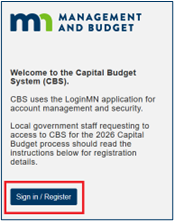
All local government users, including those who have previously accessed CBS, must use the LoginMN application to access CBS. CBS usernames and passwords used in prior years are no longer valid. If you have not done so yet, use the instructions below to register for LoginMN and submit the CBS User Authorization request.
Register for a LoginMN account and complete CBS Authorization
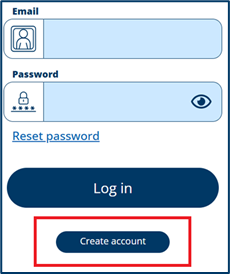
- On the LoginMN screen, click “Create account” and follow the registration steps:
Read detailed instructions for the new registration/login process at: https://mn.gov/mmb-stat/documents/budget/budget-systems/cbs/cbs-user-access-guide-local-governments.pdf.
If you need assistance with CBS registration, please email the MMB Budget Operations team at budget.finance.mmb@state.mn.us
About LoginMN
LoginMN is the State of Minnesota’s secure and centralized sign-on service that provides access to some of the state’s services, programs, and applications.
- Requesting CBS access requires a one-time user registration process where users create a LoginMN account and submit an online CBS Authorization request to MMB.
- Once registration is approved, users will simply log in through LoginMN to access CBS.
This new registration process replaces the PDF authorization forms and firewall process from previous years.
The Annual Budget and Accounting Instructions - Document 1 is posted to the SWIFT Budget and Accounting Instructions webpage. Document 1 highlights important tasks agencies must complete to successfully open FY 2026 and close FY 2025.
|