|
View this as a webpage
We’re almost there, HRD! Despite the snow, spring is just around the corner – or more accurately, just over the weekend! This year, the vernal equinox happens on Monday, March 20. The first day of spring is celebrated all over the world with a variety of traditions, many of which include cleaning, honoring gods and ancestors, and celebrating the return of warm weather with family and friends. We hope you have a good weekend and get to celebrate a bit yourself!
Don’t forget to take your floating holiday before June 30! Spring is here, and the end of the fiscal year will be upon us before you know it. Make sure you’ve checked your vacation balance before June 30 and made plans to use your yearly floating holiday and that your vacation balance is below the cap. If your balance isn’t going to be below your cap, you can choose to convert your vacation time into your deferred compensation plan. For more information, check out the MMB Deferred Compensation Conversion and Match FAQ page, or reach out to your union representative or the MDH HR team.
Join the APP Team for Café Connect: Café Connect is a weekly session sponsored by the Agency Project Planning (APP) Team that covers technology tips, resources, and guidance on shared tools for all MDH staff. Sessions are held every Friday at 9:00 a.m. via Teams, and recordings are available if you can’t make the live session. Upcoming topics include Electronic File Storage Options (March 24) with Eleanor Godbey-Chow of the RIM office, and Outlook Organization (March 31) with Siobhain Rivera.
MDH launches new Space Planning project to better support hybrid work: MDH has begun working on a project to make sure that MDH has sufficient, functional work and meeting spaces for our hybrid work model, including making sure that we have conference rooms able to support hybrid meetings. You can see more information about the project on the MDH Space Planning SharePoint Site.
This piece comes from Jen Spalding, Intake & Triage Supervisor:
Please help me congratulate Kris Christianson on her upcoming retirement. Her last day is April 3rd. When I asked Kris about her MDH journey, this is what she said:
I’ve been with the State since 1986. I started with DHS at the Fergus Falls Regional Treatment Center. In 1988 I moved over to MDH and was an Office Admin Specialist at the Fergus Falls District Office for the next 31 years. In 2019 I made the switch to Intake Specialist with HRD. Listing those dates makes me feel really old! I’m one of the fortunate ones that got in on the Rule of 90 so I get to enjoy my retirement a little earlier. I’m looking forward to coffee on the deck in the mornings and enjoying the outdoors as much as possible.
It's been such a pleasure to work with Kris during her time as an Intake Specialist. She has brought so much knowledge, skill and laughs to the team. We want to wish her ALL the best on her new chapter. We’re going to miss her.
Congratulations on your retirement, Kris! If you or a team member have a milestone coming up that you’d like to share with the rest of the team, please let us know! You can email Health.HRDCommunications@state.mn.us with the information and we’ll share it in the next issue of Have You HRD?
The 2023 legislative session is in full swing and moving quickly! During the legislative session, the legislative team and subject matter experts attend and testify at committee hearings, provide technical assistance to organizations drafting bills, write fiscals notes to determine the cost of implementing legislation, and review thousands of introduced bills. This year so far, there have been 2,927 bills introduced in the House and 2,971 bills introduced in the Senate!
This year, HRD brought forth eight legislative proposals on topics such as assisted living, home care, nursing homes, and over-the-counter hearing aids. At this time, five of our proposals seem to be moving forward. There is still a lot of time left before the session adjourns on May 22 so it is too early to tell if these proposals will become law. The legislative team will continue to monitor HRD proposals and any other relevant bills that are introduced.
Have a question from a legislator about a program you work in? Or a new idea they would like to put into law that impacts our work? The best response in these situations is to politely respond in a neutral way and let them know you appreciate their contact. Within this response be sure to indicate the division’s legislative staff will be glad to work with them and provide them with Lindsey Krueger and Jill Freudenwald’s names and email addresses in your response.
If you are interested in reviewing any of MDH’s 2023 legislative materials, you can do so at the Office of Legislative Relations SharePoint site.
Thanks to HRD’s Policy Specialists, Jill Freudenwald and Celeste Marin, for putting together this Legislative Update!
Our first cohort of HRD staff, representing a broad spectrum of functional areas and teams, will attend the Collaborative Safety Advanced Practical Training: Quality Improvement, on March 28, March 29, April 5, and April 6. We have a few (3) more openings for the advanced practical training. Please connect with Catherine Lloyd if you are interested.
The Collaborative Safety HRD Leadership Lab Cohort 1 will attend their second Lab on March 23 to explore topics related to Teamwork within the collaborative safety framework.
Planning and Partnerships is pleased again to announce we have scheduled another Leadership Lab, designed for 12 leaders, managers, and supervisors; and another opportunity for up to 24 HRD staff interested in taking the Advanced Practical Training: Quality Improvement. Here are the details:
Leadership Lab, Cohort 2
Leadership Labs are designed to support leaders, managers, and supervisors integrate the principles of collaborative safety science into everyday leadership and management. Cohort members can provide direction, feedback, and support to HRD staff and to our providers and partners. Participation in Leadership Lab will enhance opportunities to integrate learning from the staff attending the advanced practical training, and how we apply what we learn through the systemic review and mapping sessions we are holding with providers, regulators, agencies, and advocates.
- May 4, 2023, 9 a.m. to 12 p.m. - Supporting Optimal Performance
- June 8, 2023, 9 a.m. to 12 p.m. - Teamwork
- August 3, 2023, 1 p.m. to 4 p.m. - Language
- September 7, 2023, 1 p.m. to 4 p.m. - Labs in Review
Session II of Advanced Practical Training (APT): Quality Improvement
- The Advanced Practical Training is a 12-hour Institute that is designed for LCR, Evaluators, Enforcement, Continuous Quality Improvement (CQI), Quality Assurance or other staff involved in direct agency oversight and/or monitoring.
- The APT Institute lays the groundwork for the participants’ knowledge about systems safety. The content provides a framework of system safety and is designed to engage participants with a comprehensive and holistic introduction to Human Factors and System Safety.
- Participants will have opportunity to take a first step in helping to create recommendations for the Division to ultimately lead to consistent, meaningful change in team.
- For a complete description of the course, please see the article in February 3, 2023 issue of Have You HRD?: New Dates: Collaborative Safety Advanced Practical Training.
- Session II of the APT will be held Tuesday May 8, Wednesday May 9, and Thursday May 10, 2023 from 8:30 a.m. to 12:30 p.m. daily.
Please contact Catherine Lloyd if you have questions or would like to participate in any of these sessions.
This week, we have the following positions available, and more are coming soon. Please share them with anyone that you think would help make HRD a better place to work!
-
State Program Administrator (Intake Specialist), Job ID: 63817: The Intake Specialist manages complaints and incident reports received for various state and federal licensed or certified healthcare providers, technicians and facilities. This position receives critical and time-sensitive information through multiple web-based reporting systems, letters, phone calls and e-mails and is responsible to determine action needed according to statutory guidelines and timeframes. Closes March 17, 2023.
-
Health Program Representative Senior, Job ID: 63699: Use your health knowledge and expertise to be a part of a team that provides surveillance and guidance in the areas of recertification and complaint investigations of health care providers to ensure compliance with Federal and State regulations related to the provision of nursing and health services. Work time will be spent teleworking from your home office and on site performing surveillance. This position is based out of the Mankato district office. Closes March 20, 2023.
-
Office and Administrative Specialist, Intermediate, Job ID: 64001: The administrative specialist will support the state licensing team, perform a variety of advanced administrative support activities, and assist in the daily administration of the department’s standard operating policies and procedures. Closes March 21, 2023.
These positions are open to internal and external candidates. If you would like to apply, please follow the steps below:
- Sign into Employee Self Service
- On My Homepage, click on Careers and enter the Job Opening ID in the Search Jobs box and click Search.
- Click on the job title to view the job posting.
- Click Apply for This Job in the top right-hand corner.
Did you know that you can make the whole Teams interface bigger or smaller, depending on your preference? There are a few ways to do this:
- If you have mouse with a scroll wheel, press and hold the Ctrl key on your keyboard while moving the scroll wheel back and forth. When you do, you’ll see the entire Teams interface get bigger or smaller, with a black box in the center of the screen that shows you what zoom level you’re on. This also works when someone is sharing a screen within a meeting – you can zoom in on what they are showing to see it larger (this is a newer feature).
- On your keyboard, press Ctrl and minus (-) at the same time to zoom out, and Ctrl and plus (+) at the same time to zoom in.
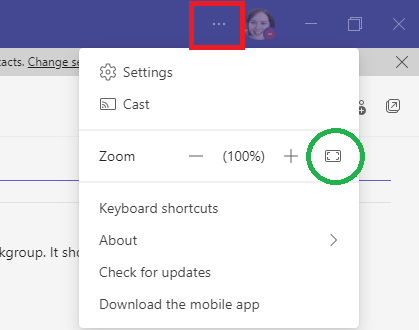
In the top left corner of the Teams interface next to your picture, click on the More (…) button (outlined in red) to see the zoom options. Click the plus or minus signs there to zoom in or out. There’s even a button (circled in green) that puts you back to 100% with a single click!
Pro tip: You can use your mouse / keyboard to zoom in and out on most applications, including Outlook, Office, and your web browser.
Change Colors and Spacing
Teams also allows you to change the colors and density of text to work better for you. In the More (…) > Settings > General menu, there are several options to change the way Teams looks.
- Under Theme you have the option of a default (purple/grey), a dark theme, and a high contrast mode. Both of the latter two can make text easier to read for people who have vision problems, are prone to migraines, or have dyslexia. (Side note: Windows has dark and high-contrast modes if this is a concern for you – you can make your entire computer more friendly for your eyes.)
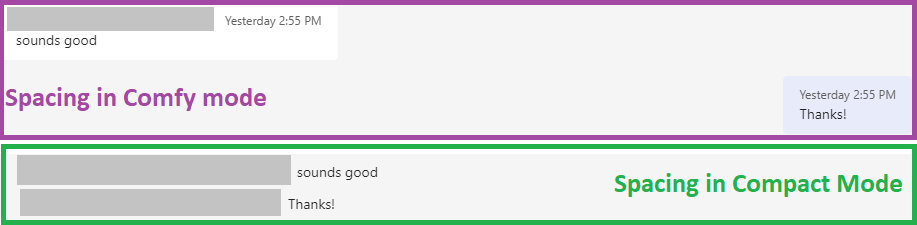
- The chat density setting changes the spacing in your chat so that the text is closer together or farther apart. In Comfy mode (top), the chat messages from people you are talking to are left-aligned, while yours are on the right. The text boxes also have colored boxes around them, which serves as a way to visually group the text. In Compact mode (bottom), all of the chat messages are left-aligned, with no visible space around them. You can see the differences in the images below.
 Show Captions and Prioritize Videos
Teams also gives options to help show captions or focus on video within meetings, which can be helpful if you are hearing impaired, or have certain neurological disorders that affect attention and listening comprehension, like ADHD.
In the More (…) > Settings > Accessibility menu, there’s a recently-added option that allows you to prioritize video from sign language interpreters on your screen in meetings. You can also set the option to always have captions show in your meetings (so you don’t have to turn them on every time), and turn off animations within Teams. (Animations can be distracting, and can also contribute to migraines and seizures.)
Within meetings, Teams also allows you to video from particular speakers, as well as turn your own video off if you find it distracting:
That’s all for this week! If you have a tip that you think would be useful to share, or you have a question about how to use a tool, let us know! You can send questions to Health.HRDCommunications@state.mn.us.
|