|
View this as a webpage
Happy October, HRD! October 1 marks the start of the federal fiscal year, and it’s also International Coffee Day! If you’re not into coffee, you can also celebrate the International Day of Older Persons, National Black Dog Day, or World Vegetarian Day. Whatever you’re celebrating today, we hope you have a good weekend.
Today is the last day to submit your response to the Public Health Workforce Interests and Needs Survey (PH WINS)! PH WINS is a national survey that is confidential and allows public health workers to share their thoughts on issues such as morale, training needs and opportunities for improvement. MDH will receive aggregate date that is not identifiable, and the survey only takes about 20 minutes. If you haven’t already, take a moment to fill it out! You should have received a link in your email. Want to see results from previous years? You can see the reports and the full data sets on the PH WINS – de Beaumont Foundation website.
Redesign Conversations are back - and bi-weekly! This week we had a really informative presentation about the history of HRD and the roots of Redesign. We learned about why we originally started the Redesign, and its predecessor, the HRR project. If you weren’t able to make it on Tuesday, you can find the slides and the recording in their usual places in our HRD Team’s General channel.
Our pause over the last few weeks encouraged us to think about how we can make sure these presentations have valuable information for the division while balancing all of the other things that are going on, and we decided to shift the Redesign Conversations to a bi-weekly schedule. This will give us more time to prepare for each one, and not feel rushed to come up with meaningful content. Thanks for your patience while we figured that out!
Cleanup Week is officially a wrap! We hope you were able to take some time to clean up your work spaces and declutter a bit. Thanks to everyone who participated in the drop-in sessions and the How to Prepare for Auto-Delete presentation – there were a lot of great questions and it was a really fun opportunity for Siobhain to get to show people all of the options we have for organizing our work.
If you weren’t able to attend How to Prepare for Auto-Delete, the recording is available in our Stream tab with all of our other sessions; the slides are available in the Files tab of the Cleanup and Records Management channel. You may want to check out the slides even if you did attend the session – Siobhain added some more slides about how to save things to particular places and how you can use the features in Outlook to sort your mail in different ways in order to make reviewing things less overwhelming. Also, a bunch of the slides have notes that she wasn’t necessarily able to cover in the presentation.
If you’re looking for more help, the Resources tab in the Cleanup channel has a bunch of ideas for ways to clean up and organize email, and the channel also has tabs that you can use to easily view the “What’s Worth Keeping?” and “What is a Record?” documents. And of course, you’re always welcome to come to Office Hours on Fridays from 2 PM to 3 PM and bring any questions you have.
Happy cleaning!
Hey there HRD, Erik Holmberg here hoping that you all had an enjoyable September. Now that the small talk is over, let’s get to the meat of this post. Today we’re going to talk about Tableau reports: what is Tableau, why do we use Tableau for reports, and whether a specific data situation is right for a full-fledged dashboard, a standard report, or neither of those.
What is Tableau?
Tableau (pronounced TAB-LOW) is a tool that HRD is heavily leveraging for our data needs and many of you have seen, talked with me about, or at the very least heard of it. But at its core, Tableau is a data visualization and data analysis tool that is extremely good at bringing data to consumers (all of you) in an accessible manner.
Why Tableau?
This part is pretty easy. HRD is using Tableau for a few reasons. 1) It is an extremely flexible and capable tool that allows creators (the people who create Tableau data products) to meet almost any data need. 2) Tableau has an EXTREMELY active community of users that support one another, as well as free customer tech support from the company itself. 3) MDH maintains a Tableau server so the marginal cost of adding Tableau to HRD is extremely low compared to most other viable options.
Dashboard, Standard Report, or Something Else?
This is where things get more complicated. For any given data need, there is no ‘silver bullet’ but rather a menu of options. The most important question for determining how the HRD data team will provide you with this data is “How often do you need this data?” If you need the data less than once per quarter, a Tableau report in any format is the wrong option – you should just submit data requests for the information.
If you need the same data set regularly, then a Tableau standard report is probably the way to go. However, maybe you want to see how your data changes over time, analyze trends, or explore how different data points interact with one another – in that case, a Tableau dashboard is probably a better fit. The cases where a full-fledged dashboard makes the most sense are less common than ad-hoc data requests and standard reports.
HRD is leveraging Tableau, as well as other technologies, to create a data-driven culture which utilizes Tableau, JIRA, SharePoint, Perceptive Content, and many other products.
For almost any data need, the HRD data team can figure out a method to deliver the needed information. This data delivery medium could be a Tableau dashboard, a Tableau standard report, a spreadsheet sent through email for a data request, or something else.
As always, please reach out to me if you have any questions and thanks for reading this.
See you next month! – Erik.Holmberg@state.mn.us
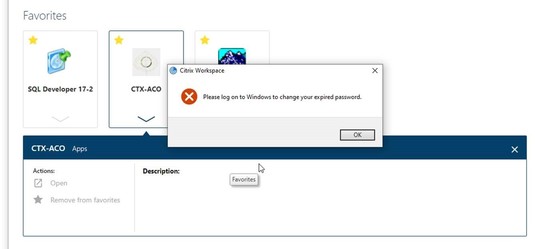
If you use Citrix to sign into HRD’s applications remotely, you may have seen the error message below: “Please log on to Windows to change your expired password.”
Your Citrix password is actually the same as your Windows password – the one you use to log in to your computer. We’re required to change that password periodically for security, but sometimes you miss the pop-up notification that tells you it’s time to update it.
If you receive the error message below, here’s how to change your password so you can get back to work!
- Press Ctrl+Alt+Delete on your keyboard – your screen should change to all one color, with a series of options.
- Choose the one that says Change a password. Type in your old password, and then enter the new password twice. Make sure they are the same!
- Press Ctrl+Alt+Delete on your keyboard again. This time, choose Lock. Your screen will change to the one that you see when you first start up your computer.
- Click anywhere, and enter your new password in the box to sign in. (This updates the network with your new password).
- You should now be able to log into Citrix again.
Thanks to Brenda Boike-Meyers for sharing this information and the steps to fix this issue! If you have a tip you’d like to share with everyone, send us a note at Health.HRDCommunications@state.mn.us and we’ll put it in the next issue of Have You HRD?
As you start working on preparing for the Auto-Delete return, you might want to take advantage of the Outlook Clean Up tool. The Clean Up tool allows you to quickly delete redundant messages from email threads, particularly ones that have a lot of replies.
When you reply to a message, you can see the previous entries in the thread below your text – but each of those replies also has their own individual email message in your inbox. The Clean Up tool scans all of the messages in the thread, and then deletes the individual items so that they aren’t taking up space, because the text of those messages is already contained in the most recent reply. It’s smart enough to catch places where the thread has split, too, so you don’t accidentally delete some offshoot of the conversation. Siobhain recommends running the Clean Up Folder option on your Search Folder before you start sorting through your mail – it will greatly reduce the amount of messages you need to look through and make decisions about!
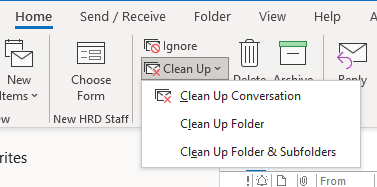 |
The Clean Up tool is in the Home tab, as shown in the screenshot above. You can clean up conversations, or whole folders, and of course, you can tweak the settings to make sure you don’t move messages that you might have flagged to do later or haven’t read yet. Give it a try and see how much it helps!
|