Pros and Cons about Quick Accessibility Fix Products
What you need to know when a vendor offers an easy solution
By: Jennie Delisi, Office of Accessibility
The Office of Accessibility invests time learning about all kinds of products that may improve accessibility and usability for people using the state’s digital technology. We also look into products that help state employees create more accessible and usable documents, websites, software, mobile apps, etc. We focus on a blend of efficiently providing information in a way that people can easily use.
We receive many questions about products that claim to automatically, or with the push of a button, fix accessibility for end users. Many of these products claim that this reduces the time (and therefore cost) of providing technology that is accessible and usable by people with disabilities. The products claim that adding a tool to a webpage or set of webpages make it easier for people, specifically end users, to use your site without effort by your web developers to address accessibility requirements.
One example that comes up frequently is something called an accessibility overlay. These are tools that are added by a site owner and used by the site visitors. To the end user, they appear like a button on the page (more on this later in this article).
Do these products deliver? It depends on many factors. Do you need the products?
- Learn more about overlays.
- Walk through considerations before purchasing.
- Review information you need to know so you can answer for yourself if you need the products.
Thinking about an easy solution for accessibility by purchasing a product? First, read Pros and Cons about Quick Accessibility Fix Products.
 Check out this Grab Bag of Great
Global Accessibility Awareness Day goodies!
Resources for GAAD campaigns and for learning
By Jennie Delisi, Office of Accessibility
Global Accessibility Awareness Day (GAAD) 2023 is Thursday, May 18, 2023 – number 12 if you are keeping track! All of us can take part by sharing information about digital accessibility with our communities. This may include your coworkers, supervisors, and community members. We know you are busy, so we’ve gathered a list of things you may need for a successful campaign!
Here's a sneak peek of what you will find in this article!
Links to our:
- No Mouse Challenge information
- Experience Lab
- Why Accessibility Matters videos
- Free Accessible PDF Training
- Data Visualization Accessibility webpages
- Free downloadable accessibility quick cards
...and tons of videos!
Find them all in Check out this grab bag of great Global Accessibility Awareness Day goodies!
 Tech tip: Using the
How to Meet WCAG (Quick Reference) Filters
This tip is for everyone, including:
- Document creators and remediators.
- Web, web app, mobile app, and software developers.
- Business analysts and quality assurance professionals.
- People creating maps, data visualizations, and social media professionals.
How to Meet WCAG (Quick Reference) is a great tool! It may be overwhelming to some people who are newer to accessibility. And, if you need something quick, you may get lost in all the information.
This is where the filter will help!
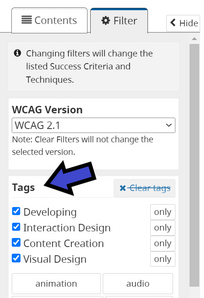
Step 1: Locate and Select the Filter
The Filter tab is in the main menu.
Visual location: left side of the page.
Select the filter tab.
 Step 2: Review Available Tags
Go to "Tags” within the filter tab. There are multiple options.
 Select "Show All Tags" to reveal more tags.
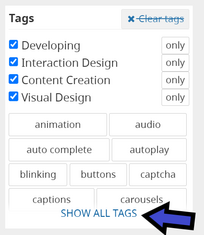 Step 3: Review Related Success Criteria
Select the tag you want to review.
The main content area updates. Now it only includes the success criteria related to that tag. The unrelated success criteria are greyed out. Make sure you scroll all the way through the main content to review the related success criteria.
Bonus Step: More Filter Options
The filter tab has other useful filters!
- WCAG version.
- Levels you would like included (A, AA, AAA).
New to the Web Content Accessibility Guidelines?
If you are interested in learning more about the Web Content Accessibility Guidelines (WCAG), visit the WCAG 2 Overview. It has great information about what the guidelines are, who they are for, who develops them, and other resources.
|