Excellence in Accessibility
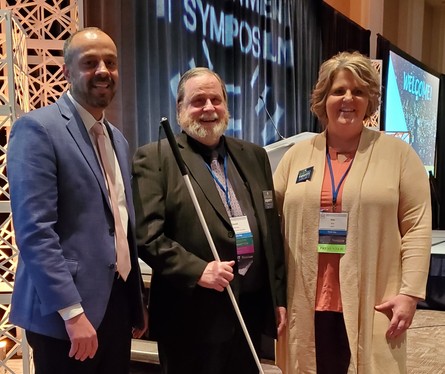
Commissioner Tomes poses with Dave Andrews (winner) and Kim Wee (finalist) for the Individual Leader Awards at the Government IT Symposium.
By Jennie Delisi, Accessibility Analyst
Think back to Minnesota, in the year 2009. How often did the phrase “digital accessibility” come up in your work conversations, meetings, or at conferences?
Did you read about people being recognized for their work in this area? How about being recognized for work in accessibility with an award that was not focused on digital accessibility?
For many of us that work in this area, the answer was: seldom or never.
Fast forward to 2019…
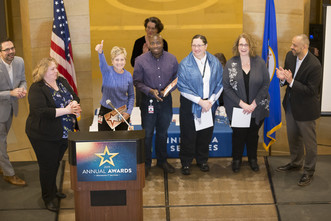
Nine state employees in Minnesota were finalists for awards recognizing their advocacy, skills, and work in digital accessibility this November and December. Better yet, one state employee won an award! You read that correctly, 10 state employees in 2 months!
 |
|
MNIT Central’s Quality Assurance Team receiving their certificates as finalists for MNIT Team of the Year. |
|
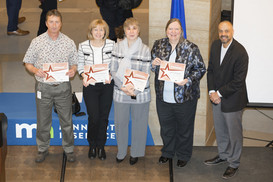
MNIT Partnering with DHS’ EAQAT Team posing with Commissioner Tomes and their certificates - they were finalists for Team of the Year.
|
|
 |
This is a great way to close this calendar year on a high note. Let’s celebrate the achievements of these individuals and the dedication of the Minnesota digital accessibility community. This is a strong (and growing) community!
Consider your own team members doing great work in digital accessibility. In 2020, commit to seeking out opportunities to help others learn the value your colleagues bring as they promote inclusion and create digital spaces and information that can be used by all.
We have details about why each individual and group was nominated in our Excellence in Accessibility blog.
Update from the State Accessible
InDesign Practices Group
By Jessica Cavazos, Health Educator, Minnesota Department of Health
Comprised of members from various Minnesota executive branch agencies, our InDesign Accessibility Community of Practice meets monthly to test and develop best practices for creating accessible PDFs from Adobe InDesign. We recently finalized a short how-to document, “Creating Accessible Documents in Adobe InDesign.” Our group members have rigorously tested these best practices to ensure they meet the State of Minnesota Digital Accessibility Standard. We also tested using methods including the Acrobat Accessibility Checker, reviewing with JAWS (a screen reading software), and CommonLook (a plug-in for Acrobat Pro DC which tests and remediates PDFs).
Jessica shares some of their best practices in our InDesign Accessibility Update.
Holiday Season? More like Internship Season!
By Molly, Former Office of Accessibility Intern, now Studying Abroad!
Internships are the perfect opportunity to dip your toes into the working world and explore potential career options. As the holiday season approaches, you may have relatives asking about your job search and though the prying is well-intentioned, below is some advice that might help you land an internship and get your relatives off your back (no, Auntie Brenda I don’t have a job yet)!
What you can learn from an internship
The stereotypical internship includes: making coffee runs, getting stuck doing all the photocopying and printing, and learning exactly zero job skills. I’m happy to report I’ve never found that the case with my actual internship. I gained valuable professional skills working in the Office of Accessibility at Minnesota IT Services (MNIT). Since digital accessibility involves working with many different types of documents, I was able to create and remediate PDFs. Working to make documents accessible also helped grow my technical knowledge; I improved my ability to use and learn new software. The Accessibility internship also improved my communication skills because I had to communicate about deadlines or my capacity to work on certain projects. Even better, I only was stuck with printing duty one time which ended in an almost-jammed printer (whoops)!
In Molly's final blog as Office of Accessibility Intern, Molly shares tips on resume writing, finding the right internship, preparing for the internship, and where to find the future job posting for the next Office of Accessibility intern.
Tech Tip: WAVE Tool Updates
Have you heard people say “did you run WAVE on it?”
WAVE, or the Web Accessibility Evaluation Tool, is free and completes automated tests of web pages to discover digital accessibility issues. Similar to the Word and PDF accessibility checkers, it looks for digital accessibility issues such as skipped heading levels and missing alternative text.
WebAIM recently released an update for this tool, which works by:
- typing a URL into the text field on wave.webaim.org, or
- using the Chrome and Firefox extensions.
Want to know more about the new version? Jared Smith wrote a blog article with details about the updates.
Please note that like any automated testing tool, it will not find all digital accessibility issues. This can be a great tool for those that want to start learning about digital accessibility, or as a portion of a more thorough digital accessibility test.
|