CDL medical examiner's certificates
- We only require a medical examiner’s certificate when an application is being made for a commercial learner’s permit (CLP) or commercial driver’s license (CDL). Standalone updates are no longer accepted.
- All medical examiner’s certificates must be submitted electronically by the medical provider. This is not new for providers, they’ve been submitting electronically for over 10 years. The change is that we now have direct access to the database.
- We are receiving calls from offices experiencing errors during the Issue a Credential transaction. This is most often caused by changing the 'Commercial Operating Status' dropdown. Do not change the dropdown. See the screenshot below.
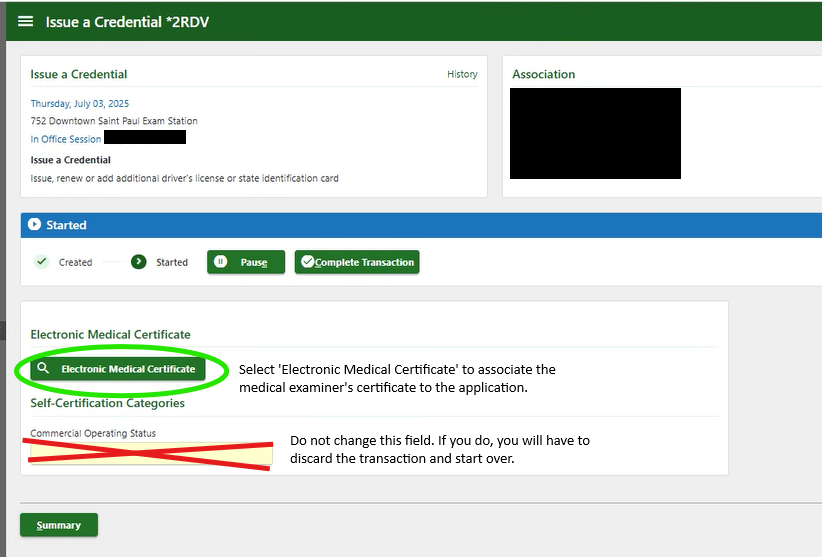 Issue a Credential screen showing the green 'Electronic Medical Certificate' button users need to select.
Troubleshooting
- If the exam was done today, the provider has until midnight to submit it. Advise the customer to wait until tomorrow, then visit drive.mn.gov and select the 'I want to' button 'Find my driver's license status' on the homepage for their updated status.
-
Q: What happens if I search for the medical certificate and nothing comes up or the most recent exam doesn't pop-up?
A: Tell the customer to contact their medical examiner to add the medical certificate to the national registry.
-
Q: When is a DVS Self-Certification form (PS33203) required?
A: A self-certification is required for initial CLP and CDL applications, CDL transfers to Minnesota, CDL renewals and CDL upgrades.
-
Q: If the customer is changing from an interstate to an intrastate driver, do I need to do anything differently?
A: Yes, complete a duplicate license transaction to ensure the customer has the proper restrictions on their license.
-
Still stuck? Contact your exam supervisor.
SQRs in progress
SQR 58891
There’s an SQR in progress to show a preview of the med cert on the Issue a Credential screen, so users know it has been associated with the transaction.
SQR 58929
There’s an SQR in progress to show self-cert and med cert expiration information on the credential application form the customer reviews and signs.
Next steps
Visit the MNDRIVE Help manager and search for CDL medical certification for a full procedure with screenshots for pulling in a medical certificate during an issuance transaction.
|