What's New in this Update
- Use Find an Office to locate offices that provide driver, vehicle and crash records
- Reminder: Race and ethnicity questions on DL/permit/ID applications
- Reminder: Driver's License/Permit/Identification Card Application new version is live
- Additional info on changes to veteran benefits
- Obsolete inventory reminder
- Reminder: new $1 surcharge & registration renewals
- Full-service providers: requesting access for your staff
Use Find an Office to locate offices that provide driver, vehicle and crash records
The new full-service provider designation goes into effect Jan. 1 and mandates that offices that are both a deputy registrar and driver's license agent provide customers with driver, vehicle and crash records. There are 113 offices around the state that will provide this new service. Customers can use the Find an Office feature at drive.mn.gov to locate an office for the record(s) they need.
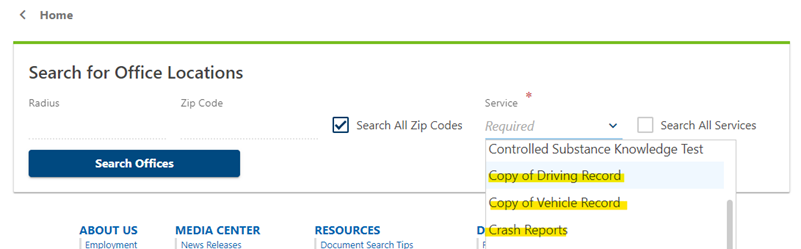
The crash record request form has been updated and the new version will go live Jan. 1 on the website. Customers still have the option to request crash records via mail using this form.
Race and ethnicity questions on DL/permit/ID applications
The driver's license, permit, and identification card application (PS33100) will have additional boxes to check for the customer to provide voluntary race and ethnicity information starting Jan. 1. This change was mandated by recent legislation.
A new question was added to the Tennessen notice on page two of the application:
Why does DVS ask for my race and ethnicity?
State law (Minnesota Statutes, section 171.06) requires DVS to provide you an opportunity to disclose your race and ethnicity on an application for a driver’s license, instruction permit, or identification card. You are not required to provide this information. Failure to provide race and ethnicity data will not impact the processing of your application. DVS will only share your race and ethnicity data with the Office of Traffic Safety for purposes of research, evaluation, and public reports. Race and ethnicity data will not be printed on the card and will not be shared with law enforcement or any other entity, except in summary form pursuant to a valid data request.
If a customer is frustrated by the limitation to select only one option for race and one for ethnicity you may say, "If you don't feel represented by the options available you may decline to answer." Remind the customer that the race and ethnicity section is optional.
A system update will be made in the future to allow the selection of multiple options in MNDRIVE. We will send an update when that change goes into production.
Driver's License/Permit/Identification Card Application (PS33100) new version is live
The new application is live on the website.
- This version should be used immediately. It contains information about automatic voter registration and other important updates.
- This version will not be going to the warehouse. Print copies in office as needed.
The next version of the application will be posted online Jan. 1, 2024. It will contain a section to collect the voluntary race and ethnicity data mentioned above, as mandated by recent legislative changes. The January 2024 version will go to the warehouse.
Orders with the warehouse
- Previous orders will be filled when the warehouse gets the January applications. If you would like to change your order email DSCO.
- If you would like to place an order for the January application, send an email to DSCO and we will add it to the backlog.
- Email: DVS.DSCO.Issuing@state.mn.us
Additional info on changes to veteran benefits
Disabled veterans who have a 100% service-connected disability are exempt from most title and registration fees effective Jan. 1, 2024. Not included in the exemption: sales tax (not exempted until 07/01/2024), personalized plate fees, all contribution plate fees, impound reinstatement fees, expedited title fees and salvage inspection fees.
Registration taxes and fees will only be waived if the registration period begins on or after Jan. 1, 2024 (December 2024 expiration or later).
Users will see a new question in MNDRIVE: 100% Disabled Veteran? on transactions with the ownership section. Otherwise, the question is available in the first panel of the transaction. If the question is answered YES then a second required field asking for proof provided will display.
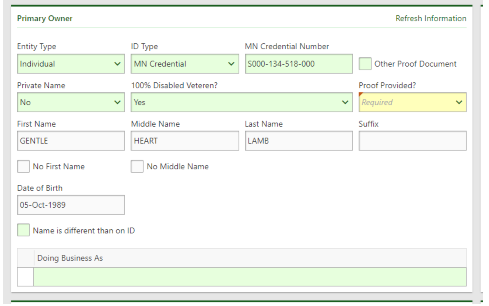 If the driver’s license number provided already has this indicator on their driver record a banner will appear showing that they meet this exemption. The user will still have to answer YES or NO to the 100% Disabled Veteran question if the customer wants to claim the exemption for the specific vehicle.
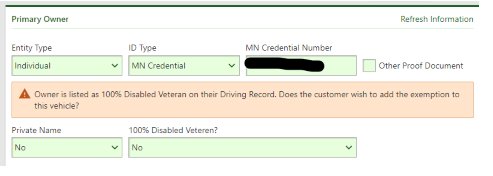 This exemption is only applied to individuals who meet this requirement. The vehicle must list the individual as a registered owner of the vehicle. This question will be available in all transactions so the exemption can be claimed, but there is currently no validation on the two-vehicle limit that is allowed with this exemption. This will be handled with a later SQR. This means if the exemption is claimed in a transaction that does not specifically have an ownership section (renewal, add/remove lien or duplicate title) the system does not validate if the owner meets the exemption requirements so please be careful when choosing this exemption.
There is a help topic that is available in MNDRIVE that has examples of eligibility documents that can be used to claim this exemption. Keyword: disabled veteran. Title: Eligibility Documents for 100% Disabled Veteran Exemptions.
Obsolete inventory reminder
2023 Registration Stickers
As of Jan. 1, 2024, you may mark your unused 2023 registration stickers as Outdated-Audit Needed in MNDRIVE. DO NOT destroy them. These stickers must be reviewed by an MV liaison prior to destruction. Secure them until your next inventory audit or office visit. The liaisons will give you instructions for destruction after they have been reviewed.
Reminder: Deputy registrar surcharge goes into effect Jan. 1
Starting Jan. 1, 2024, deputy registrars must charge a $1.00 vehicle services surcharge.
The $1.00 surcharge applies to any vehicle services transaction that charges a filing fee and is processed at a deputy registrar or through a DVS Now kiosk. The surcharge applies at kiosks because they are always linked to a deputy registrar.
What you need to know:
EVTR (Electronic Vehicle Title and Registration)
If an EVTR transaction is completed at a dealer before Jan. 1, 2024 the transaction has been processed and will not have the $1.00 VS DR surcharge. If a deputy registrar needs to return an EVTR transaction to a dealer to reverse and redo on or after Jan. 1 the new $1.00 VS DR surcharge will be charged when the transaction is being redone.
VTAP (Vehicle Title Application and Permit)
If a VTAP is completed at a deputy registration before Jan. 1 the system will not charge the $1.00 VS DR surcharge.
If a VTAP is created on or before Dec. 31 and then processed at a deputy registrar on or after Jan. 1, the system will go by the transaction date and charge the new $1.00 DR VS surcharge. The person processing the transaction should write the new $1 VS DR surcharge on the application if processed at a deputy registrar.
If a VTAP is created on or after Jan. 1 then the dealers will see a new question: “Are you submitting your paperwork directly to DVS?” The default answer is No, which will cause the system to add the $1.00 VS DR surcharge. If the dealer changes the answer to Yes, indicating they will send the paperwork directly to DVS, then the $1.00 VS DR surcharge will not be charged in the VTAP.
Renewals
The $1.00 VD DR surcharge is based on the date the customer renews their registration, not the date their registration expires. Customers who receive renewal notices by mail may be charged differently than what is printed on the renewal notice based on when they actually complete the renewal transaction. The customer should be printed a new cab card with the renewal to show the fees that were charged for the transaction.
All other service transactions
All service transactions in the system that are not finalized (money taken in) on Dec. 31, 2023 will be discarded systematically and will need to be redone on or after Jan. 1, 2024 in order to charge the new $1.00 VS DR surcharge.
Requesting access for your staff
Reminder: Don't forget to add the supplemental role Request Crash Report! We are receiving user access requests that don't include the supplemental role.
After you and your staff have completed the two required training modules for providing driver, vehicle, and crash records, make sure your DUR requests access to the new transaction types in MNDRIVE by submitting an Update User Access security request and adding the supplemental role Request Crash Report to the request.
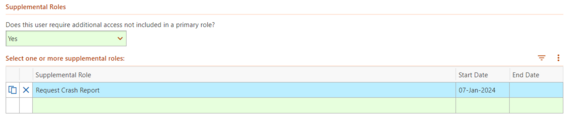
If you need a refresher on how to do this, refer to the MNDRIVE help topic Adding a Security Request Case.
Note: A required field will present: Date Background Check Passed. If it does not pre-populate and the date is unknown, enter 11/16/2020.
The deadline to add security request cases in time for Jan. 1 is Wednesday, Dec. 27. The security team will need a few days to process the requests.
You may have users in your office who do not need to complete the training!
Thank you to those who have contacted us to clarify which staff in your office need to complete the training.
Any staff in your office with limited access only, (not listed as DR/DLA – Full) are not required to complete the driver, vehicle and crash record training. If they require the access in the future, training will be required at that time.
You can review employee access in MNDRIVE in the Users in My Office under Office Management to see who has what access.
Any full access employees that have not completed training will be brought down to DR-VS/Disability only access with no access to DL or reports.
Follow DVS on Facebook and Twitter and share our posts with your followers.
Report Office Hours/Service Changes
Update GovDelivery Distribution Lists
Available on Info Hub
DVS Dashboard
Refund Turnaround Time - refer to MNDRIVE Service manager then View Processing Dates
Real ID Resources
Visit REALID.dps.mn.gov for additional resources for your office.
|




