What's in this update
- Vehicle inspections
- Salvage law reminder
- Wheelage tax 2023 update
- New online: Driver record request
- Updated Dealer Guides now available
- Selling to state agencies
- Previous news
- Dealer support/questions/resources
Vehicle inspections
Starting April 1, vehicle inspections will require an appointment. Inspection sites will no longer offer walk-in service. Appointment availability will be for 30 days out, similar to driver’s testing appointments. This is a more efficient use of DVS staff resources and provides a better service for customers.
Dealers and customers can make an appointment online at drive.mn.gov or by calling 651-284-1000 or 651-284-1234.
You can also manage your appointments and subscribe to appointment notifications at drive.mn.gov. Select Manage Your Appointment Availability Subscriptions from the Appointment panel. This information will be covered at the next DVS Dealer Training sessions, which start on Feb. 14.
Salvage law reminder
Changes to the salvage law that became effective on Jan. 1 require all vehicles designated as salvage to receive a branded title when the salvage status is cleared. This applies to Minnesota and out-of-state salvage vehicles coming into Minnesota. The change eliminates the branding exception for non-high value vehicles, non-late model vehicles, commercial vehicles, pioneer vehicles and motorcycles. These vehicles no longer receive a clear title after the salvage process is complete.
There are no changes to salvage inspection requirements. Click here for an updated model year chart with the new salvage law information.
Wheelage tax 2023 update
We have updated the wheelage tax information on the DVS public website to reflect 2023 collection rates. Click here for the updated chart.
New online service: Driving record request
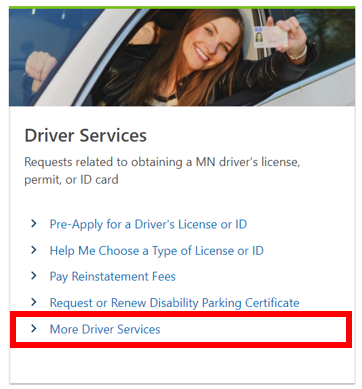
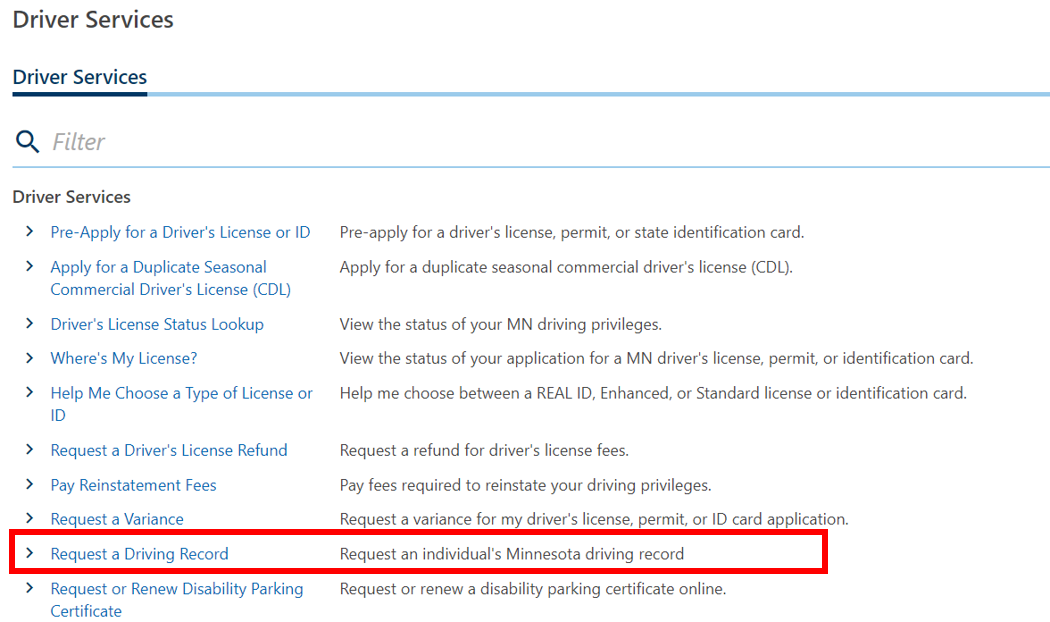
Customers can request a copy of their driving record online. This new online service allows individuals to get a copy or certified copy of their driving record. Customers select More Driver’s Services from the Driver Services panel at drive.mn.gov and click on Request a Driving Record.
  What you need to know:
- Customers receive an email confirmation with the link to their driving record.
- The record is viewable for 30 days; however, the record the customer receives is based on the date requested not the date viewed.
- Customers will need to print their own record if they want a hard copy. DVS will not mail a hard copy of the record to them.
- Payment type: checking and savings accounts (ACH)
- Records will not include reinstatement requirements. To view reinstatement requirements, customers will need to visit mn.gov, select More Driver’s Services from the Driver Services panel and click on Driver’s License Status Lookup.
Reminder: Selling to state agencies
State agencies are required to pay all vehicle fees and taxes directly to DVS through an interagency payment system. Dealers cannot process the transaction using e-Services for Business, EVTR, or at a deputy registrar’s office.
Dealers that sell a vehicle to a state agency are required to provide the ownership document, purchase agreement, and other supporting documents to the state agency. The state agency is responsible for sending the paperwork, sales and registration tax and other fees with the payment form directly to DVS.
Dealers can collect and keep any non-state fees, such as their handling fee.
Are you in compliance?
The DPS-DVS Dealer Unit helps you stay in compliance with the Minnesota statutes and rules that apply to dealership licenses and vehicle sales. They do this through regular dealer inspections, training opportunities, and support services available by phone or email.
Not complying with Minnesota laws can jeopardize your license to sell vehicles in Minnesota. Here are a few common violations identified by the Dealer Unit that are easy to avoid:
- You need to file electronic notifications with DPS-DVS within 48 hours of acquiring a vehicle for resale, removing a vehicle from the state, or junking a vehicle. You can do this yourself through e-Services for Business or work with a deputy registrar.
- If you acquire a vehicle with an out-of-state title that will result in a branded Minnesota title, you need to transfer the vehicle into the name of the dealership within 48 hours of purchase and before you sell the vehicle to a retail buyer.
- You need to have an approved licensed location. We will cancel a dealer license for loss of the location. If you need to change locations, contact the Dealer Unit for assistance.
- You must have continuous liability insurance and a surety bond if your type of license requires it. We will cancel your dealer license if there is any lapse in coverage.
- Notify the Dealer Unit right away, if you change your insurance or bond company. You will need to provide the new insurance or bond documents.
- Be sure to pay outstanding NSF or ACH fees promptly to avoid license suspension.
- You are required to have worker compensation insurance on file with the Dealer Unit if you have employees or agents working for your dealership.
- Dealers are required to list on their license application a four-hour time during the week when dealer inspectors can visit and review records. Contact the Dealer Unit by email at dealerquestion@state.mn.us or call us at 651-201-7800 if you cannot be available during that time. You could receive a non-compliance notice if a dealer inspector visits your dealership during your chosen time and find you are not available.
- You need to send a written response to the Dealer Unit if you receive a non-compliance notice or letter. The response needs to include the corrective actions you will take and the owner’s/officer’s signature. The Dealer Unit will review your written response and if sufficient will clear the non-compliance. You must follow the corrective action identified in your response to avoid any future action against your license.
Recent EVTR enhancements
The following enhancements were made to EVTR transactions in August.
- Added unladen (empty) weight override.
- Added previous government and tribal titles as acceptable proof of ownership documents.
- Dealers can now submit a new recreational vehicle transaction with MSO as proof of ownership though EVTR.
- EVTR now accepts transactions for vehicles being titled in the name of a trust.
- Assigned a key to common lienholders that correlates lienholders’ named and addresses.
Demonstration plates
We have received reports of individuals taking their skills (road) driver’s license test using a vehicle with demonstration plates. This is not an allowable use for demonstration plates.
Demonstration plates are limited to use by:
- Dealer owner, officer or board member for business or personal use.
- Dealer’s spouse, for business or personal use.
- Full-time employee, for business or personal use.
- Part-time employee, only while conducting dealership business.
- Prospective buyer, for demonstration only for a maximum of 48 hours for passenger vehicles and for up to seven days for trucks, truck-trailers, or emi trailers.
- Promotional events, for a maximum of four days on no more than three vehicles.
Some common examples of improper use of demonstration plates include display on:
- Consignment vehicles.
- Courtesy cars, loaners, or lease vcard.
- Tow trucks, service trucks, or parts pickup trucks.
- Vehicles sold to an employee on contract.
- Vehicles used by the spouse of a dealership employee (full- or part-time).
In-transit plates cannot be used on vehicles being demonstrated or on vehicles being driven to repair or inspection sties.
e-Services for business important information
- E-Services for Business webpage:
https://dps.mn.gov/divisions/dvs/mndrive/Pages/dealers-overview.aspx
-
First-time payments in e-Services for Business: Notify your bank of the DPS-DVS ACH company ID A416007162 if you have a debit filter on your bank account. You need to do this before making your first payment in e-Services for Business. DPS-DVS charges a $30.00 returned payment fee if your bank does not process your payment.
Common questions
Please submit all email questions directly to the shared email addresses listed below.
Questions about:
Questions about:
Questions about:
- Administrator needing a password reset or locked out
- Updating Administrator for the company or the Administrators email address
- Update authentication method on e-Services for Business
- Logon questions
- Email: dvs.dataservices@state.mn.us
Questions about:
Questions about:
- Direct all EVTR questions to your vendor
Questions about:
Online resources
You can find the following resources on the DPS-DVS website drive.mn.gov
21-day/31-day permits stock
- To purchase from the Minnesota Auto Dealers Association (MADA) email services@mada.org or call 651-291-2400.
Training videos and resources
(Must have completed a records access agreement first. See account set-up.)
Training/Information Materials:
Account Set-Up
Dealer license management
Basic transactions
Trailer transactions
|




