What's in This Update
- New Vehicle Services Program Director
- MNDRIVE e-Services for Business Update
- 2022 Motor Vehicle Tax Manual
- Wheelage Tax for Stevens County
- Electronic Liens
- Data Access Reminder
- Previous News
- Dealer Support/Questions
New Vehicle Services Program Director
Greg Loper is the new Vehicle Services Program Director. He has been serving as the acting director for the Vehicle Services program area since April 2021.
Loper has more than 20 years of managerial experience in testing, healthcare, technical support, and finance. He stared his career with DVS in 2018, serving in leadership positions in the Public Information Center (PIC).
Loper has lived in Minnesota since 1991, holds a bachelor’s degree from Pacific Lutheran University, and a masters from Bethel University. He and his wife Lisa have three daughters. When not at work, Loper enjoys outdoor activities such as cross-country skiing and bicycle riding.
MNDRIVE e-Services for Business Update
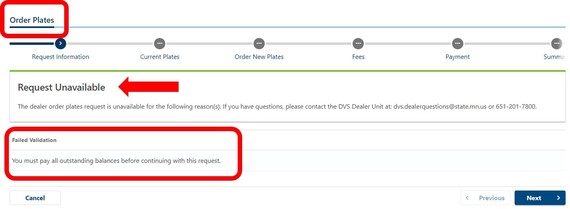
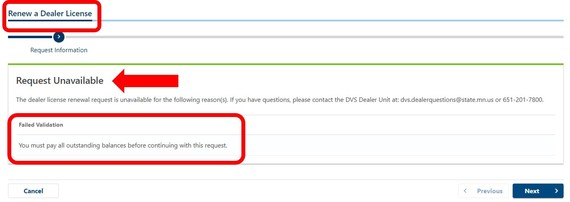
Dealers with an outstanding balance on their account will be unable to order dealer plates or renew their dealer license until the balance is paid.
The following messages will display in e-Services for Business staring May 5, to alert dealers that an outstanding balance is due.
2022 Motor Vehicle Tax Manual
The 2022 Motor Vehicle Tax Manual with miscellaneous class tax tables is now available at drive.mn.gov. Select DVS Forms, Manuals, and Documents from the DVS information panel and click on motor vehicle.
To calculate passenger vehicle registration, go to drive.mn.gov, select more vehicle services from the Vehicle Services panel and click on estimate vehicle registration tax.
Wheelage Tax Added for Stevens County
There is a $15 wheelage tax applied to vehicles kept in Stevens County.
What you need to know:
- The wheelage tax is applied to vehicles that expire in May 2022 or later. Renewal notices for May and beyond will include the wheelage tax.
- Starting June 1, the wheelage tax will be applied to registration renewals being processed for vehicles that expired Jan. through April 2022.
Electronic Liens
The electronic lien (e-Liens) pilot project began in April with a small group of lending institutions. Participating lienholders create an account in e-Services for Business that allows them to store, track and release a lien electronically in MNDRIVE.
What you need to know:
- DPS-DVS does not send a lien card to e-lienholders. Lienholders not participating in the e-lien project will still receive lien cards.
- E-lienholders release liens electronically through MNDRIVE. The customer does not need to provide a hard copy of a lien release to remove it from the title.
- The customer will automatically receive a notification letter when an e-lien is released.
- The lien will appear on the vehicle record until the customer updates the title or transfers the vehicle.
You can verify if an e-lien was released on the DPS-DVS website drive.mn.gov:
- Select More Vehicle Services from the Vehicle Services panel
- Click “Check My Vehicle Status” from the list of options.
- Enter the vehicle’s VIN and click Search.
There will be a released date and a lender release note if the e-lien was released.
Data Access Reminder
DPS-DV Policy 125-1000, Security and Confidentiality of Data & Records states that “An authorized user is prohibited from accessing the DVS information system for themselves, family members or individuals residing in the same household as the authorized user.”
Unauthorized access includes looking up your record for training, reference or comparison purposes. Authorized users are not allowed to process transactions in the DPS-DVS information system for themselves, family members or individuals residing with them in the same household.
DPS-DVS defines family members under Policy 125-1000 as: spouse, parents, stepparents, foster parents, father-in-law, mother-in-law, children, stepchildren, foster children, sons-in-law, daughters-in-law, grandparents, grandchildren, brothers, sisters, brothers-in-law, sisters-in-law, aunts, uncles, nieces, nephews and first cousins.
E-Services for Business Update: Search Vehicle Notification History
A new feature in e-Services for business allows dealers to view a list of vehicles they have marked as Held for Resale, Junk, or Removed from State.
Select the Search for Vehicle Notification History link under the Other Services menu section.

Dealers must select an indicator type (held for resale, junked vehicle, or vehicle removed from state).
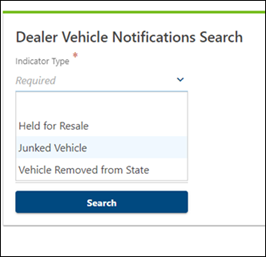
The date range entry is optional, but if no range is entered the results are limited to the first 1,000 results.
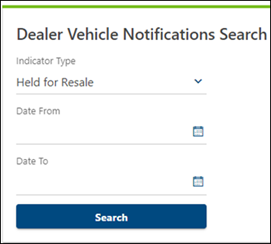
The search result columns are sortable and filtered by the criteria entered.

Important: Held for resale notifications filed before Feb. 22, will only show information in the date reported column. That date is the date the dealer acquired the vehicle. Notifications filed on Feb. 22 and later will display an acquisition date and the date the notification was filed
Important: Private Address
Dealers should only select “yes” to the private name or address question if the customer indicates they want their name or address listed as private. The DPS-DVS training team covers this in all dealer training sessions.
Deputy registrars cannot change or correct an address if a dealer selects “yes” to the question “is this a private address” on a VTAP transaction. MNDRIVE automatically sends the customer a letter asking for the private address form or additional information. This applies to all scenarios that involve adding or changing a private name, private address, safe-at-home address and residential address when the private name or address question is answered yes.
Vehicle Inspection Reminder
The maximum number of vehicle inspection appointments a dealership can have per day is three.
Held for Resale Notification Required
Dealers are required by Minnesota law to file a held-for-resale notification (HR flag) within 48 hours of acquiring a vehicle titled and registered in Minnesota. Dealers must file the notice electronically through MNDRIVE e-Services for Business or by contracting with a deputy registrar, who can charge a fee of $7 per transaction. Reference: Minnesota Statutes, section 168A.11 subd. 2.
Not Required
The two situations where a dealer is not required to file a held-for resale notification are:
- The vehicle is titled in another state and no Minnesota record exists.
- Note: The dealer must immediately apply for a Minnesota salvage title if the vehicle was acquired as a damaged late-model or high-value vehicle with an out-of-state title and the vehicle:
- Was acquired by an insurer through payment of damages;
- Is one for which the cost of repairs exceeds the value of the damaged vehicle, or;
- Has an out-of-state salvage certificate of title as proof of ownership.
- Reference: Minnesota Statutes, section 168A.151, subd. 1(b).
- The vehicle is in the DPS-DVS purged file (not active in MNDRIVE). Dealers cannot file a held-for-resale notice because an active record does not exist. Deputy registrars will create the record and add it to the system when the dealer submits the vehicle transfer.
Dealers need to keep the vehicle title in the vehicle jacket at the dealership location and have it available upon demand during the normal records inspection process as required by Minnesota Statute 168A.11 Subd.3.
Common Questions
Please submit all email questions directly to the shared email addresses listed below.
Questions About:
Questions About:
Questions About:
- Administrator needing a password reset or locked out
- Updating Administrator for the company or the Administrators email address
- Update authentication method on e-Services for Business
- Logon questions
- Email: dvs.dataservices@state.mn.us
Questions About:
Questions About:
- Direct all EVTR questions to your vendor
Questions About:
Online Resources
You can find the following resources on the DPS-DVS website drive.mn.gov
21-Day/31-Day Permit Stock
- To purchase from the Minnesota Auto Dealers Association (MADA) email services@mada.org or call 651-291-2400.
Training Videos and Resources
(Must have completed a records access agreement first. See account set-up.)
Training/Information Materials:
Account Set-Up
Dealer License Management
Basic Transactions
Trailer Transactions
|




