What's New in this Update
- Honorary Consul Plate Procedures
- MNDRIVE Update – Marked for Export
- January DPS-DVS Exam Station Reopenings
- Important Town Square Reminder
- Customer Conduct
- Correction: Homeless Youth Verification Form
- AAMVA System Maintenance
Honorary Consul Plate Procedure
Deputy registrars can accept applications for Honorary Consul Plates.
What you need to know:
- Honorary consul plates can be displayed on passenger vehicles, noncommercial one-ton pickups, trucks, motorcycles and recreational vehicles owned by the honorary consul.
- The applicant must be recognized as an honorary consular official appointed by the respective government to serve in Minnesota.
- Required documents: Letter from the Minnesota Consular Corps and a signed special plate application.
- Deputy registrars can print the MNDRIVE pre-populated special plate form for the customer to sign. It is updated to include honorary consul plates.
- A special honorary plate application form is available on the DPS-DVS website. A customer can download, complete and print.
- Plate Fees: Single: $13.50 Double: $15.50
- Registration might be due if vehicle is new or up for renewal
- Plates are transferable. The $5 plate transfer fee is due.
- Plate format: The International Olympic Committee three-letter country code for the represented country followed by a number. Example: Belgium would be BEL 1
- We will let you know when the updated special plate brochure is available.
MNDRIVE Instructions:
1. Select Honorary Consul as the “Other” plate type and pick the country the qualifying owner represents.
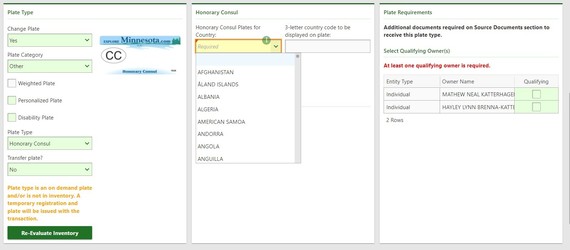
2. If the country is not eligible, you will get an error message.

3. Indicate you have received the required documents.

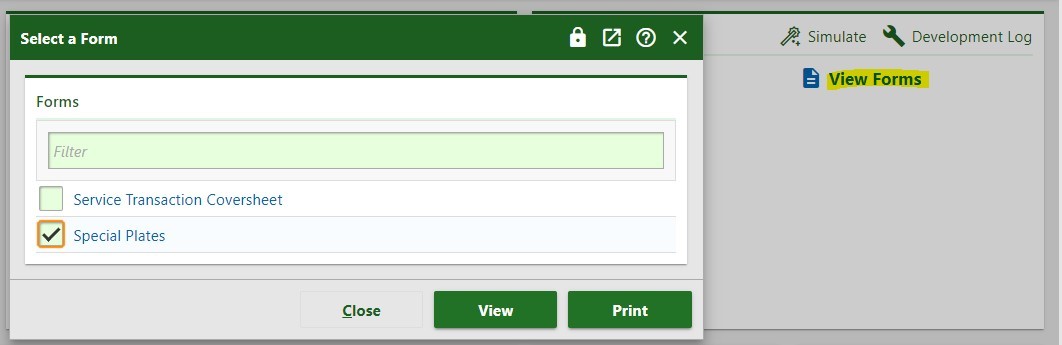
4. You print the pre-populated special plate application by clicking View Forms.
MNDRIVE Update – Marked for Export
The FAST and MNDRIVE teams updated the review title information screen Monday night to include the question. “Is the title marked for export?” Deputy registrars must select yes or no from the drop-down box.

Minnesota titles stamped EXPORT mean the customer purchased the vehicle through an auction for the sole purpose of taking the vehicle out of the country and needed a title to take the vehicle through customs. The customer cannot renew the registration or sell the vehicle in the United States.
This information will be shared with dealers in the January DPS-DVS Dealer Update. Dealers will find the question on the required documents screen.
January DPS-DVS Exam Station Reopenings
Fifty-one exam stations are opening this month. All 93 stations closed during the COVID-19 pandemic will be open by Jan.31. Please see the DPS-DVS news release from Jan. 6 for the list of stations opening this month. Customers can make appointments within two weeks of an exam station opening. Customers can visit drive.mn.gov to find locations and make appointments.
Important Town Square Reminder
Motor vehicle title and registration services are not available at the DPS-DVS Town Square location. Do not refer customers who need assistance with a title or registration transaction to Town Square. Staff at that location cannot assist the customer.
Services available at Town Square:
- Driver compliance/evaluation
- Driver’s license/ID card applications
- Knowledge Testing (Class D by appointment only)
- IRP/IFTA (by appointment only)
- Dealer licensing
- DPS-DVS Records
Customer Conduct
DPS-DVS recently developed a customer code of conduct in its continuing efforts to provide a safe environment for staff and customers. The signs posted at DPS-DVS exam stations identify customer behaviors that are unacceptable and potential consequences for those behaviors. The sign is available on Info Hub under the DL agent/Exam tab. You might find it useful or might want to modify it for use in your office space.
Correction: Homeless Youth Verification Form
Last week’s update had an incorrect link to the homeless youth verification form (PS2908). You will find the form on the DPS-DVS website under Forms/Documents/Manuals – select ID forms.
AAMVA System Maintenance
AAMVA will conduct system maintenance on Sunday Jan. 16, from 6-10 a.m. to the CDLIS/S2S environment. CDLIS/S2S will be unavailable during this time.
January Training-Save the Date!
The January webinar training schedule is below for your planning purposes. This training provides valuable information about DPS-DVS processes. DPS-DVS wants you to have accurate and complete information.
Please plan to attend one of our January training sessions. DPS-DVS will offer eight virtual training sessions over two days.
Schedule
Tuesday, January 18
- 6:30-8:00 a.m.
- 8:30-10:00 a.m.
- 10:15-11:45 a.m.
- 1:30- 3:00 p.m.
Thursday, January 20
- 10:00-11:30 a.m.
- 1:30-3:00 p.m.
- 3:15-4:45 p.m.
- 5:00-6:30 pm
Link a User Profile to a Driver Record
Linking a user profile to their driving record will prevent self-searches. This option is now available in MNDRIVE.
An administrator with the data use representative (DUR) role can follow the instructions below if your office chooses to configure MNDRIVE to prevent self-searches.
Note: A DUR can link their own profile to their driving record. Following these steps exactly will not take the user into their own record avoiding a data privacy violation. Offices with multiple DURs can perform these steps for each other to avoid a policy violation.
Instructions
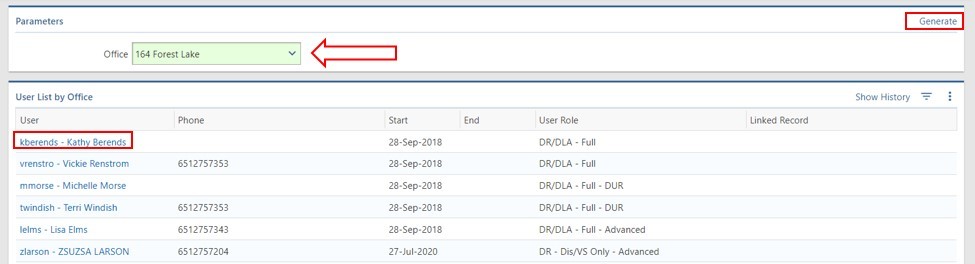
1. Open the Office Management manager.
2. Click the Users in My Office hyperlink in the User Management panel.
 3. Select a User by clicking on the User Name hyperlink.
Note: If you manage multiple offices you can change your office location and click the Generate hyperlink to display users in another office.
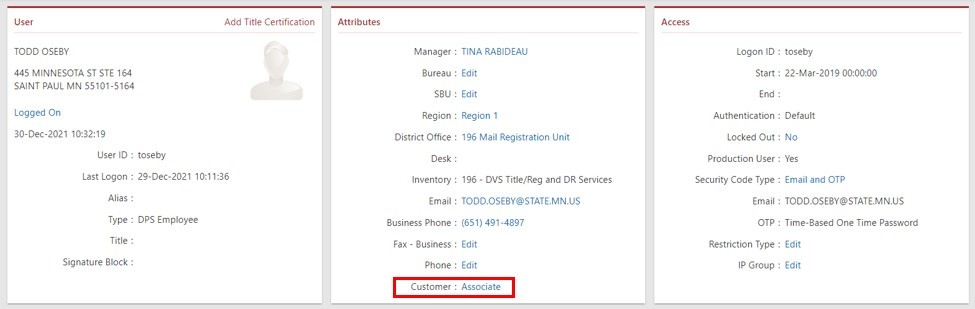
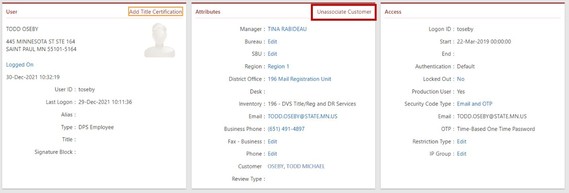
 4. Click the Associate hyperlink at the bottom of the Attributes.
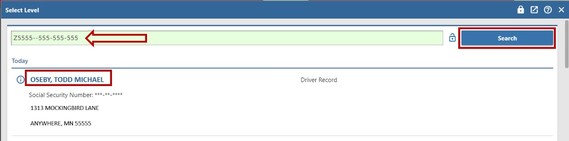
 5. Enter the user’s driver’s license number in the search bar and click Search.
6. Click the Customer Name hyperlink
 The user’s profile is now associated. The Unassociate Customer hyperlink is available if an error was made.
 7. Repeat for the next user until all users for the office are associated to their driver license number.
If a user attempts to access their accounts/records they will receive an Access Denied screen. Users will also get the Access Denied screen if they attempt to perform a service transaction on one of their own accounts. Another user in your office must claim the session and perform the transaction if this happens.
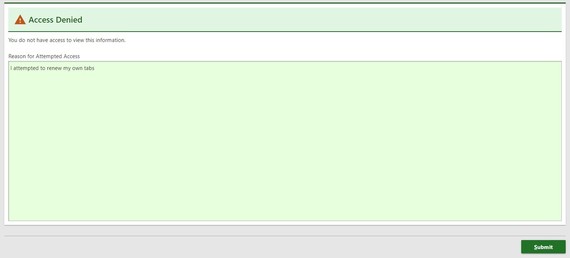
Important: Since the user has not accessed their record they have not violated the Data Use Agreement and policy.
No-Fee Identification Card for Homeless Youth
Starting Jan. 1 homeless youth can apply for a no-fee, standard Minnesota identification card (non-REAL). "Homeless youth" means a person 24 years of age or younger who:
- Is unaccompanied by a parent or guardian and is without shelter where care and supervision are available.
- Has a parent or legal guardian who is unable or unwilling to shelter and care for them.
- Lacks a fixed, regular and adequate nighttime residence.
Requirements:
- Application for a standard Minnesota identification completed by the homeless youth (they can pre-apply at drive.mn.gov).
- Completed Eligibility Verification for Homeless Youth form (PS2908) signed by an employee of a human services agency that receives public funding to provide services for homeless youth or staff at a school providing services to homeless youth, or a school social worker.
- Certified copy of birth certificate. Homeless youth can apply for a no-fee Homeless Youth Birth Certificate if they were born in Minnesota and are 24 years of age or younger. The certificate expires six months from the date issued and is available at no cost from any Minnesota vital records office. For more information the applicant can contact the Minnesota Department of Health County Vital Records Office:
Visit https://learningcenter.dps.mn.gov/mndrive/External/HomelessYouthIdentificationCard.html to review the information presented at the December training sessions.
2023 Registration Sticker Supply Chain Issue Resolved
MINNCOR notified DPS-DVS that 3M filled the entire order for the 2023 sticker and cab card stock used for online and mail registration renewals. Customers renewing online or by mail are receiving their tabs in the normal timeframe.
AAMVA System Maintenance
AAMVA will perform system maintenance on Sunday Jan.9 from 1 to 7 a.m. AAMVA services (PDPS, NMVTIS, etc.) will be unavailable during the maintenance window.
DPS-DVS December Training Webinar Summary
DPS-DVS strongly encourages each deputy registrar office to plan ahead and have at least one person attend a monthly training session.
This summary is an overview of the December training for offices that were unable to attend. Please contact the driver’s license or motor vehicle liaisons if you have questions.
Driver Services Segment
-
AAMVA/PDPS Fail. Reviewed the steps to take when a PDPS fail occurs while processing a credential for a customer. Review the “PDPS and CDLIS Overrides” topic in the MNDRIVE help manager.
-
Homeless Youth ID Card. A segment on the procedure to assist those customers considered homeless youth including a focus on the proper paperwork to complete. A video that describes the process can be found in the Learning Center.
-
Homebound Customers. A segment on the proper procedures for those customers deemed to be homebound including the required documents needed for review by DVS. The forms needed for these customers can be found at dps.mn.gov.
-
Temp Stay/Status Check. Reviewed the different proof documents needed for those customers who are in the U.S. on a temporary stay with an emphasis on status checks. Review the “Temporary Stay Documentation and Rules” topic in the MNDRIVE help manager.
-
Locating an Application. Demonstrated the different procedures to locate applications after a transaction has been completed. Review the “Locate an Application” topic in the MNDRIVE help manager.
Disability Segment
-
Surrender Plate/Issue 2 Disability Certificates. Demonstrated scenario where the customer surrenders their disability plate in order to get two disability certificates. Review “Service Transaction Matrix” topic in the MNDRIVE help manager.
Motor Vehicle Segment
-
Abandoned Vehicle Sales. Reviewed the business and MNDRIVE process for an abandoned vehicle sale. Review the “Procedures; Involuntary Transfer; Abandoned Motor Vehicle” topic in the MNDRIVE help manager and Minnesota Statutes, section 168B.
-
Administrative Forfeiture. Reviewed the business and MNDRIVE process for administrative forfeitures. Review the “Procedures; Involuntary Transfer; Administrative Forfeiture” topic in the MNDRIVE help manager.
-
Viewer’s Choice – Registration Corrections. Reviewed and demonstrated the procedures and process for MNDRIVE transactions involving use type changes and weight changes. Refer to the “Change Gross Weight, Change Use Type and BPC Detail: Vehicle Type/Vehicle Class/Use Type Differences topics in the MNDRIVE help manager.
-
Receiving a MINNCOR Fulfillment. Demonstrated the correct way to receive a shipment sent with a successful MINNCOR file transfer using the Inventory Fulfillment springboard. You can view the instructions in the new training video Receive a MINNCOR Fulfillment located in the Learning Manager.
-
Logging Searches. Reviewed the new functionality to log a record search in MNDRIVE and the report available to Administrators. The information was shared in the 21, DPS-DVS Weekly Update and is available in the MNDRIVE help manager under “Record Access/Lookup Log.”
-
MV Tools & Tips
-
Registered Weight Missing: The two methods to overcome a registered weight invalid error on non-weighted vehicles was shared.
-
Lease Buyouts: Shared information about the recent MNDRIVE Acquisition Type, Lease Buyout, including document requirements. You can review the instructions in the MNDRIVE help manager under the topic “Lease Buyouts and Procedures; Sales Tax; Leases.”
-
Redacting a Document. Demonstrated how to redact sensitive information on a document within the Document Viewing tool in MNDRIVE.
-
Sales Tax on Government Vehicles: Covered the requirement to collect sales tax on vehicles changing from marked emergency vehicles to unmarked vehicles. You can find the requirements in the Sales Tax Booklet used for title certification training located on the Info Hub.
Follow DPS-DVS on Facebook and Twitter and share our posts with your followers.
Report Office Hours/Service Changes
Update GovDelivery Distribution Lists
Available on Info Hub
DVS Dashboard
DVS Processing/Turnaround Times
Real ID Resources
Visit REALID.dps.mn.gov for additional resources for your office.
|




