District News
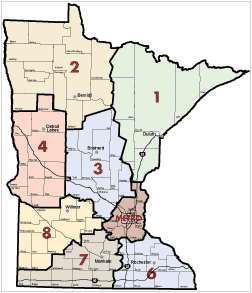
Introducing Alek Halverson from District 8
Alek Halverson is originally from Lester Prairie, MN. He received his Bachelor of Science degree from Minnesota State University, Mankato. He completed his GIS Graduate studies at Saint Cloud State University.
Alek was previously employed at Wright County for 13 years as a GIS Specialist, Sr. Survey Technician, and most recently GIS Coordinator.
Alek currently resides in Big Lake, MN with his wife Marie, daughters Mya, 8, Olivia, 5. They have a golden retriever, Stormy, and Yorkie-poo, Lexi. He enjoys spending time with his family, watching football and hockey, golfing, fishing, gardening, and home improvement projects with his free time. He is looking forward to joining the new team at MnDOT.
Trivia
-
In winter, drivers should never let their fuel tank get below what percentage?
-
When driving on snowy or icy roads, will it take up to 5, 10 or 20 times longer to stop?
-
In snowy weather, what should drivers do every time they pull over: Check weather conditions, check headlights, check reflectors, or all of these?
-
What should drivers do if they start to skid? Brake lightly and steer in the opposite direction of the skid?
-
One inch of rain in the summer turns into roughly how many inches of snow in the winter?
-
True or False: When stopping on icy roads, pump your brakes.
"SDW_INFRA.Bridges" Feature Class Updates
Recently the SDW_INFRA.BRIDGES feature class went through some updates to enhance the data readability and query capabilities. This was initiated from a user request regarding querying fields that appear to be numeric but were stored as text limiting the querying capabilities. While correcting this, other field modifications, additions and omissions were completed.
The data type changes primarily affected measurable distances such as vertical and horizontal clearance measurements (feet), load rating values (Tons) and bridge dimensions (feet). The bridge office utilizes codes 0-9 to evaluate parts of a structure, these codes along with items such as county code and district code remained text.
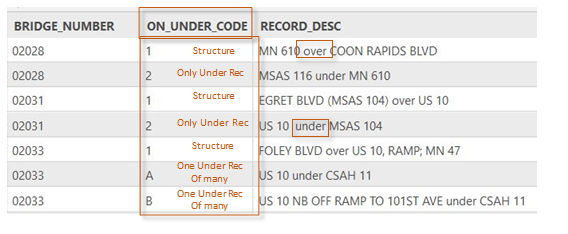
Before diving into other modifications and how to utilize the bridge feature class for analysis, a user should understand how bridges are inventoried. Bridges are inventoried using latitude and longitude and displayed as a point; the inventory unit attempts to place the bridge point at the center of a structure. Each bridge consists of at least one feature that is carried on the structure (Roadway, Pedestrian, Railroad) and could also have one or many roadways traveling underneath it that are inventoried as well. The bridge feature class displays all records, which is why a user will see the same bridge number multiple time in some cases when there are multiple roadways traveling under a structure. This can be determined by using the column ON_UNDER_CODE (1= Structure; 2= only under record; A,B,C… = One of many under records). Users should reference the bridges feature class metadata for more detail.
 |
Several fields in the feature class have been modified to assist users in identifying features that are on or under the structure. Service_Code/Service_Desc, these fields describe what the feature is by applying a code (H = Highway, RR = Railroad, HW = Highway/Waterway, etc.) Previously this field would list only what feature was carried on a structure, now it lists specifically what is in that row. Another field is Record_Desc, this column will detail what the row carries and if it is on or under the feature the structure carries. The Bridge Inventory Unit does not create a record for Railroads, Pedestrian trails or waterways traveling under a structure. These are noted elsewhere in inventory, the fields BRIDGE_OVER_WATER, BRIDGE_OVER_RR and BRIDGE_OVER PED were added to assist users in querying for structures that cross these features.
The Bridge Office has been integrated with the Linear Reference System (LRS) for several years and maintains their records manually throughout the year. Our unit tracks LRS route system, route ID and route measure (Increasing and Decreasing). All these fields were added to the feature class along with other roadway fields such as NHS_IND, FUNC_CLASS and ROUTE_SIGN_PREFIX. Route_Sign_Prefix is a field that details what type of route is carried (Interstate, US Trunk, MN Trunk, County, City) this field is helpful when querying connector structures since they are inventoried based on the highest-ranking roadway the ramp connects.
Along with the addition of some roadway fields others were omitted from the feature class for data clarity. Bridge ADT and Bridge ADTT were removed since there are more reliable sources for this information such as the Traffic Mapping Application and other SDW feature classes in the SDW_INCDT schema.
The new version of the SDW_INFRA.BRIDGES feature class will be available soon, with all the changes mentioned available to users. An updated metadata record will also be available at Spatial Data Warehouse web page. For more information about Bridge Inventory and this feature class please contact Joe.Russella@state.mn.us.
Minnesota Bikeways Mapping Application
Minnesota Bikeways updates
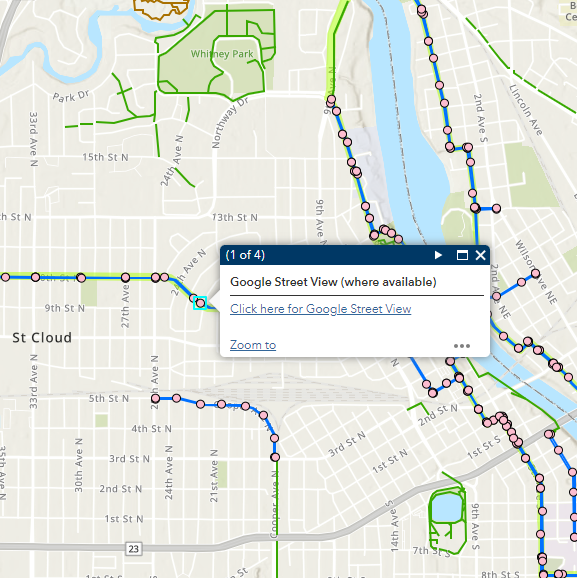
First, we added a Google Street View layer to our Bikeways app. These points appear for all on- road bicycle facilities, at 1000-foot intervals (plus endpoints). Simply zoom in to your area of interest, click on a point, and the pop-up link will bring you directly to Google Street View, where you can visually check out the road conditions, bike lanes, and shoulders for yourself!
 We had a couple of data updates: A Gravel Roads layer was added, which can be toggled “on” for all the thrill seekers out there looking for a more rugged biking experience. Find it in the Layer List, symbolized as brown dotted lines. We’ve also received and incorporated a brand new DNR dataset, in our Bikeways Data Standard for Minnesota. This means much more complete attribute information for all State Trails.
We are also advertising! After a multi-agency marketing effort, we assembled a social media kit to easily advertise statewide. There is an embedded QR code on all new postcard sized handouts as well as rack cards, posters, and screen displays. A well-timed social media blast and distributing the postcards at the State Fair this year resulted in a significant bump in our AGOL app usage numbers! We love to see more and more people discover this resource.
 Minnesota Bikeways map advertising poster
By Bob Wolbeck
Check our redesigned iHUB GIS Homepage. For comments and ideas, please email it to Bob Wolbeck at bob.wolbeck@state.mn.us.
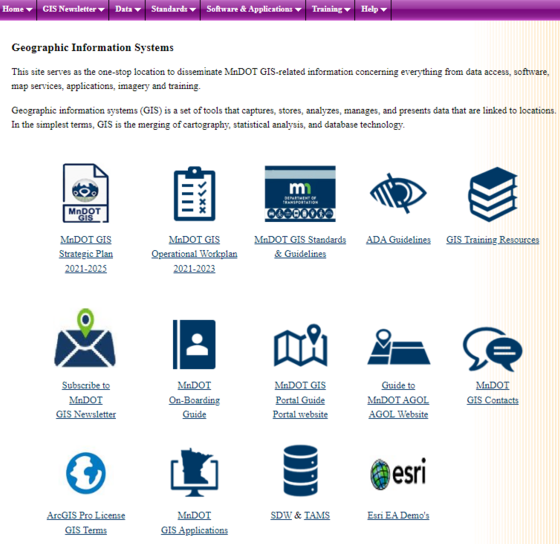 Geographic Information Systems iHUB page
 |
|
GIS Bytes
Bob Diedrich, District Operations GIS Program Support
Ruojing Scholz, Central Office GIS Program Support
|
Training & Resources
Topic: December 4, 2023.
The statewide parcel dataset is available from the MnGeo Folder through our Geospatial Data Resource Site (GDRS) Data connection.
The GDRS can be accessed by mapping an unused drive letter, in my case “Y” to \\gisfs\gdrs then navigating to the path below in ArcGIS. There are other ways to connect to the GDRS that might work better for another workflow. (Ruojing Scholz covers the GDRS connection process in our “ArcGIS Pro Series Part 1 - Intro to MnDOT GIS & ArcGIS Pro” Training Class.)
From the GDRS connection, we can access the statewide parcel dataset. This dataset is clearly marked “FOR INTERNAL USE ONLY” and is required to be used as such.
\data\pub\us_mn_state_mngeo\plan_parcels_minnesota
Establishing logins for the Web MDSS, (Maintenance Decision Support System Operations Website). Dan Gullickson, presented this software at our KEG Meeting 2/15/2022. There are a few contacts on the iHub for the MDSS.
https://www.webmdss.com/login/?destination=%2Findex.pl
MnDOT GIS Newsletter Team
Amy Sanda (Editor) – Geographic Information & Mapping, OTSM
hol.flor@state.mn.us - Office of Transportation Systems Management
Ruojing Scholz - Central Office GIS Support
Alex Stoiaken - Data Reporting and Innovation Coordinator, OTAT
Andy Trcka - MnIT E-GIS Support
bob.wolbeck@state.mn.us - Geographic Information & Mapping, OTSM
| Back to top |

|