DNR GIS News May 2023

Having trouble viewing this email? View it as a Web page.

minnesota department of natural resources

DNR GIS News

May 25, 2023


In this newsletter


Compass Icon

2023 User Group Meetings for GIS users

Join a User Group Meeting to hear from fellow colleagues and to share the GIS work we do. All are scheduled to be virtual meetings.

Click on the user group name below to access and add the series .ics file to your calendar.  

ArcGIS Pro User's Group Meetings for anyone interested in ArcGIS Pro

4th Friday Quarterly, from 1pm-2pm

May 26, Aug 25, November 17th (3rd Friday)

Python User Group Meetings for anyone interested in using Python

2nd Thursday Quarterly, from 1pm-2pm

June 8, Sept 14, Dec 14

GIS User Group Meetings for ALL GIS users or anyone interested in GIS at MNDNR

4th Tuesday Quarterly, from 1pm-2pm

July 25, Oct 24

Agendas and past meetings are available online. Please visit our web site today!

Back to top menu 


NEW Fall Peak Color Imagery Available

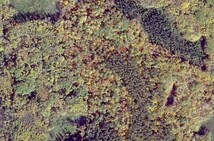
New peak fall color imagery services are now available!  

PeakColorPhoto

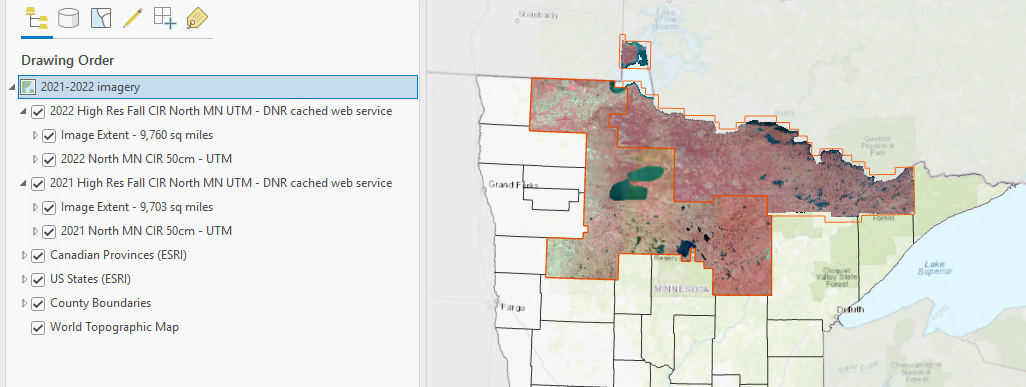
The DNR Resource Assessment Program (RA) has been busy updating image services for peak fall color photography across northern Minnesota. You can now access 2021 and 2022 color and color-infrared image services (UTM and web mercator) on the GDRS and MN Geospatial Commons. These collections include the following counties (see above map), for 2021: Lake of the Woods, Koochiching, St Louis (northern half), Lake (northern half), and for 2022: Roseau, Beltrami, Clearwater, Mahnomen, and Itasca.

In fall 2023, RA will set their sights on central Minnesota in the Mississippi River Valley.  

PeakAreas

Forest in peak fall color.

Back to top menu 


ESRI UC 2023: Digital Conference Access

This year's ESRI UC will be held in-person on July 10-14, 2023, with some conference sessions available virtually. DNR employees are eligible to access the digital conference virtually and at no charge.

There is a process to register - follow these steps:

First: Discuss the event and get approval from your supervisor to register and attend. 

Second: With supervisor consent, submit a support ticket to mnitservices.dnr@state.mn.us with "ESRI GIS User Conference" in the subject. 

Third: GIS Support team will e-mail some important directions and help get you registered.

Fourth: Enjoy the digital content in July. *See* you there!


ArcGIS Pro logo

Watch for Summer Webinar Series

The GIS Support team will be hosting a few GIS focused webinar series over the summer.

Cartography 101 (Using ArcGIS Pro)

Map Accessibility Multi-Part Webinar Series

Python Multi-Part Webinar Series

Invitations will be shared via the GIS Community Team when available.

Don't Forget: Stay "In the Know" and join the GIS Community Team for all upcoming event updates!

Back to top menu 


GISBytes

GIS Collaborative GIS Bytes

Missed the GIS Bytes on Arcade? Watch online at MN State GIS Collaborative Yammer website.

Starting in June, the GIS Collaborative will offer a two-part GIS Bytes on LiDAR data LiDAR collection and the important role we all play in data collection! 

Invitation will be shared via the GIS Community Team when available.

Don't Forget: Stay "In the Know" and join the GIS Community Team for all upcoming event updates!

Have a project you'd like to share during a GIS Bytes? Complete a GIS Bytes Submission Form.

Back to top menu 


ArcGIS Pro Tip: What is the default geodatabase?

GeodatabaseTip

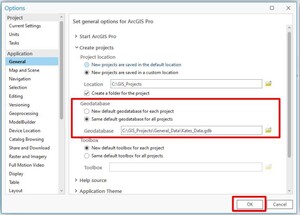
Did you know, ArcMap only has one default geodatabase, but ArcGIS Pro creates a new default geodatabase for every project!

If you like to save things in the default geodatabase and are worried you won’t find it again, never fear! You can change Pro’s geodatabase settings. In the Project Option Settings, you have the option to change the default geodatabase location for existing projects and even change the settings so new projects always point to the same default geodatabase.

This tipsheet outlines how to create a new geodatabase, change a project’s default geodatabase, and the default for all new projects.


Do you have a GIS Tip? We'd love to hear from you! Share your tips or ideas with the DNR GIS Community Team. It's a great place to share and learn! Next time you do something fun or cool in ArcGIS feel free to share with us all; we're all virtual GIS cube mates in the DNR GIS Community Team!

Back to top menu 


MN GIS LIS Logo

Minnesota GIS/LIS Consortium Update

Accepting Fall Conference Presentation Proposals

Fall Conference is October 4-6th and the Consortium is accepting Presentation abstracts. If you have a project, tip, workflow, panel discussion, anything GIS/LIS related please submit your abstract today! As a reminder, one presenter per accepted submission will receive discounted conference admission.

Back to top menu 


MN GIS Community

Join the Conversation

Add yourself to the DNR GIS Community Microsoft Team today. It has been designed for any DNR employee using or interested in GIS technology. Anyone can be as active or passive in the Team as they desire. 

The Community is an interactive environment for members to ask GIS related questions and collaboratively share ideas. Join to Be Informed, Get Answers to Questions, or Get Feedback on Ideas.

Join team with code

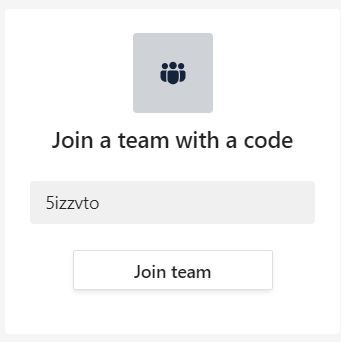
DNR employees can add themselves to the DNR GIS Community with the Team code 5izzvto.

In Teams, click on the Join or create a team button at the bottom of your list of Teams.

Type in the code 5izzvto and click Join team.

The DNR GIS Community Team is an additional communication tool to enhance (not replace) the purpose of this DNR GIS Newsletter or the GIS Section Intranet pages

Want to know more? Check out the Team's Frequently Asked Questions.

Back to top menu 


Back to top menu 

MNIT DNR GIS Section

Kate Carlson - Region 4 Support

Catherine Hansen - Interim Section Supervisor | Region 3 Support 

Jeremy Moore - GIS Architect | Operations Team Lead

Kim Nelson- Region 2 Support

Chris Pouliot - Application Development

Katie Rossman - Region 1 Support

Zeb Thomas - Database Coordination, GDRS

Mike Tronrud - ArcGIS Portal Administrator, Imagery, Basemaps