DNR GIS News March 2023

Having trouble viewing this email? View it as a Web page.

minnesota department of natural resources

DNR GIS News

March 22, 2023


In this newsletter


Hal Watson

GIS Section Update

Congratulations to Hal Watson! He accepted the MNIT DNR Deputy Chief Business Technology Office position this month. 

We look forward to supporting Hal as he and the leadership team implement the department’s IT strategic plan for Building a Digital DNR. Join us to congratulate Hal for taking on this leadership role; we are in good hands with his continued leadership. We're excited to have a GIS friend as the Deputy CBTO! 

In the short-term Hal will continue to supervise the GIS Section as we work to backfill the GIS Supervisor position.  Catherine Hansen and Jeremy Moore remain leads for GIS Support and Operations respectively.


GIS layers from Quick Layers menu

GIS Data Update: Forestry Data Updated in Quick Layers

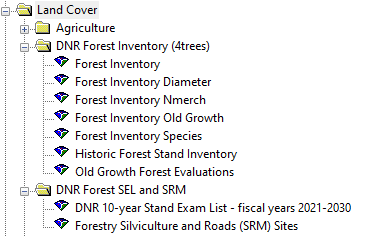
We’d like to make you aware of several changes to the DNR Forest Inventory folders on Quick Layers.

The folder called DNR Forest Inventory (4trees) is the place to find current stand inventory data, historic inventory data, and old growth data.

The folder that was previously called DNR Forest Stand Inventory (FIM and SRM) has been renamed to DNR Forest SEL and SRM and has been significantly condensed to only include layers relevant to SEL and SRM.

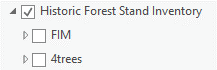
Historic Forest Stand Inventory group layers

The Historic Forest Stand Inventory layer was moved into the DNR Forest Inventory (4trees) folder and updated to include both the old Forest Inventory (FIM) data plus 4Trees inventory data. Snapshots of the 4Trees inventory data will be taken twice per year and added to the layer. 

Here are some updates to be aware of if you use forestry data in your projects:

  • The layer that was called Forest Stand Inventory – Statewide was incorporated into the Historic Forest Stand Inventory layer (it’s the June 2022 FIM layer)
  • The individual area Forest Stand Inventory layers were removed since they are represented within the Historic Forest Stand Inventory layer
  • The layer that was called Forest Stand Inventory – Old Growth has been replaced by the layer called Forest Inventory Old Growth in the DNR Forest Inventory (4trees) folder
  • The Old Growth Forest Evaluations layer was moved to the DNR Forest Inventory (4trees) folder so that the Old Growth layers are housed together
  • The DNR 10-year Stand Exam List and Forestry Silviculture and Roads (SRM) Sites layers will remain in this folder; the Sites layer has outdated data and is currently being reevaluated

Back to top menu 


ArcGIS Pro logo

Last Call for Spring 2023 GIS Training

We've added a few more classes in April and May to meet the demand and interest. These are the last classes this spring. We will hold classes again in the Fall. Visit the GIS Section Intranet Resources to review our current course offerings and registration directions. 

Please review the course prerequisites and descriptions here

Migrating from ArcMap to ArcGIS Pro - 1 Day, $100

  • April 11, 2023
  • May 5, 2023

Introduction to ArcGIS Pro - 2 Days, $200

  • April 6th and 7th, 2023
  • May 9th and 10th, 2023

Editing Workflows in ArcGIS Pro - 1 Day, $100

  • April 21, 2023
  • May 23, 2023

Students can log into Self-Service portal, go to Learning Management and search for key word "ArcGIS" to see available courses and if there are seats available.

Seats are limited and registration is first come, first served by approval.  Enrollment is pending until supervisor approval is made and a purchase order is established. Visit the GIS Section Intranet Resources for registration directions.

Questions? Please send an email to Catherine Hansen.

Back to top menu 


MN DNR Toolbox tools

ArcGIS Pro Tip: More tools added to MN DNR Toolbox for ArcGIS Pro

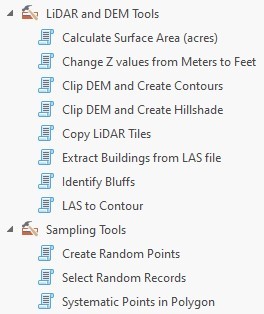
The LiDAR and DEM Tools and the Sampling Tools have been migrating to the MNDNR Tools Pro toolbox.

If you're curious about what these tools do, or all of the other available tools, browse the updated documentation for MNDNR Tools Pro

 When you install ArcGIS Pro 3.0.3 from software center, the toolbox is automatically added as a favorite to your ArcGIS Pro Catalog pane.

Missing the mndnr_tools_pro.tbx in your favorites?

You may have installed Pro without being connected to a GDRS.  The MNDNR Tools Pro toolbox is stored on the GDRS. Verify a connection to a networked GDRS and then run the repair option for ArcGIS Pro application using software center.

You can also manually add the mndnr_tools_pro.tbx toolbox. Please refer to this tip sheet for additional details around Toolboxes in ArcGIS Pro.


BLM PLSS Search

GIS Tool TIP

Here is a handy resource for anyone looking for quick public land survey information. The Bureau of Land Management's (BLM) PLSS Map Viewer is a web application to search and interactively get the PLSS description for a location.

PLSS Map View

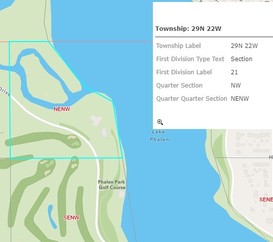
The default view shows township, range, and section. Zoom in to make the quarter-section data appear. With quarter sections visible, clicking the quarter section will return detailed information for that location.

You can change the basemap, use the measure tool, share the view as a link, or print the view as a PDF or image.

Thanks for the tip Molly Lou Pintok (PAT Assistant Area Supervisor- Sauk Rapids)


Do you have a GIS Tip? We'd love to hear from you! Share your tips or ideas with the DNR GIS Community Team. It's a great place to share and learn! Next time you do something fun or cool in ArcGIS feel free to share with us all; we're all virtual GIS cube mates in the DNR GIS Community Team!

Back to top menu 


MN GIS LIS Logo

Minnesota GIS/LIS Consortium Update

  • Save the Date May 11 2023 Plans are set in motion to offer the 2023 MN GIS/LIS Spring Workshops which will be held on May 11 at the University of MN. Check online for more details. 
  • Mentorship Program Survey We’ve revamped our mentorship survey. We’ve streamlined the signup process and added additional mentoring categories for mock and informational interviews. You can view the new survey and signup here. For more information about the mentorship program, please see our Professional Development pageNOTE: Mentors who have already signed up should fill out this new form to express their interest in newly added mentorship activities.
people
  • The GIS/LIS Consortium's Professional Development Committee is seeking members to help shape the events and programs we use to help grow our members. Especially needed are representatives from both Greater Minnesota and the Twin Cities to support planning of Consortium-hosted networking events. Other activities that committee members get to take part in include the Mentorship Program, Member Spotlight Series, and the Member Showcase. But we’re hoping for even more in 2023—with the new year underway, the path is open for direction and we want you to help us form it!
  • The committee meets once a month for one hour and commitment is flexible based on your availability. Interested? Contact the Professional Development Committee via email at profdev@mngislis.org.

Compass Icon

2023 Virtual User Group Meetings for GIS users

Join a User Group Meeting to hear from fellow colleagues and to share the GIS work we do. All are scheduled to be virtual meetings.

Click on the user group name below to access and add the series .ics file to your calendar.  

GIS User Group Meetings for ALL GIS users or anyone interested in GIS at MNDNR

4th Tuesday Quarterly, from 1pm-2pm

April 25, July 25, Oct 24

ArcGIS Pro User's Group Meetings for anyone interested in ArcGIS Pro

4th Friday Quarterly, from 1pm-2pm

May 26, Aug 25, November 17th (3rd Friday)

Python User Group Meetings for anyone interested in using Python

2nd Thursday Quarterly, from 1pm-2pm

June 8, Sept 14, Dec 14

Agendas and past meetings are available online. Please visit our web site today!

Back to top menu 


MN GIS Community

Join the Conversation

Add yourself to the DNR GIS Community Microsoft Team today. It has been designed for any DNR employee using or interested in GIS technology. Anyone can be as active or passive in the Team as they desire. 

The Community is an interactive environment for members to ask GIS related questions and collaboratively share ideas. Join to Be Informed, Get Answers to Questions, or Get Feedback on Ideas.

Join team with code

DNR employees can add themselves to the DNR GIS Community with the Team code 5izzvto.

In Teams, click on the Join or create a team button at the bottom of your list of Teams.

Type in the code 5izzvto and click Join team.

The DNR GIS Community Team is an additional communication tool to enhance (not replace) the purpose of this DNR GIS Newsletter or the GIS Section Intranet pages

Want to know more? Check out the Team's Frequently Asked Questions.


As always, please submit a ticket to DNR IT Services for any GIS performance issues you'd like help with. Just include "GIS" in the subject line.

Back to top menu 

MNIT DNR GIS Section

Hal Watson - Section Manager | MNIT DNR Deputy CBTO

Katie Rossman - Region 1 Support

Kim Nelson- Region 2 Support

Catherine Hansen - Region 3 Support | Support Team Lead

Kate Carlson - Region 4 Support

Jeremy Moore - Application Development | Operations Team Lead

Chris Pouliot - Application Development

Zeb Thomas - Database Coordination, GDRS

Mike Tronrud - ArcGIS Portal, Imagery, Basemaps