|
February 28, 2023
LRS in 2022
A look at LRS transaction data from 2022 reveals that a great deal of work was performed in LRS last year.
- More than 1,800 transactions were completed.
- Of these transactions, the DNR was the:
- Granting party in 76% of transactions
- Receiving party in 14% of transactions
- The remaining are administrative transactions with no parties listed.
- The top five transaction types completed most frequently in 2022 accounted for more than half of all transactions. These transaction types were:
- Grant Utility License - Water (22% of transactions)
- Renew Real Estate Lease (10% of transactions)
- Renew Division Lease Agreement (9% of transactions)
- Process Division Lease Revenue (7% of transactions)
- Grant Utility License - Land (5% of transactions)
- Some transactions list an administrating division. In 2022, those divisions were:
- Fish and Wildlife (50% of transactions)
- Forestry (37% of transactions)
- Parks and Trails (8% of transactions)
- Ecological and Water Resources (4% of transactions)
- Lands and Minerals (1% of transactions)
|
Question 1: What are some best practices for selecting a party for a transaction?
- When searching the system for the person or entity you want to select:
For detailed instructions on selecting parties for a transaction, see one of the tutorials:
Question 2: How do I know where I am within a workflow?
There are a couple different ways to view a workflow diagram:
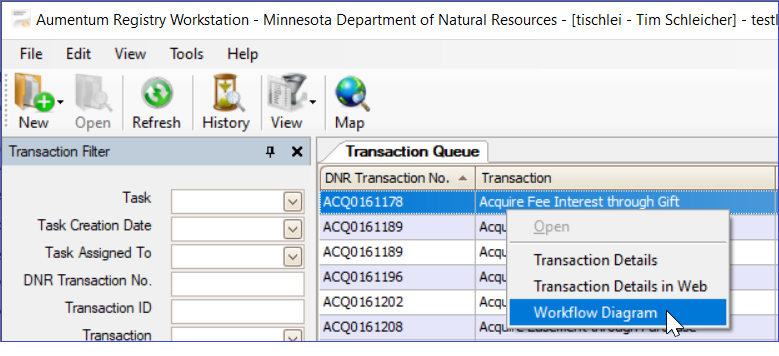
From your Transaction Queue in Workstation:
- Right-click on a transaction in your queue and select Workflow Diagram.
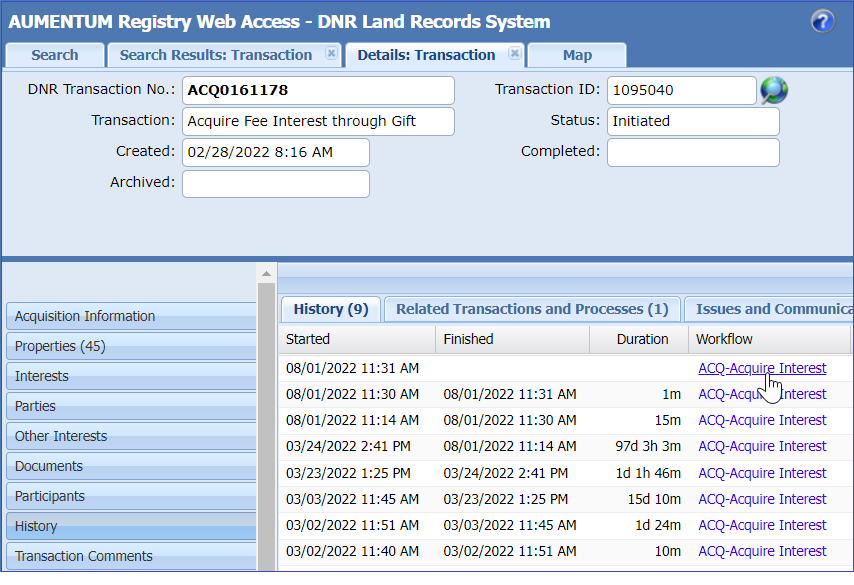
 From the Transaction History in Web Access:
- Search for a transaction, and select it to open a Details: Transaction tab.
- Click on the History tab on the left side of the screen.
- Click on a blue link in the Workflow column.
 To better understand how to read a Workflow Diagram, view the video tutorial: How to Read a Workflow Diagram.
Question 3: For real estate leases, what should I select for the Contract Administrator?
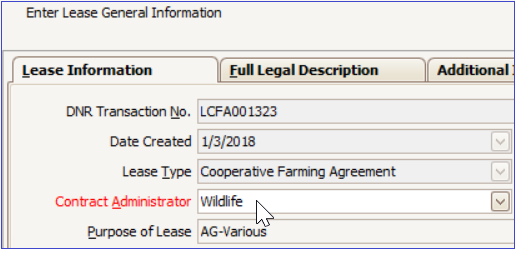
When you start a real estate lease, such as a cooperative farming agreement, grazing agreement, or miscellaneous lease, LRS requires you to select a Contract Administrator.
It is important to select an administrator that reflects the division initiating and administering the lease or agreement, for example, Wildlife or Forestry.
These training materials available on the LRS SharePoint site were recently created or updated.
LRS Tutorial - Moving a Transaction into and out of Abeyance This new tutorial describes how you can temporarily suspend or permanently cancel an LRS transaction when one or both parties decide not to pursue the conveyance.
LRS Tutorial - Perform Management Unit Designation This new tutorial explains what information division coordinators should enter during the Perform Management Unit Designation stage in an acquisition transaction, or during the Finalize Exchange Transaction stage in an exchange transaction.
LRS Tutorial - Regional Resource Reviews This tutorial is updated with best practices for requesting and completing resource reviews in LRS.
LRS Tutorial - Adding a Project to the Project List This tutorial, for division coordinators, describes how to add a project to the project list, and is updated with information about editing an existing project on the project list.
LRS Tutorial - Splitting Properties for Sales and Exchanges This tutorial is updated with best practices for preparing only a portion of a parcel for a sale or exchange.
LRS Tutorial - Selecting Parties for Inbound Conveyances and LRS Tutorial - Selecting Parties for Outbound Conveyances These two tutorials are updated with best practices for finding and selecting parties to include in transactions.
Find help while working within LRS
Send an email to LRS Support and include LRS in the Subject line. Your request is entered into our issue tracking/management software and assigned to the first available MNIT Services staff member.
Emailing LRS Support is the quickest way to reach us for assistance. Please do not email individual MNIT Services staff or CC individual MNIT Services staff when submitting a support request.
LRS SharePoint Site
The LRS SharePoint site contains many resources for learning more about using LRS, including an FAQ section, video tutorials, and much more. If you have specific questions that are not answered in the SharePoint site or would like to request a walk-through of a specific part of LRS, feel free to send an email to LRS Support, and someone will contact you.
LRS Online Drop-In
Keep up with recent changes made to LRS and ask questions of the LRS Support Team. Connect with us via Teams during a scheduled Online Drop-In session. We will send out invites for upcoming sessions.
Usability Suggestions
Do you have a suggestion for improving LRS? Please let us know. We can't guarantee that your suggestion will be implemented, but we would consider how your suggestion fits within other planned improvements to LRS. Send Suggestions to LRS Support.
Past issues of LRS Insider can be found on the LRS SharePoint site.
|