|
August 23 , 2022
In this newsletter

ArcGIS Desktop 10.8.2 Available in Software Center
All ArcMap users across the department who wish to continue using ArcMap will need to update to ArcGIS Desktop 10.8.2 (ArcMap) and have any older versions of ArcMap removed from computers.
ArcGIS Desktop 10.8x is the last version of ArcMap that ESRI will release. Esri will retire its support for ArcMap on March 1, 2026. Although there may be minor patches (10.8.2 is available now), ESRI has no plans for another major release.
This update is now available in Software Center! ArcMap users will see this in the Applications list (it is not listed in Updates). You will need to be connected to the network (or use VPN if working from home) for up to an hour in order for software center to refresh.
This ArcGIS Desktop 10.8.2 installation will default to a basic ArcMap license level. Although advanced licenses and extensions are available by request, the GIS Section recommends that users who need advanced features migrate to ArcGIS Pro.
Please contact GIS Support if you have concerns about updating to 10.8x on your computer; there are a few known exceptions.
|

Esri StoryMaps have usability, accessibility, and mobile device compatibility challenges. Due to these challenges, the Office of Communications and Outreach in consultation with division Web Liaisons and the MNIT@DNR Web Team will no longer allow the publishing of Esri StoryMaps to the DNR website.
However, Esri users are still able to publish embedded interactive web maps to webpages on the DNR website. Using the current content management system (Drupal), the web team can create a webpage that has similar functionality to StoryMaps. Contact your division web liaison or GIS Support team to learn about the process to have a web map approved for publication on the DNR website.
|
Back to top menu
GIS Tool Tip: Minnesota DNR Travel Time Tool Updated!
The MN DNR, MNIT@DNR and BWSR are taking this opportunity to announce an updated version of the MN DNR Travel Time Tool.
The Travel Time Tool was created by the MN DNR to use GIS analysis for calculation of hydraulic travel time from gridded digital surfaces and develop a downstream travel time raster for each cell in a watershed. The analysis uses watershed characteristics such as land-use, geology, channel shape, surface roughness, and topography to estimate time of travel for water. The tool calculates the elapsed time for a simulated drop of water to migrate from its source along a hydraulic path across different surfaces of the digitally modeled watershed landscape, ultimately reaching the watershed outlet. The Travel Time Tool creates a raster GIS output where each cell is a measure of the length of time (in seconds) that it takes water to flow across it, and then accumulates the time (in hours) from the cell’s location to the outlet of the watershed.
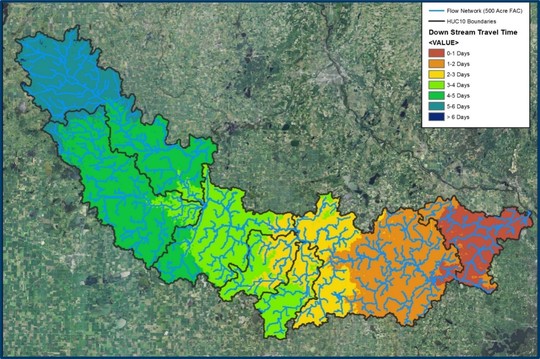 Watershed studies use this information to understand watershed responses to simulated precipitation events and land use changes. Engineers, GIS specialists, and hydrologists throughout Minnesota use various travel time results in their hydrology and hydraulic (H&H) analysis and design projects. For example:
- Watershed planning tools such as the Prioritize, Target, and Measure Application (PTMApp) require input of accurate upstream and downstream Travel Time (Tt) grids for modeling water-transport of total nitrogen (TN), sediment, and total phosphorus (TP) throughout a watershed, ultimately reaching the watershed outlet. Additionally, this water routing, transport, and rate is used to prioritize resources suitable for implementation of best management practices (BMP) supporting field-scale conservation measures on the landscape.
- Climate adaptation studies conduct culvert size assessments for watershed and channel response to modern high-intensity precipitation events.
This tool has undergone several computer-language changes over the years. The most recent version is designed to work with high resolution Digital Elevation Models (DEM) and improved efficiencies with ESRI ArcMap and ArcGIS Pro.

The MN DNR Travel Time tool is available from the Minnesota Geospatial Commons and the DNR GDRS. You can access the MN DNR Travel Time Tool at this resource on the Commons - https://gisdata.mn.gov/dataset/dnr-travel-time-tool . Documentation concerning the methodologies of the tool and detailed instructions to run the tool are packaged with the download of the tool. Any questions pertaining to the Travel Time Tool can be directed to Rick Moore.
Funding for the update of the Travel Time Tool was provided through the Minnesota Clean Water Fund through BWSR and DNR. More information about the Clean Water Fund is available here.
|
Back to top menu

GIS Tip: Dynamic Range Adjustment
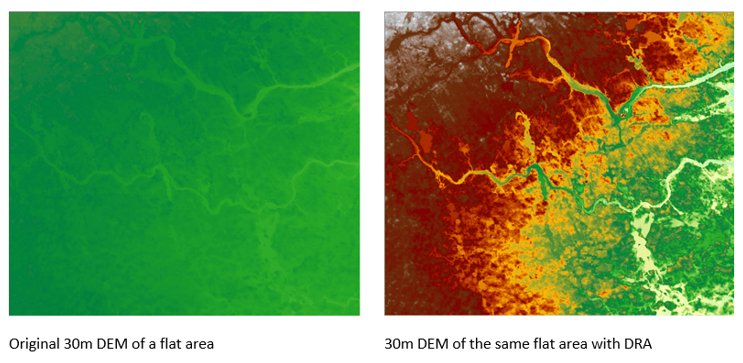
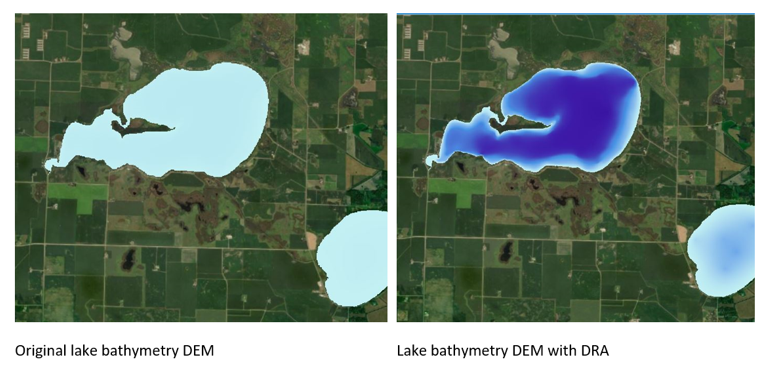
Have you ever looked at a flat area on a DEM and wished you could see what was happening because it was all one color? What if your raster color ramp adjusted as you moved around your map? What you are looking for is Dynamic Range Adjustment (DRA). This visualization tool stretches the color ramp to the pixel values in your current extent instead of the values for the entire raster. What this means is that in an area with little variation, DRA will apply the entire color ramp so that subtle features are easier to distinguish.
Click to learn how to use this setting in ArcMap or set the DRA property in ArcGIS Pro.
|
Do you have a GIS Tip? We'd love to hear from you! Share your tips or ideas with the DNR GIS Community Team. It's a great place to share and learn! Next time you do something fun or cool in ArcGIS feel free to share with us all; we're all virtual GIS cube mates in the DNR GIS Community Team!
Back to top menu

ESRI Academy ArcGIS Pro Training Resources Available
DNR employees have access to FREE learning using the ESRI Learning Academy.
Explore these Editing in ArcGIS Pro Resources:
ArcGIS Pro Editing Essentials Is a 1-hour ESRI Training Seminar covering essential concepts such as using snapping, editing guides, and constraints to improve drawing efficiency. Configure and use feature templates and modify feature attributes and geometry (recorded in December 2017).
Editing Basics in ArcGIS Pro Is a 2-hour ESRI Web Course teaching editing basics and how to use workflows. Create new features and attributes and use tools to modify existing features and attributes.
Don't forget about these ArcGIS Pro Training Resources:
Get Started with ArcGIS Pro This is a 30 minute tutorial showing you how to add data to a new project, perform some analysis and create a map.
Migrating to ArcGIS Pro from ArcMap In this 1 hour seminar, the presenters introduce key ArcGIS Pro terminology and components, demonstrate how to migrate maps and other items to ArcGIS Pro, and share additional resources that will help ArcMap users smoothly transition GIS workflows to ArcGIS Pro.
ArcGIS Pro Terminology Guide is a 6 page document that helps ArcMap users understand the terms used in the ArcGIS Pro interface. Download a copy for your reference!
Having trouble accessing these courses? Please submit a ticket to DNR IT Services. Just include "ESRI Academy" in the subject line.
|
Back to top menu

GIS Bytes Webinar: GIS at MN DOT's RTMC
Thursday, August 25, noon - 1:00
Join this State GIS Collaborative's Webinar for an overview of the Regional Transportation Management Center (RMTC) and its evolution of GIS datasets. The presentation will include a high-level description of how these datasets are used daily by RTMC's design, operations, construction, maintenance, and IT staff to quickly detect, respond to and remove incidents off of Minnesota's freeways.
Presented by Adam Julson, a MNIT employee embedded in the RTMC group at the Minnesota Department of Transportation, has helped support GIS and IT systems at the RTMC for 10+ years.
Download the meeting invitation
Questions? Contact Bob Diedrich
|
Back to top menu

Minnesota GIS/LIS - Annual Conference
The 32nd Annual Conference and Workshops of the Minnesota GIS/LIS Consortium will be held October 12-14, 2022 at the Sanford Center in Bemidji, Minnesota. Workshops will be held Wednesday, October 12, with the conference following on Thursday and Friday. For more information and registration information visit: Minnesota GIS/LIS Consortium Annual Conference.
|
Back to top menu

2022 Virtual User Group Meetings for GIS users
Join a User Group Meeting to hear from fellow colleagues and to share the GIS work we do. All are scheduled to be virtual meetings.
Click on the user group name below to access and add the series .ics file to your calendar.
Python User Group Meetings for anyone interested in using Python
2nd Thursday Quarterly, from 1pm-2pm
[September 8] [December 8]
ArcGIS Pro User's Group Meetings for anyone interested in ArcGIS Pro
4th Friday Quarterly, from 1pm-2pm
[October 28]
GIS User Group Meetings for ALL GIS users or anyone interested in GIS at MNDNR
4th Tuesday Quarterly, from 1pm-2pm
[November 22]
Agendas and past meetings are available online. Please visit our web site today!
|
Back to top menu

Join the Conversation!
Add yourself to the DNR GIS Community Microsoft Team today! It has been designed for any DNR employee using or interested in GIS technology. Anyone can be as active or passive in the Team as they desire.
The Community is an interactive environment for members to ask GIS related questions and collaboratively share ideas. Join to Be Informed, Get Answers to Questions, or Get Feedback on Ideas!
|

DNR employees can add themselves to the DNR GIS Community with the Team code 5izzvto.
In Teams, click on the Join or create a team button at the bottom of your list of Teams.
Type in the code 5izzvto and click Join team.
The DNR GIS Community Team is an additional communication tool to enhance (not replace) the purpose of this DNR GIS Newsletter or the GIS Section Intranet pages.
Want to know more? Check out the Team's Frequently Asked Questions.
|
Back to top menu
As always, please submit a ticket to DNR IT Services for any GIS performance issues you'd like help with. Just include "GIS" in the subject line.
|