|
July 19, 2022
Hello DNR Employees!
Here's what's new:
Upcoming Courses and Learning Events
Scroll down for additional details regarding any of these learning requirements and opportunities:
-
Reminder - All employees must complete New Policy Acknowledgements in ELM by July 31
-
Safe Use of the Buckthorn Blaster - New eLearning course
-
DNR New Employee Orientation - Required for all new DNR employees
-
Training, Tools and Resources for the New World of Work - New eLearning course
- Learning Management System Tip of the Month
-
Learning Pathways by MNIT - New courses & dates
Most courses are optional, but some courses may be required of some employees. Please read carefully, and discuss with your supervisor to determine if the courses are required of, or right for you. If there is a cost to attend, you must ensure all necessary funding actions are in place before attending any course.

1. Reminder - Completion of New Policy Acknowledgements required by July 31
As announced earlier, Minnesota Management and Budget has updated three key policies to help state agency employees comply with Minnesota's high standard of honesty, integrity, and ethical behavior.
Each policy includes a required policy acknowledgement available in the Enterprise Learning Management System found within Self Service. Employees should follow the instructions for completing these Policy Acknowledgements, found on the DNR Learning and Development Intranet site.
As part of the Code of Ethical Conduct Policy Acknowledgement, employees may be asked to complete a Conflict of Interest Disclosure form. If asked, send the completed form to the DNR Ethics Officer Colleen Schmitz at colleen.schmitz@state.mn.us, who will follow up with you to discuss.
If you have questions related to being able to complete the policy acknowledgements in ELM, contact dnrelmsupport@state.mn.us. If you have questions regarding the policies themselves, or have a potential conflict of interest, contact colleen.schmitz@state.mn.us.
|

2. Safe Use of the Buckthorn Blaster
Type of Course: Online eLearning
Course Code: R29DNRFORBBLAST
Who should take this: All DNR employees who spend time in the field and want to use the Buckthorn Blaster in their regular work. Anyone who wants to use the Buckthorn Blaster tool to apply pesticides who does not have a non-commercial pesticide license from MDA. (Those with MDA licenses are highly encouraged to take the course too!)
Cost: Free
Course Description: This training is for DNR employees and volunteers using Buckthorn Blasters to control buckthorn and other woody invasive plants in the course of their normal work. The Buckthorn Blaster is a small, handheld tool that allows users to safely and precisely apply small amounts of herbicide to cut stems of buckthorn and other woody invasive plants.
In this training we will:
- Go over laws and DNR policies related to pesticide use,
- Review the contents of a pesticide label for a product commonly used in the Buckthorn Blasters, as well as examine other safety requirements,
- And finally, demonstrate the safe and effective use of the Buckthorn Blaster tool.
Length of Course: 30 minutes
How to Complete: Enroll in ELM*
Sponsored by: Division of Forestry (FOR)
Contact: Sascha Lodge at Sascha.Lodge@state.mn.us
More Information: This course was recently updated from its original version. It is now more concise, up-to-date, and interactive. Anyone who has completed the previous version of this training is highly encouraged to take the new and improved training. When you complete the new training, your participation will be tracked so that it will be easier for you to receive Buckthorn Blaster tools and other supplies.
|

3. New DNR Employee Orientation
Type of Course: Blended, including online eLearning and a live webinar via Webex.
Who should take this: Required of all new DNR employees who have not yet completed this orientation. We strongly encourage new employees complete New Employee Orientation within the first 30 days of employment if possible. Some of the information presented would be more valuable sooner rather than later.
Cost: None
Course Description: New Employee Orientation (NEO) is is designed to provide an introduction to the DNR – its mission and goals, structures, procedures and policies, Culture of Respect, safety, and ethics. NEO includes both a pre-work eLearning assignment that should be completed first, followed by two half-day live Webex webinar sessions.
How to Complete:
1. Prerequisite: Enroll in "DNR Policies and Procedures for All Employees" (ELM eLearning Course: R29DNRHROPOLPROC). Note: You must enroll in this course before you can enroll in New Employee Orientation.
2. Live Webinar via Webex: Enroll in ELM* for choice of live webinar sessions listed below:
August NEO - (Deadline for enrollment is July 21)
Class Code: R29DNRHRONEOVC-080222
- Tuesday, August 2, from 8:30 a.m. to 12:30 p.m.
- Wednesday, August 3, from 8:30 a.m. to 12:30 p.m.
September NEO - (Deadline for enrollment is September 9)
Class Code: R29DNRHRONEOVC-092022
- Tuesday, September 20, from 8:30 a.m. to 12:30 p.m.
- Wednesday, September 21, from 8:30 a.m. to 12:30 p.m.
Sponsored by: Operation Services Division (OSD), Human Resources Office
Contact: Any questions or need more information, contact Michelle Barringer at Michelle.Barringer@state.mn.us
More Information: To request a reasonable accommodation for this course, email dnrlearning.dnr@state.mn.us.
|

4. Training, Tools and Resources for the New World of Work
All employees can benefit from training to help make the transition to our new world of work as smooth as possible. Our Learning and Development team has developed a new eLearning course now available in ELM.
Course Title: How to Facilitate Hybrid Meetings
Course Code: R29DNRHROFHM
Course Description: This training will share how to effectively plan and host a hybrid meeting that is meaningful for all participants, regardless of physical location.
Length of course: 15 minutes
In addition, on our new Learning and Development Training, Tools, and Resources for the New World of Work webpage, you will find a collection of resources that have been selected by the Learning and Development team, sorted by relevant topic area.
These resources have been selected because they may provide some good information and ideas. Not every example may be applicable to state government service or your situation; use your best judgement when implementing these resources.
|
5. Learning Management System Tip of the Month
How to Add Supplemental Learning
Supplemental learning is training that you have completed outside of Learning Management or job-related training outside of the DNR. Supplemental Learning is approved by your manager or supervisor before it shows in your learning history. To add Supplemental Learning, log into Self-Service and select the Learning Management Tile, then the My Learning Tile, and finally Supplemental Learning from the sidebar:
|
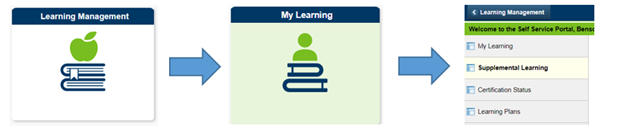 Enter the class information in the Supplemental Learning Details and save. When the learning has been approved, it will be listed in your My Learning History.
6. Learning Pathways by MNIT
Minnesota IT Services (MNIT) offers numerous online resources, general tips, a Training Events & Meetings calendar and more. In fact, MNIT offers trainings for all Microsoft 365 products including how to get started with Teams, OneDrive, SharePoint, Softphones, and Streams.
Find out about upcoming MNIT training, office hours and meetups by visiting the Learning Pathways website.
Upcoming Training Events:
Teams Meeting Collaboration: Whiteboard & Polls
Thursday, July 21, 2022
11:00 AM – 12:00 PM
Get Organized with OneNote
Thursday, August 4, 2022
10:00 AM – 11:00 AM
Teams Calling (Softphone)
Monday, August 8, 2022
1:00 PM – 2:00 PM
|
Have Training You Want Added in the Next Issue?
For learning events and training opportunities that cross divisions and employee groups, simply complete the Microsoft Office Learning & Development Newsletter Submission Form.
If you have any questions about this L&D Training newsletter, email DNRLearning.DNR@state.mn.us.
For inclusion in the next communication, please submit no later than August 5, 2022.
Please discuss with your supervisor prior to signing up for or completing training.
Some courses may be required of some or all employees, others may be optional. Please read course details carefully, and discuss with your supervisor to determine if the courses are right for you prior to enrolling in or completing them.
Also, for any training that involves a fee, each employee must ensure all necessary funding actions are in place before attending. If you have questions, please talk with your supervisor.
|