|
August 18, 2022
Welcome, Jim Olson
We are excited to share that a new member recently joined our Lands and Minerals MNIT team!
Jim Olson recently joined our team as the GIS Data Steward and App Developer.
Jim brings a great deal of skill and experience in working with GIS data and in developing map-based tools and applications for a variety of use cases and stakeholder groups over his 20+ year career.
|

In addition, he has spent the past 4 years developing expertise in DNR and Lands and Minerals data domains and with the DNR’s GIS application platform and infrastructure. Jim is excited for the opportunity to join our team and further advance these skills, while continuing to support DNR and LAM teams and projects.
Welcome to the team, Jim!
|
Aumentum Registry Workstation 4.3.54
The most recent round of enhancements to LRS was released on May 12. The most notable enhancements in this version include:
- A new workflow, Acquire Construction Lease, is now available, allowing Division Regional Staff to process contracts where the DNR is leasing property from a private party for construction purposes. The tutorial, Acquire Construction Lease, describes the new workflow in detail.
- New system behavior for Funding Reviews: When multiple funding reviews are started for a single parent transaction, LRS now requires an Initial Response in EACH open funding review before allowing the parent transaction to move forward.
For a complete list of enhancements, visit the System Enhancements page of the LRS SharePoint site.
Tip 1: Can I add a comment to a transaction that is completed or in someone else's queue?
Yes. The transaction called Manage Transaction Documents is designed to allow you to attach documents to transactions that are completed, or that are in-process but in someone else's queue. However, this transaction can also be used to add a comment to a transaction.
To start a Manage Transaction Documents transaction in LRS, click New > Common Activities > Manage Transaction Documents.
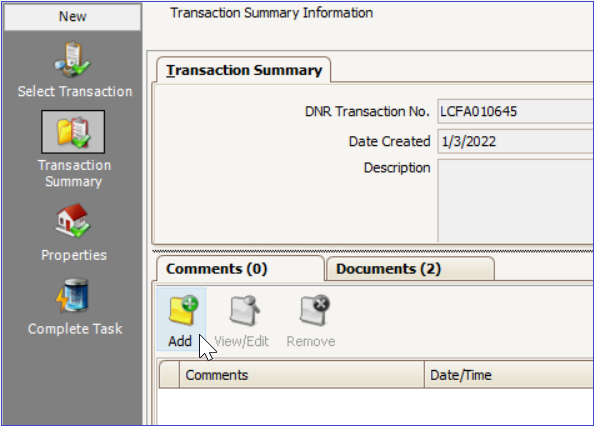
Comments can be added on either the Transaction Summary or Complete Task screens by clicking on the Add button.
Once you have added your comment, be sure to click Next to reach the Complete Task screen, and then click Finish.
|
For detailed instructions on using the Manage Transaction Documents transaction, see the tutorial: Attaching Documents to Transactions NOT in Your Queue.
Tip 2: Can I add contact information to a party without changing the party name?
Yes. One or both of the Parties associated with an LRS transaction are often set to automatically appear as "MN Department of Natural Resources", and this party name should not be edited.
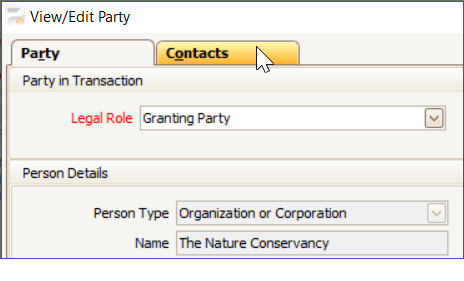
However, you can add contact or reference information for a DNR party or any other party by using the Contacts tab.
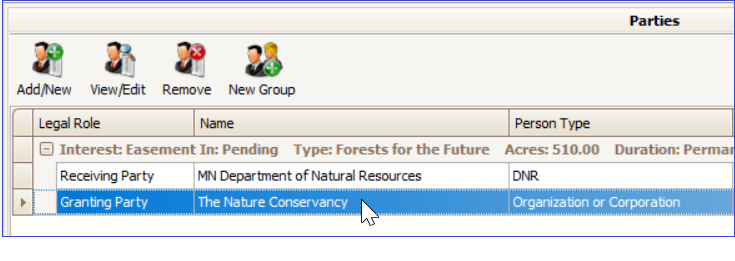
To begin, on the Parties screen, double-click on the Party to which you want to add a contact.
Tip 3: What if a transaction was started in LRS, but one of the involved parties decides to no longer pursue the transaction?
Most LRS workflows contain opportunities to temporarily suspend work on a system transaction, or in other words, put the transaction into "abeyance." Looking at a workflow diagram, the red arrows indicate where these opportunities exist.
In the example of the Cooperative Farming Agreement (CFA) workflow diagram below, if one of the involved parties decides to no longer pursue the conveyance, the Division Regional Manager could move the transaction to the Communicate Abeyance stage.
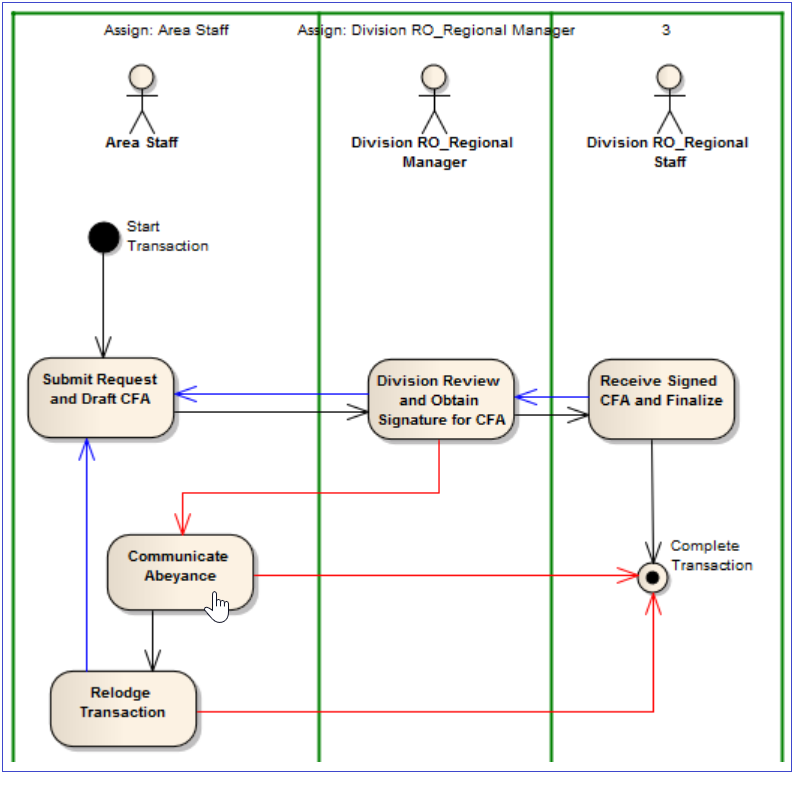
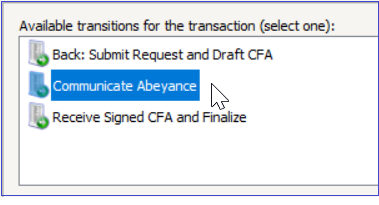
If, at some later date, the parties involved agree to move forward with the conveyance, someone in the Area Staff role could relodge the transaction and then move it back to the Submit Request and Draft CFA stage, at which point they would be returned to the beginning of the workflow. However, the information that was entered previously is saved.
If a transaction has been moved to abeyance and you are certain that the conveyance will never go forward, then you should select Complete Transaction. This will permanently end the transaction, assign it a status of Rejected, and prevent it from ever being re-started.
For detailed instructions on the abeyance process in LRS, please see the tutorial: Moving a Transaction into and out of Abeyance
|
This section alerts you to training materials that were recently created or updated and are now available on the LRS SharePoint site.
LRS Tutorial - Acquire Construction Lease This tutorial describes the key steps for using the new workflow, Acquire Construction Lease. The workflow allows Division Regional Staff to process contracts in LRS where the DNR is leasing property from a private party for construction purposes.
LRS Tutorial - Assigning a Lease or License This tutorial, which describes how to assign an existing lease or license from one party to another, was updated with information about handling pending billings within an assignment workflow.
How to find help while working with LRS
If you need assistance or have a question while working with LRS: Send an email to LRS Support, and include LRS in the Subject line. Your request is entered into our issue tracking/management software and assigned to the first available staff knowledgeable about your LRS issue.
Emailing LRS Support is the quickest way to reach us for support. Please do not email individual MNIT Services staff or CC individual MNIT Services staff when submitting a support request.
LRS SharePoint Site
The LRS SharePoint site contains many resources for learning more about using LRS, including a Frequently Asked Questions (FAQ) section, Video Tutorials, and much more. If you have a specific question that is not answered in the SharePoint site or would like to request a walk-through of a specific part of LRS, feel free to send an email to LRS Support, and someone will contact you.
LRS Online Drop-In
Keep up with recent changes made to LRS and ask questions of the LRS Support Team. Connect with us via Teams during a scheduled Online Drop-In session. We will send out invites for upcoming sessions.
Usability Suggestions
Do you have a suggestion for how LRS could work better? Please let us know. We can't guarantee that your suggestion will be implemented, but we would look at it and see if it fits within the context of other planned improvements to LRS. Send Suggestions to LRS Support.
Past issues of LRS Insider can be found on the LRS SharePoint site.
|