Note: Please connect to the VPN to experience the OSD Newsletter content

Introducing Samantha Minkler, New Capital Asset Manager
 |
|
As OSD’s new Capital Asset Manager, Samantha “Sam” Minkler is bringing her passion for public service and the outdoors to her new role.
Sam started her public service career over a decade ago as an intern at the Dakota County Community Development Agency (CDA).
Get to know more about Sam Minkler
|
Thank You to Jarrett Purdue, Interim Capital Asset Manager
 |
|
Thank you to Jarrett Purdue for stepping up as the Interim Capital Asset Manager during the five-month search.
Currently OSD’s Design and Construction (DAC) Manager, he has worked at the DNR for over five years. Jarrett started his DNR career as the Regional Manager for Region 3 before moving to his current role in 2019.
Jarrett's experience as Interim Capital Asset Manager
|
DNR employees complete Lean Six Sigma Green Belt training
Ten employees representing the divisions of Forestry (FOR), Fish and Wildlife (FAW), Lands and Minerals (LAM), and Operations Services (OSD) recently completed Lean Six Sigma Green Belt training to improve work efficiency and solve process problems within the DNR. Lean Six Sigma is an internationally recognized, specialized training to improve business processes.
 From left to right and top to bottom row. Top row: Kari Torkelson (OSD), Scott Hillard (FOR), Linse Lahti (OSD), Laura Grunloh (OSD, teaching assistant) | Middle row: Kerry Ross (OSD), Tom Moore (St. Cloud State University, Instructor), Rebecca Oestreich (OSD) | Middle row: Mark Lindquist (OSD), Jennifer Narveson (LAM) | Bottom row: Jennifer Corcoran (FOR), Dennis Kepler (FOR), Laurinda Brown (FAW)
The most recent cohort of DNR trainees started their journey in January and attended about 40 hours of Green Belt training via Microsoft Teams. Over the course of the training, each person applied the training curriculum to a process improvement project for the DNR.
Learn about the cohort's Lean Six Sigma Green Belt projects
For more information about Green Belt training or other continuous improvement training, visit the Continuous Improvement page on the intranet.

Policy updates and acknowledgements
Minnesota Management and Budget (MMB) has updated three key policies to help state agency employees comply with Minnesota's high standard of honesty, integrity, and ethical behavior.
All state agency employees are required to complete the acknowledgments for these policies by July 31, 2022. Each policy includes a required policy acknowledgement available in the Enterprise Learning Management System (ELM) found within Self Service. Please follow the instructions for completing these Policy Acknowledgements, found on the DNR Learning and Development Intranet site.
If you are unable to check “agree” to all of the statements in the Code of Ethical Conduct Policy Acknowledgement, you may need to complete a Conflict of Interest Disclosure form. Respond to the questions in the disclosure form with as much detail as possible and send it to the DNR Ethics Officer Colleen Schmitz at colleen.schmitz@state.mn.us. The Ethics Officer will review the forms and follow up with you to discuss any direct, potential, or perceived conflicts of interest.
If you have questions related to being able to complete the policy acknowledgements in ELM, contact dnrelmsupport@state.mn.us. If you have questions regarding the policies themselves, contact colleen.schmitz@state.mn.us.

Who do I contact about…?
Office of Management and Budget Services (OMBS) Financial Management Contacts
To provide a more seamless customer service experience, OMBS is standardizing their services. Financial management contacts are listed by service function area, including accounts receivable, purchasing operations, regional services and more. For example, who should you talk to about business expense questions? The contact list includes the accounts payable staff who are available to assist you with business expense questions.
OMBS Financial Management Contacts [XLSX]
|
DNR purchasing card log improvement project
A collaborative improvement project is underway for the purchasing card (P-card) log form. The team is working on various enhancements to automate the form to be more user friendly. Currently, a statewide pilot team is testing the new log form in order to go live by August 1, 2022. Stay tuned for more communication!
New file naming conventions changes
Accounts Payable has implemented new, easier-to-use file naming conventions for documents submitted for processing. It allows staff to name their files in a more flexible way and reduces the amount of needed information.
General Guidelines:
- Always use a four-digit year (i.e., 2022) when identifying dates. Do not use two-digit years (i.e., 22).
- Enter all leading zeros in the supplier number, month and day, and/or invoice number if applicable (i.e., 0000295401 for a supplier number or 06052022 for a date of invoice receipt). If the supplier number begins with a letter, enter all zeros that follow (i.e., H550000).
- Use only underscores for field separators as indicated on the document “Submitting Documents to Accounts Payable and File Naming Conventions.”
Please send all documents to AccountsPayableOMB.dnr@state.mn.us. Put the document type in the subject line for easy sorting and work organization. Questions? Contact Toni Golden at toni.golden@state.mn.us.
MNIT DNR service desk changes
Urgent and routine service desk support is now available 24/7. MNIT DNR Service Desk staff are integrated with the MNIT Enterprise Service Desk. As a result, MNIT can handle support requests anytime. Contact the Enterprise Service Desk at 651-297-1111 or mnitservices.dnr@state.mn.us.

Reserving a pool vehicle
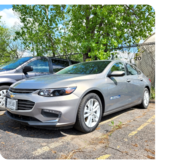
The DNR’s Fleet Program maintains pool vehicles available by reservation to employees who need to travel for their work. Before you head out in a pool vehicle, please check that you have completed Defensive Driver training within the last three years and electronically signed your Driver’s License and Vehicle Use Agreement in the Employee Self-Service.
Pool vehicles are reserved using your Outlook calendar. For step-by-step instructions, please visit the Reserving a Pool Vehicle intranet page. If you have any questions about vehicle reservation, contact your regional Fleet contact.
|
|