|
Electronic information accessibility tips, tricks and trainings. Mar 2022, Issue XXXIX
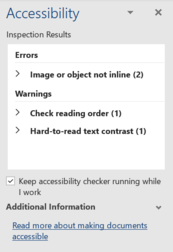
Error, warning or tip – what's in a name?
The Accessibility Checker in Word classifies each issue as an error, warning, or tip. But what do these mean? Is one more important than another?
First, the definitions:
-
Error. Content that makes the document difficult or impossible to read and understand for people with disabilities. Example: Non-text content has alt text.
-
Warning. Content that in most (but not all) cases makes the document difficult to understand for people with disabilities. Example: Sufficient color contrast between text and background.
-
Tip. Content that people with disabilities can understand but that could be presented in a different way to improve the user’s experience. Example: Document uses heading styles.
-
Intelligent Services. Content that is automatically made accessible by AI, and that you should review for accuracy and context. Example: Auto-generated alt text.
Second, the importance:
All issues should be addressed. It doesn't matter what category they fall into. One flaw may be more fatal than another, but they all contribute towards making a document difficult for someone to read and understand.
|
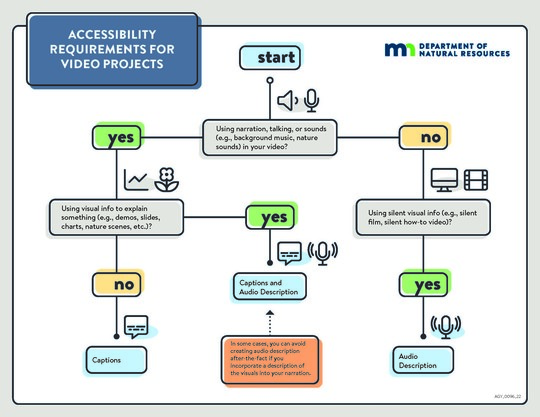 You'll find resources like this accessible video decision tree on the accessible multimedia intranet page.
New accessible multimedia guidance
The accessible video intranet page got a makeover and is now the accessible multimedia page. It's expanded to cover:
- Audio description
- Captions
- CART
- Social media
- Transcripts
- Video
You'll find information on what the accessibility requirements are for your multimedia projects. Additionally, there is guidance on how to incorporate the requirements into your project, whether you are doing it yourself or contracting out for a professional.
 |
|
Accessible Word ELM course completion issue
The ELM course Accessible Word Document Training is currently not marking the course as complete after staff finish a module. If you complete the course, but ELM doesn't mark you as having completed the course, please contact Rebecca Oestreich.
|
Accessibility resources
Electronic Information Accessibility Intranet Page
Go-to location for resources, guidance and information.
Designees
Need assistance? Contact your division electronic information accessibility designee.
|