DNR GIS News December 2021

Having trouble viewing this email? View it as a Web page.

minnesota department of natural resources

DNR GIS News

December 17, 2021


In this newsletter


full calendar

December GIS User Group Cancelled

The December 28th User Group meeting is cancelled. Enjoy a wonderful holiday break and rest after this busy year as a lot of the GIS Section team will be on vacation too!

Please join us from 1 - 2pm on February 22nd for the first quarter MN DNR GIS User Group Meeting.


Compass Icon

2022 Virtual User Group Meetings for GIS users

The GIS Section hosts a variety of user group meetings, a different one each month! Join to hear from fellow colleagues and share the GIS work we do. All are scheduled to be virtual meetings.

Click on the user group name below to access and add the series .ics file to your calendar. Click on a previous meeting links to see the topics and access the materials or recording.

GIS User Group Meetings for ALL GIS users

Tuesdays 1p-2p on February 22, May 24, August 23, November 22

ArcGIS Pro User's Group Meetings for anyone using or interested in using ArcGIS Pro

Fridays 1p-2pm on January 28, April 22, July 22, October 28

Python User Group Meetings for anyone using or interested in using Python

Thursdays 1pm-2pm on March 10, June 9, September 8, December 8

All of this information is available online. Please visit our web site today!

Back to top menu 


ELM books and apple

Registration open for MNIT DNR GIS Courses 

The GIS Section Support team is offering virtual ArcGIS (ArcMap) classes in December and January. Registration is now available online in Self-Service Enterprise Learning System. Search for classes using the key word "ArcGIS." Supervisor approval and purchase orders are required to attend.  Refer to these registration directions for more information.

  • Introduction to ArcGIS Desktop (ArcMap) - Jan 5/6, 2022 ($200)
  • Editing in ArcGIS Desktop (ArcMap) - Jan 19/20, 2022 ($200)
  • Migrating from ArcMap to ArcGIS Pro - Jan 13, 2022 ($100)

Watch for ArcGIS Pro - specific classes coming in March 2022

  • Fundamentals of GIS (ArcGIS Pro)
  • Introduction to GIS (ArcGIS Pro)
  • Editing in GIS (ArcGIS Pro)

Back to top menu


Viewshed example

GIS At Work: Viewshed Analysis

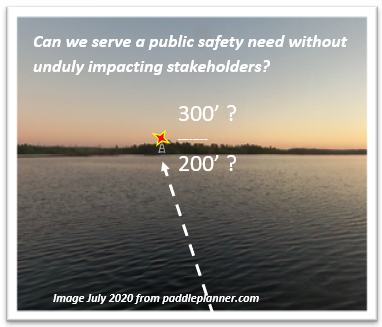
MN DNR Lands and Minerals team was asked a very good question: Would there be concerns about a new communications tower near the Boundary Waters? How might this impact potential recreational users? Would the the safety lighting be visible from pristine natural wilderness? How could we model visibility under existing and varying conditions?

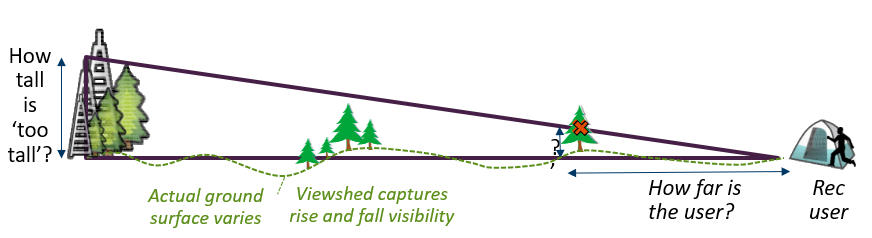
Hello Viewshed Analysis!  Viewshed analysis utilizes a set of GIS functions to examine cross-sections of the landscape, so specific points can be observed at any distance and trajectory from an ‘observer point’. 

viewshed diagram

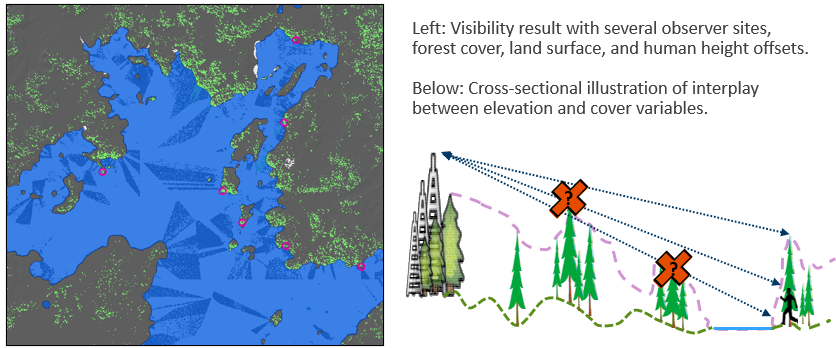
We are fortunate to have LiDAR data that includes canopy intercept (first return) as well as terrestrial surface readings. A canopy normalized digital surface model (nDSM) was used and the visibility tool was run for differing tower heights and offsets to account for the observed canopy. LiDAR also allows bare earth measures to demonstrate ‘perfect’ visibility, with no ground cover. This would model a clearance event such as logging, wildfire, or blowdown. With GIS, the analysis was run multiple times to produce a variety of viewable probabilities.

viewshed model map
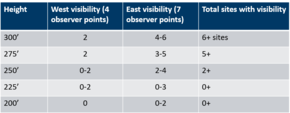
viewshed results table

For the visibility question, the GIS viewshed analysis was able to provide data-driven confidence in likely impacts for a range of alternatives. Although the GIS was impressive and very useful, in the end a table helped communicate which height may have the least (or most) visible impact. Decision makers relied on the data to tell the story and the discussion moved forward.

If you'd like to know more about this project or using viewshed analysis, you can reach out to Jim Olson, GIS Analyst | Mineral Potential | Division of Lands and Minerals

Back to top menu


Layer Transparency example

GIS Tip: Transparency

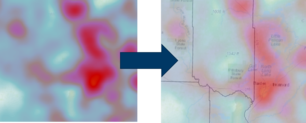
Setting the transparency property for a layer in GIS is a very helpful  when you need to keep a polygon fill color but still want to see the base layers drawn under your layer. This is also helpful when trying to draw a raster layer above vector layers (like shown in picture!)

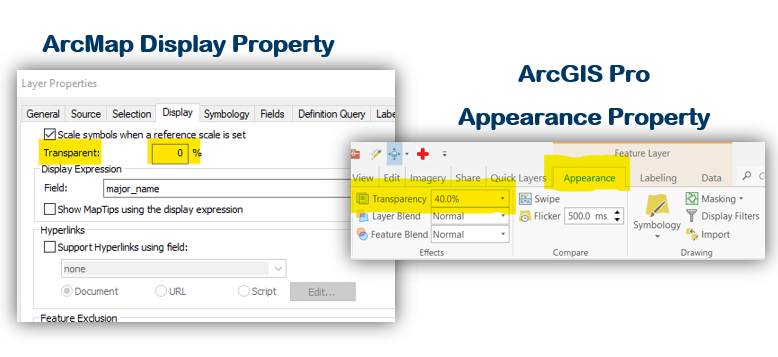
HOW? In ArcMap: Double click on the layer in the table of contents and go to the layer's display property to change the transparent setting, click OK to apply. In ArcGIS Pro: Select the layer in the contents pane, then go to the Appearance tab's Effects group, change the transparency value and click enter to apply.

Layer Properties

Do you have a GIS Tip? We'd love to hear from you! Share your tips or ideas with the DNR GIS Community Team. It's a great place to share and learn! Next time you do something fun or cool in ArcGIS feel free to share with us all; we're all virtual GIS cube mates in the DNR GIS Community Team!

Back to top menu


MN GIS Community

Join the Conversation! 

Add yourself to the DNR GIS Community Microsoft Team today! It has been designed for any DNR employee using or interested in GIS technology. Anyone can be as active or passive in the Team as they desire. 

The Community is an interactive environment for members to ask GIS related questions and collaboratively share ideas. Join to Be Informed, Get Answers to Questions, or Get Feedback on Ideas!

Join team with code

DNR employees can add themselves to the DNR GIS Community with the Team code 5izzvto.

In Teams, click on the Join or create a team button at the bottom of your list of Teams.

Type in the code 5izzvto and click Join team.

The DNR GIS Community Team is an additional communication tool to enhance (not replace) the purpose of this DNR GIS Newsletter or the GIS Section Intranet pages

Want to know more? Check out the Team's Frequently Asked Questions.


Jim Olson

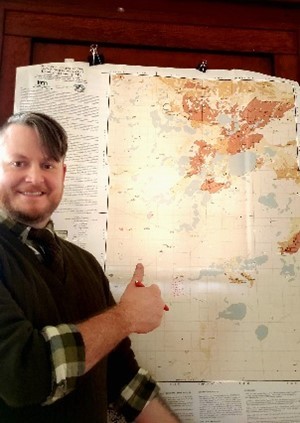
Get to know Jim Olson

What’s your role:  I’m a web liaison and all-around GIS analyst for DNR Lands and Minerals.  I enjoy outreach to other staff, helping them with new spatial analysis, and providing GIS tips and tricks to people at our LAM GIS User Group.

What aspects of GIS work do you enjoy most:  I like to help people find their way through a problem, analyzing data and seeing what stories the data reveals.  It’s satisfying to go from question to answer and to help people on their own terms.

What’s a project that’s had a positive impact:  I’ve been working on our Drill Core Library project which is all about looking at this data set that has been around for a long time and seeing how we can make it more accessible to staff.  For example we’ve been able to tie it to a mobile Survey123 project and use it to help inventory where in our facility various drill-core materials are housed.  Now we’re working on using that base for a materials check-in/check-out system when people come to the library.

What’s been exciting about GIS for you:  The exciting things are when I get Portal working and connecting web maps with configurable apps such as the newer tools like Survey123.  Then the data starts to flow and that feels really good, results happen for the division, and you know you are moving the ball forward.


As always, please submit a ticket to DNR IT Services for any GIS performance issues you'd like help with. Just include "GIS" in the subject line.

MNIT DNR GIS Section

Hal Watson - Section Manager

Katie Rossman - Region 1 Support

Kim Nelson- Region 2 Support

Catherine Hansen - Region 3 Support | Support Team Lead

Naoko Meyer - Region 4 Support

Kitty Hurley - Application Development | Operations Team Lead

Jeremy Moore - Application Development

Chris Pouliot - Application Development

Jessica Schuler - Data Steward, App Development (PAT)

Zeb Thomas - Database Coordination, GDRS

Mike Tronrud - ArcGIS Portal, Imagery, Basemaps