|
Beginning with this issue the SSIS Update will include a new section titled AFCARS & SSIS Repository Corner.
Articles will encompass:
- Updates and information regarding AFCARS changes, compliance, and specific errors.
- Reminders, tips and warnings to help agencies improve AFCARS data entry.
- Updates on reports and Worker Repository developments to help agencies identify, improve and correct AFCARS entry.
- Helpful AFCARS and Repository resources.
- Updates about statewide AFCARS performance.
SSIS Removal/Adoption/TPLPC History screen requirement
In mid-July, the SSIS Business Operations Team began sending emails to agency SSIS coordinators/mentors pertaining to children with continuous placement episodes who do not have either a completed or up-to-date Removal/Adoption/TPLPC History screen completed. This screen is required for all children in placement and should be reviewed and updated with each subsequent new continuous placement.
Since the inception of AFCARS in 2020 a new field was added in SSIS asking “Was there a TPLPC/transfer of custody order through juvenile/family court for this child prior to the current continuous placement?” This field is required and is one of Minnesota’s most noncompliant reporting elements in the AFCARS report. SSIS Business Operations, with the assistance of CSP Research Team, has retrieved data to help agencies identify:
- Children in out-of-home care (OHC) are missing a Removal/Adoption/TPLPC History screen
- Children in OHC have the screen, but have not been updated since the most recent continuous placement start date
- Children in OHC have the screen created or updated since the most recent continuous placement start date, but do not have the new question, noted above, completed.
Agency staff were asked to review and follow up on these cases.
Additional emails will be sent to SSIS mentors/coordinators regarding non-compliance of AFCARS elements or groups of elements. Information provided should be reviewed, entered, and/or corrected at the agency level as soon as possible.
The AFCARS 24A submission for reporting period October 1, 2023 -- March 31, 2024, will be re-run at the end of August and monthly thereafter. Additional or remaining errors will be sent to agencies monthly with the goal that Minnesota will be in compliance and a penalty will be avoided for the final 24A re-submission in early November.
SSIS Repository update
Updates to the SSIS Worker Repository will be occurring in upcoming releases. Once new Repository errors are implemented, emails will not be sent to agencies to assist with identifying issues. Instead, the SSIS Repository, which should be run monthly, will be the primary tool to assist agencies in identifying missing AFCARS information or errors needing to be entered or corrected.
Due to fields added to the Intake Child Maltreatment Reports (CMRs) in Statewide Release v 24.3, Pilot agencies will only be able to transfer intakes/CMRs to other pilot agencies. Non-pilot agencies will only be able to transfer Intakes/CMRs to other non-pilot agencies.
Pilot and non-pilot agencies are unable to transfer Intakes/CMRs between each other and will instead need to communicate directly rather than make transfers within SSIS.
All Agencies will be able to resume the direct transfer of Child Maltreatment cases via SSIS after the occurrence of Statewide Release v24.3, August 21, 2024. Communications/calls between agencies is still required when transferring a child maltreatment case in SSIS.
Pilot agencies are Olmsted, Big Stone, and Lac qui Parle. Pilot is scheduled July 31, 2024 – August 21, 2024.
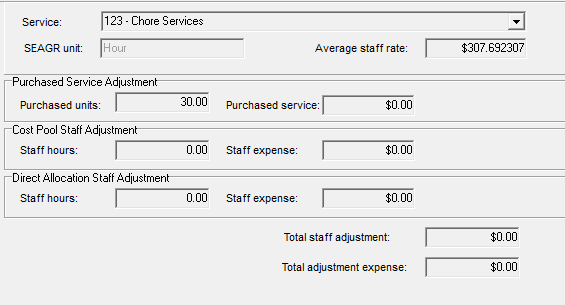
BRASS code or service 123 – Chore Services was reported by an agency as not pulling SEAGR units into the SEAGR Report. Payments using service 123 do not allow the worker to enter a number in the SEAGR units field and they are not converting the payment units to report on SEAGR as the default unit type ‘Hour.’ The workaround for this problem is to manually enter a SEAGR Adjustment for the purchased service units reported for BRASS code 123 without a dollar amount associated (report purchased service $0.00 with total number of adjusted purchased units). The dollar amount is accurately reflected from the payment to the SEAGR Report, and an adjustment is needed only for the units to be correctly reported. An example of a SEAGR Purchased Service Adjustment is below that is reporting 30 units (hours) for service 123 – Chore Services (Searches/Logs > State Reports > SEAGR Report > SEAGR Adjustments tab).
 Questions can be directed to the SSIS Help Desk.
SSIS Statewide Release v24.3, Pilot 1 install will be delayed one week due to the continued CrowdStrike related issues impacting MNIT resources. Pilot and Release dates for v24.3 are:
Pilot 1: July 31 – August 13, 2024
Pilot 2: August 14 – August 20, 2024
Statewide Release: August 21, 2024 @ 6:00 p.m.
When a child is removed from one parent then resides with another, they are not in foster care. During the 2024 legislative session, Minnesota statute 260C.178 Subd. 7 was revised to clarify that it is a Child Protective Services Plan that should be filed with the court within 30 days of filing the juvenile protection petition and not an out-of-home placement plan (OHPP). The Child Protective Services Plan is now called the In-Home Family Support Plan in SSIS. The revisor’s office has not updated the statute online yet, but the new language is in Chapter 115, Article 18. Section 33.
Workers only complete an OHPP if a child is removed from their home and placed in foster care. Foster care, under state and federal definition (260C.007, subd. 18, and 45 CFR 1355.20(a)) is placement away from parents, so a child residing with a parent isn’t in foster care, with two exceptions:
After being removed and placed in foster care, a child is returned to the home of the parent from which they were removed for a trial home visit.
A child is formally co-located with a parent in an approved Substance Use Disorder treatment facility (260C.190).
Questions can be submitted to the SSIS Help Desk or the Child Safety and Permanency Division, Foster Care Unit
The SSIS claiming interface will be unavailable Wednesday, July 31 at 6:00 p.m. until Friday, August 2 to complete maintenance for MN-ITS annual password updates which allows healthcare claiming to continue between SSIS and MMIS. The effect on agencies should be minimal. Normal operation of the claiming interface will resume once an “all clear” has been given. This notice will be sent out to agencies through a mentor blast when the work has been completed.
This process only changes SSIS user accounts for county MN-ITS mailboxes. Agency users have their own user IDs and passwords to access their MN-ITS mailboxes that are not affected by the SSIS password change.
Questions regarding this process should be directed to the SSIS Help Desk.
When entering a new intake in SSIS, there are multiple ways to search for and add participants:
- Right click on the PARTICIPANTS folder in the treeview of the intake; or
- Use the ‘Action’ button on the bottom of the SSIS screen; or
- Use the two icons, shown below, located on the SSIS task bar.
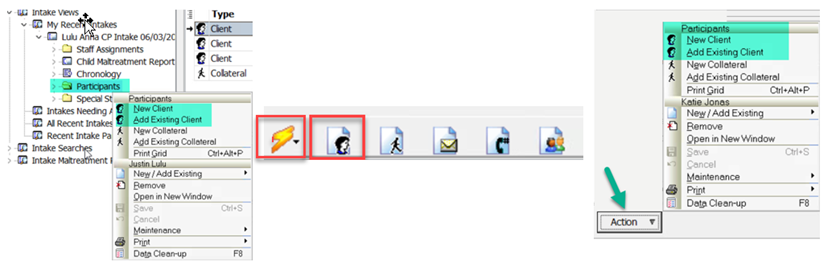 From Intake Views in SSIS click ‘Participants’ and select ‘Add Existing Client’ to check for existing clients in SSIS (the client may have been added by another agency). Always search both the county and state databases prior to adding a new client. If the client’s name appears and information can be verified by DOB, first name, last name, SSN from either the county or state SSIS search, select that person and add them as a participant to the intake. The purpose of searching both county and state is to prevent duplication of clients in SSIS.
If a client is not found in the SSIS state or county search, they can be added as a ‘New Client’ in SSIS. Always enter the person’s name, DOB, and any other known person details. Select ‘Uncleared Client’ in the clearing status field to allow administrative staff to clear the client to the county’s SSIS database.
For more information regarding Person Search in SSIS click here.
SSIS Help Desk staff are available to help agency SSIS mentors/coordinators, supervisors, and IT staff Monday through Friday 8:00 a.m.– 4:00 p.m. All others will be referred to their agency mentor for assistance. Preferred method of contacting the Help Desk is via email at dhs.ssishelp@state.mn.us. A ticket will be created and questions will be routed, when necessary, to the appropriate staff. When reporting system issues please include a screenshot of the issue and as much detail as possible.
The SSIS Business Operations Section will be hosting the SSIS coffee talk, Statewide Release v24.3, Tuesday, August 20, 2024 at 9:00 a.m. Information regarding August’s Statewide Release can be found on the SSIS Resource page under SSIS Release Information. Statewide Release v24.3 is scheduled for 6:00 p.m. Wednesday, August 21.
All SSIS users are welcome to attend. Registration is required. Click here to register.
Coffee talk webinars are recorded and posted to the Minnesota Child Welfare Training Academy website seven to ten business days following each event.
Questions regarding SSIS coffee talks can be directed to Heide Moris, SSIS Mentor Program Coordinator.
Training opportunities for new SSIS users or those seeking a refresher are now available to SSIS users. Courses are great for those new to SSIS or those seeking a refresher. Click the topic below for course descriptions, schedules, and registration information.
SSIS webinar materials and previous recordings can be found on the MCWTA site.
|




