|
Program related time means a program is selected on a Contact/Activity by a worker in SSIS. Program related time should reflect both the Program and Service provided to a client. The service code in SSIS is often referred to as a Budgeting, Reporting, and Accounting for Social Services (BRASS) code. Service activities are selected in combination with the Program and Service on the Contact/Activity screen for staff time reporting. Examples of service activities are client contact, collateral contact, coordination, and documentation.
Non-program related time is time a worker reported for training, personal leave, or time spent administratively that was not a service provided directly to a client or the community. These types of records include Admin and Payroll activities rather than Service activities. When an Admin or Payroll activity is selected by the worker, a Program, Service, Workgroup, and Client cannot be selected. This is important because services provided by workers are included in the social service cost pool as social service expenditures. This gives agencies credit for the service provided and can increase allocation amounts when time reporting is reflected accurately. Admin and Payroll activities will not count as program related time on the state Social Services Expenditure and Grant Reconciliation (SEAGR) report.
Something to be aware of in SSIS is when a Service Activity is selected on a Contact/Activity without a Program and Service selected. This counts as non-program related time on the SEAGR report. Helpful reports for this can be found in SSIS under Tools > General Reports > Time > Time Summary – by Service Activity and Total Time. Reports can be run by department, unit, or worker for a specified date range. If a service activity such as “Coordination” is selected under non-program related time, it is likely the time record could be applied to a specific program and service with a client workgroup selected. This can help agencies identify trends and correct areas where underreporting is occurring because the record is not reflecting the service provided by the worker.
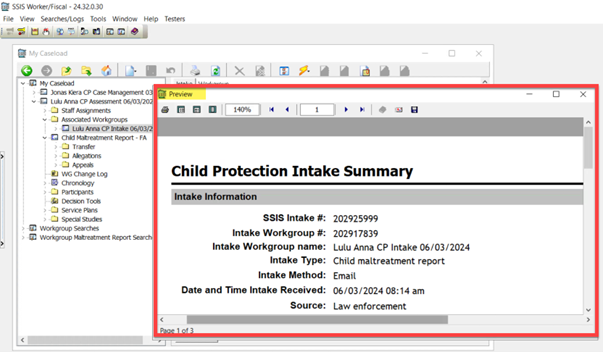
SSIS users are reminded to close the print preview dialog box as soon as a report, such as the intake summary or person summary report, has been previewed and/or printed.
If the preview window is not closed prior to opening another summary or report related to a different intake or workgroup, the subsequent report will not open correctly.
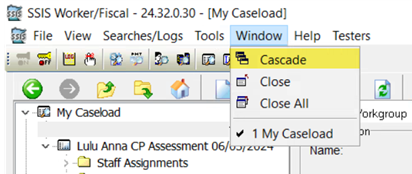  Windows are sometimes hidden behind others making it difficult to know what is open in SSIS. Select the Window option from the menu to display open windows in a cascading format, close a specific window, or close all open windows.
Agency SSIS mentors are encouraged to collaborate with other mentors within their agency prior to submitting requests for assistance to the SSIS Help Desk. Doing so will assist in preventing duplicate requests from several mentors within an agency that can cause confusion, create data integrity related issues, and possibly delay response from Help Desk staff. At present the Help Desk ticketing system does not have the ability to identify duplicate requests submitted from more than one mentor in an agency. Attention to this matter is appreciated.
The SSIS User Support team is seeking a SSIS Fiscal Subject Matter Expert/Trainer who is familiar with the fiscal requirements of the delivery of child protection, child welfare, and other social services in Minnesota. Visit the State Career website and search job ID #77670 for more information regarding this telework opportunity and/or apply. Applications will be accepted through July 1, 2024.
Questions can be directed to Eric Kratt, SSIS User Support Supervisor, Business Integration Division.
The SSIS Business Operations team will be taking a break from coffee talk preparation during the month of July. Information regarding August’s Statewide Release v24.3 coffee talk will be announced soon via the SSIS Update and mentor email.
Training opportunities for new SSIS users or those seeking a refresher are now available to SSIS users. Courses are great for those new to SSIS or those seeking a refresher. Click the topic below for course descriptions, schedules, and registration information.
SSIS webinar materials and previous recordings can be found on the MCWTA site.
|




