|
Extended QRTP placement reviews are completed by the director of the responsible social services agency when a child 13 years of age or older is placed in a QRTP for more than 12 consecutive months or 18 nonconsecutive months, or in the case of a child 12 years of age or younger who is placed in a QRTP for more than six consecutive or nonconsecutive months. (MN Statutes Sec. 260C.714 (a))
The policy clarification is that an extended QRTP placement review is completed once per QRTP placement by the director of the responsible social services agency, at the timeframe outlined in MN Statutes Sec. 260C.714 (a). Previous department policy stated the director of the responsible social services agency completed an initial extended QRTP placement review and possible subsequent extended QRTP placement reviews, depending on the length of time the child remained in the QRTP placement. Therefore, once an extended QRTP placement review has been completed, no further or subsequent extended QRTP placement reviews are required to be completed. Additional information regarding extended QRTP placement reviews can be found in the department’s Corrected Bulletin #22-68-09: Extended QRTP Placement Review. Please reach out to the department’s Foster Care Unit or SSIS Help Desk with questions.
One way to simplify saving items from SSIS, when using Azure, is to personalize the pinned items in the ‘Save As’ window’s Quick Access panel which will be saved on the user profile for future use. A new job aid that walks users through the process of unpinning the current (default) Azure Quick Access items then finding and pinning the user’s chosen save locations to the Quick Access panel is now available on the SSIS Resource page under the Azure Information section.
Adult Protection (AP) workers can view and print the Adult Maltreatment Report (AMR), with or without the Reporter, and the PDF version of the adult protection report as received by the Minnesota Adult Abuse Reporting Center (MAARC).
To view the PDF version of MAARC Report
Workers can view a PDF version of the report as received by MAARC under the Transfer folder of the AMR in the Intake Workgroup. The PDF may not be immediately available when the maltreatment report is received. The PDF file transfer is on a different schedule and runs every 15 minutes.
To access the MAARC report: (this is the printed version law enforcement receives)
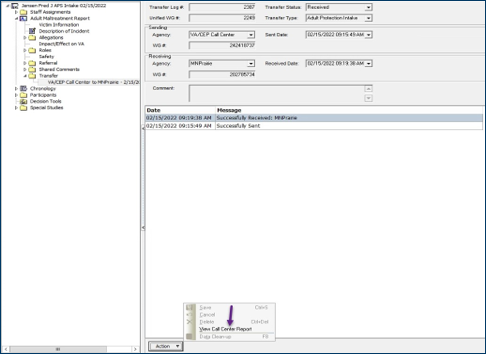
- Navigate to the Adult Maltreatment Report node in the tree
- Select the Transfer
- Create an Action Menu and select View Call Center Report.
Until “duplicate screens” are implemented in the SSIS, open the MAARC PDF and move the PDF to another monitor for full viewing. This will assist in viewing the MAARC report while in an AP Workgroup. In the current version of the SSIS, workers cannot move open windows to a different monitor. “Duplicate Screens” will allow this to occur. This function will be available in a future SSIS release.
To Print the AMR:
The AMR will print in a similar layout to the contents on the AMR tabs. AP workers may choose to print the report with or without the reporter’s information.
The AMR is accessible from:
-
Adult Maltreatment Report Node in the Tree View/Transfer Folder: This will print an unaltered copy of the report as it was received from MAARC; or
-
Adult Maltreatment Report tab on the Adult Maltreatment Report: Any changes made by the LIA to the report after receipt from MAARC will be reflected in this printed copy.
Consult a supervisor prior to printing the report with the reporter’s information to ensure that statutory data privacy requirements are not violated, and the reporter’s information is protected.
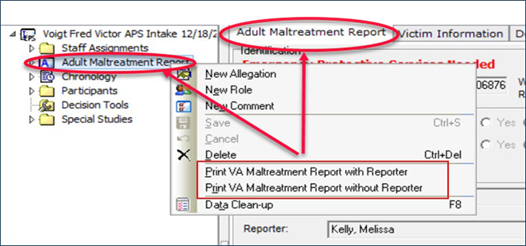
To Print the AMR from the AMR node or AMR Tab:
- From the Adult Maltreatment Report node in the Tree, access the Action menu and select Print Adult Maltreatment Report with Reporter or Print Adult Maltreatment Report without Reporter
Or
From the Adult Maltreatment Report tab on the AMR access the Action menu and select Print Adult Maltreatment Report with Reporter or Print Adult Maltreatment Report without Reporter
2. Click the Print
3. Click OK to
4. Close Print Preview
There is a known defect in the Time to Initial Contact with Victims Report. When a victim with an allegation requires a 24-hour response timeline, and an additional victim does not require a 24-hour response, all victims in the assessment CMR are assigned the 24-hour response in the report. Note: This data is not pulled into Tableau as Tableau uses its own queries. Work is being done to fix this defect. Currently there is not a workaround.
User Settings, User Grid Settings, and User Spelling Settings can be adjusted in SSIS to display items in a certain way. It is recommended that workers that have personalized their User, Grid or Spelling settings, back up user settings prior to each new release to ensure they are not lost. If settings are not saved, SSIS will revert to default settings. Backing up settings is easy and takes a few minutes. Instructions for the process can be found here.
Statewide Release v24.2 is scheduled for Wednesday, May 22, 2024 at 6:00 p.m. Additional Release information can be found on the SSIS Resource page under SSIS General Release Information.
When choosing SSIS mentors agencies are encouraged to select those having SSIS experience and expertise, interest in computer systems, excellent communication skills, and a willingness to learn and help others.
Mentors communicate well and ensure agency staff are receiving SSIS information needed to effectively perform their job duties. Mentors also serve as communication liaisons between agency SSIS users and DHS by reporting bugs or usability issues to the DHS SSIS Help Desk. Mentors also distribute information to agency staff pertaining to SSIS updates, release information and mentor events.
Questions related to mentor selection or the SSIS Mentor Program can be directed to Heide Moris, SSIS Mentor Program Coordinator.
Register now for May’s SSIS coffee talk SSIS Statewide Release Version 24.2 (v24.2). The webinar will be held Tuesday, May 21 at 9:00 a.m. Visit the SSIS Resource page>SSIS Release Information to view what’s new in v24.2 including Release notes, calendars, and previous Release information. Statewide Release v24.2 is scheduled for Wednesday, May 22 at 6:00 p.m.
Coffee talk webinar recordings and related materials are posted on the Minnesota Child Welfare Training Academy website seven to ten business days following each event.
Training opportunities for new SSIS users or those seeking a refresher are now available to SSIS users. Courses are great for those new to SSIS or those seeking a refresher. Click the topic below for course descriptions, schedules, and registration information.
SSIS webinar materials and previous recordings can be found on the MCWTA site.
|




