|
The 2023 Minnesota Legislature appropriated $2 million to DHS to conduct reviews of SSIS for excessive data entry requirements, application performance and stability, and to make recommendations for a modernized system. We have determined that the most efficient and cost-effective approach is to conduct separate and concurrent reviews based on each of those three dimensions.
System Reviews for Performance and Stability, and Modernization- MNIT@DHS is taking the lead with writing two requests for offer (RFO) for publication in February. One will be to obtain experts in the Delphi programming language to review the existing SSIS architecture to find potential sources of poor performance. The second will procure a consultant to do a current and future state review that will include options and recommendations for a modernized platform.
System review for excessive data entry requirements- Later this month, DHS will begin a comprehensive review of all SSIS screens from the point of view of a Child Protection caseworker. The first phase begins with DHS SSIS subject matter experts walking through each field on every screen a worker touches. They will document the legal requirements, the utility of the data, and design or performance problems (e.g. duplicative entry, slow loading screens, too many clicks). Policy staff will participate as consultants during these reviews and will review findings for accuracy. Phase 2 of the process will have current end users and SSIS Mentor working alongside SSIS subject matter experts to validate the findings and fill in any gaps. More information will be forthcoming about this process with more detail. Please contact Cynthia Shypulski, SSIS Business Operations Supervisor with questions. cynthia.shypulski@state.mn.us
The Infant and Toddler Intrevention screen is where workers document the date of the referrral to the Minnesota Department of Education(MDE) Help Me Grow prgram; or to identify the reason no referral was submitted. The Infant and Toddler Intrevention screen lists a phone number that workers can call or workers can use the Refer Online hyperlink on the screen to complete the referral directly online. When submitted online, there is no separate paper referral or telephone call required.
Infant and Toddler Intervention Screen>Refer Online Hyperlink
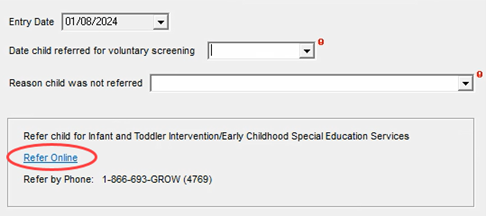 To Complete the Referral Online and Complete the Infant and Toddler Intervention Screen:
- Expand the Participants folder and the desired child’s Client node.
- Right-click on the CWB/Education/Infant and Toddler Intervention
- Select New Infant and Toddler Intervention from the Action menu.
- The Entry Date defaults to the date the screen is opened. This references the date of the data entry, not the date of the referral.
- Double-click the Refer Online The Help Me Grow Refer a Child: Professional Form displays.
- Review the instructions on the web page, complete each question on the referral (as applicable), and click the Submit Referral Click the X on the web page to close the page and return to SSIS.
- Enter the date the referal was completed in the Date child referred for voluntary screening Note: Once a date is entered, the Reason child was not referred field is no longer required and is left blank.
-
Save.
The following documents have been updated to reflect accurate functionality or updated policy and technical language:
SSIS Admin
SSIS Administration Functions
Backing up and Restoring Settings in SSIS (state.mn.us)
User View Log
FFPSA
QRTP Extended Placement Review 11-30-2023 (state.mn.us)
In-home Service Plan in SSIS (state.mn.us)
Registration is now open for January and February SSIS coffee talk events. All agency and state SSIS users are welcome to attend. Registration is required and will remain open until the presentation begins.
SSIS Open Discussion
Tuesday, January 23, 2024
9:00 a.m.
Click here to register.
This is an opportunity for users to ask SSIS related questions, share ideas and openly discuss various SSIS topics. Questions are appreciated in advance and should be submitted to Heide Moris, SSIS Mentor Program Coordinator, by end of business day Wednesday, January 17.
SSIS Statewide Release v24.1
Tuesday, February 20, 2024
9:00 a.m.
Click here to register.
Join the SSIS Business Section at DHS as they share what’s ahead in SSIS Statewide Release v24.1. Visit the SSIS Resource page for Release specific information.
All coffee talk webinar recordings and related materials are posted on the Minnesota Child Welfare Training Academy website seven to ten business days following events.
Training opportunities for new SSIS users or those seeking a refresher are now available to SSIS users. Courses are great for those new to SSIS or those seeking a refresher. Click the topic below for course descriptions, schedules, and registration information.
SSIS webinar materials and previous recordings can be found on the MCWTA site.
|