|
Effective Dec. 21, 2020, a new Activity was added to two BRASS Codes, which allows the user to select the activity when there is client contact through Law Enforcement or Medical Provider, when 24-hour response is required. Activity “Waiver: Law enforcement/medical contact” has a retroactive effective date of April 8th, 2020 to follow Bulletin #20-68-13 which allows modification of child protection initial contacts in certain situations, and when these situations apply. The proper Documentation is necessary:
The following activities have been added to BRASS Code:
- 104 - Child Protection Investigation
- Activity: WAIVER: Law enforcement/medical contact
- 108 - Family Assessment Response
- Activity: WAIVER: Law enforcement/medical contact
Bulletin #20-31-01 announced the creation of SSIS sub-service codes for COVID-19 activities; the SSIS sub-service code “87- COVID-19” was designed to capture agency responses that that differ from the norm due to a waiver or modification for COVID-19 to allow Minnesota’s local social service agencies (counties and Tribal Nations) to continue providing essential programs and services safely and without undue delay during the COVID-19 pandemic. In particular, the modification to the requirement for agency contact with a child within 24 hours must be properly documented in SSIS using the designated sub-service code. For users at the agency level, the following coding structure should be followed whenever a 24-hour response is required:
- Did the case worker see the child within 24 hours?
- If yes, then document contact normally.
- If no, did law enforcement or a medical provider see the child within 24 hours?
- If yes, document 24-hour contact using the sub-service code AND Add new Activity WAIVER: Law Enforcement/Medical Contact to the Time Record.
- Social worker must make contact with child within 5 days, which must also be documented using the sub-service code.
- If no, then document when child was seen. The agency did not achieve timely contact.
In sum, if the case worker saw the child, or law enforcement or medical provider saw the child within 24 hours AND the social worker saw the child within 5 days, then the agency has satisfied the 24-hour contact requirement. There is no requirement for agencies to retroactively change their documentation.
If you have questions about Child Protection Assessments/Investigations policy, please email questions to dhs.csp.safety@state.mn.us.
If you have questions about use of county sub-service codes and new activities, please email the SSIS Help Desk dhs.ssishelp@state.mn.us.
Join us as we relaunch the ICWA Coffee Talk Series. These informational webinars cover topics related to the Indian Child Welfare Act (ICWA), Minnesota Indian Family Preservation Act (MIFPA), and SSIS. They begin Tuesday Jan. 12, 2021 and occur every two weeks. Each session is held from 10-11 a.m. and questions are welcome. See dates, topics and registration links below.
Trouble registering? Please reach out to eric.kratt@state.mn.us or SommerDey.Rosette@state.mn.us.
The Behavioral Health Division (BHD) of DHS is pleased to announce the Alternatives to Face to Face Service Delivery trainings for Targeted Case Management (TCM) providers is launching this month.
This training provides implementation guidance for Child Welfare and Mental Health Targeted Case Managers and social service case workers to serve individuals safely via telephone and/or videoconferencing in lieu of a face to face contact.
DHS Child Safety and Permanency and the Behavioral Health Divisions have developed the training to assist social services professionals to assess and address individual and family safety during service delivery. The training provides guidance in order to conduct meaningful meetings via telephone and/or teleconferencing.
Please see below for details.
Dates/location: (please note class times: 10:00 – 11:00)
Registration deadline: Midnight on Tuesday prior to training date.
To register for this WebEx, please go to the Adult and Children’s Mental Health Learning Center for the training listed above. Use the following instructions for how to enroll in training. If you do not have a UNIQUIE KEY you will be required to obtain one.
For more information about this Behavioral Health e-Memo please contact Diane.marshall@state.mn.us.
Save time correcting SSIS payment issues by running the Payment Batch Edit Report prior to submitting a payment batch. To access the report the user must be assigned either the Create Payment Request or Manage Payments security function in SSIS. Click here for additional information on the Payment Batch Edit Report and the steps to access it in SSIS.
Old service arrangements may be cleaned up by inactivating them. To inactivate multiple service arrangements:
- In the Service Arrangements Search grid, multi-select the service arrangements you wish to inactivate.
- Select Inactivate Service Arrangement in the Action menu.
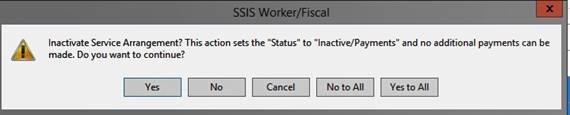
- A pop-up window will appear with the message Inactivate Service Arrangement? This action sets the “Status to “Inactive/Payments” and no additional payments can be made. Do you wish to continue? Select “Yes to All”
You may also re-activate service arrangements by selecting Activate Service Arrangement in the Action menu.
Since the return to fingerprint-based studies on Oct. 21, 2020, many applicants have been unable to complete studies due to limited access to fingerprinting sites, which are at 65% capacity statewide with permanent closures at some locations. As a result, DHS returned to emergency background studies and temporary modifications of certain statutory requirements. See the DHS announcement for more details.
Effective date and instructions
The changes were effective at 6:30 a.m. Thursday, Nov. 19, 2020. Instructions with the steps and information entities need to submit an emergency background study are available on NETStudy 2. Frequently asked questions about emergency background studies are also available on the background studies COVID-19 webpage.
The Family First and Prevention Services Act (FFPSA) requires that all staff working in a Title IV-E Group Children’s Residential Facility (CRF) receive fingerprint-based “Adam Walsh” background checks in order to meet Title IV-E child safety requirements.
To assist counties and initiative tribes with claiming Title IV-E reimbursements for these placements, we will periodically update the list of facilities that have met the background checks safety requirements.
Click here for an updated list of facilities in compliance
|




