|
The Adult Protection in SSIS Information and Frequently Asked Questions document is updated for SSIS version 20.2. In this issue you will find new information regarding:
- What to do for “Out of State MAARC Reports”
- What to consider when there are duplicate allegations in Assessment Workgroups
- New VA victim and VA alleged perpetrator fields on the allegations tab
- New General Reports added for Adult Maltreatment.
For questions related to workflows for Adult Protection in SSIS, reference the SSIS Adult Maltreatment Module.
A new FAQ document is available for Title IV-E Group Provider Search and Children’s residential facilities background studies requirements for the Family First Prevention Services Act. This document can be found on the CRF requirements and compliance page along with an updated list of facilities that have met the background checks safety requirements
The purpose of this document is to provide answers to local agencies’ questions regarding the Title IV-E Group Provider Search and claiming for compliant and non-compliant facilities. The Minnesota Department of Human Services has received many questions from child welfare agencies and providers about these requirements related to SSIS. This document may be updated, as the work of implementing these requirements and maintaining ongoing compliance with these requirements is ongoing. Please contact the SSIS Help Desk with questions.
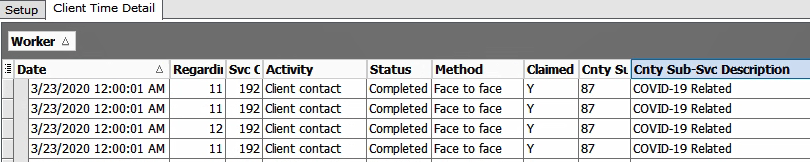
Did you know that claiming can be verified and the new COVID-19 sub-service code can be easily tracked by using the “Client Time Detail” general report?
Recently, agencies have asked for a report showing the sub-service indicator on Claims generated by SSIS. Because many time records are grouped into one claim for Targeted Case Management, it is impossible to choose a sub-service code for the monthly claim. Staff need to view the time record to indicate if a sub-service was used for the activity.
There are many options to filter this report. The Sub-Service code can be displayed and staff can identify if the contact/activity was claimed or not using the filter options below. This report works to identify the discrepancies within the time record that may result in a failed claim, and can be reviewed to determine if the time record was accurately recorded.
You can find this report under Tools > General Reports > Healthcare Claims > Client Time Detail Report.
 If you have questions regarding this report, please contact the SSIS Help Desk.
|




