|
The Family First Prevention Services Act of 2018 has new safety requirements for children placed in Title IV-E eligible children’s residential facilities. The Minnesota Department of Human Services has received a myriad of questions from child welfare agencies and providers about these requirements and the implementation of the requirements. We have gathered many of the questions and created a FAQ document to provide answers and information to stakeholders. Please note: this document may be updated, as the work of implementing these requirements and maintaining ongoing compliance with these requirements is ongoing.
Click here for an updated list of facilities in compliance.
SSIS Version 20.1 was released statewide on Feb. 26, 2020. You can find a presentation on What’s New in V20.1 as well as an additional presentation related to System Defect Triage and Fixes on the SSIS Worker Pilot and Release Training page on County Link. Release notes can be found on the SSIS Release Information page.
Thank you to Dakota County, Des Moines Valley Health and Human Services, and Washington County for volunteering to pilot SSIS V20.1. They were enormously helpful in fine-tuning the application. Their efforts ensured the statewide release was tested and ready to go.
The SSIS Adult Maltreatment Module has been updated and is available on the CountyLink SSIS Adult Protection Training page under Training Resources. This user guide contains the steps needed to complete Adult Protection Services entries in SSIS during the (1) Adult Protection Services Intake Workgroup; (2) Adult Protection Services Assessment Workgroups; and (3) Transfer to an Adult Protection Services Case Management or other Adult Services Workgroup. Also include are:
- Updated AMR Screens from SSIS Versions 19.2 to 20.1.
- The Majority of the VA-CEP FAQ document has been integrated into the Module. If information from the FAQ didn’t flow seamlessly into the body of the module it is now part of an added appendix.
- A new section has been added to include General Reports related to Adult Maltreatment.
- Information related to the new bounce features.
- New information related to the Shared Comments Screen.
- New enhancement information regarding the Initial Disposition Letter for screened out reports.
- BRASS 603 information.
Recently, a county agency reported that the data clean-up message ICWA information is required for (Participant Name) was not working correctly. This message reviews “ICWA-related” workgroups and requires the creation of a new ICWA record after a gap in services of more than seven days. The message was incorrectly requiring a new ICWA record in some situations where there was not a gap in services. This issue was corrected in the statewide release of SSIS V20.1.
Old service arrangements may be cleaned up by inactivating them. To inactivate multiple service arrangements:
- In the Service Arrangements Search grid, multi-select the service arrangements you wish to inactivate.
- Select Inactivate Service Arrangement in the Action menu.
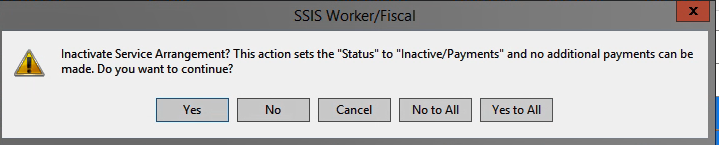
- A pop-up window will appear with the message Inactivate Service Arrangement? This action sets the “Status to “Inactive/Payments” and no additional payments can be made. Do you wish to continue? Select “Yes to All”
- You may also re-activate service arrangements by selecting Activate Service Arrangement in the Action menu.
If you have questions about service arrangements, contact the SSIS Help Desk.
SSIS in-person trainings have been scheduled for the first half of 2020. See the schedules for the SSIS Child Protection Worker training, SSIS Adult Protection Worker training, and Fiscal New Worker training. These classes cover the fundamentals of SSIS data entry and are appropriate for new workers as well as experienced workers seeking a refresher. Prior to registering for the Child Protection Worker or Adult Protection Worker classes, workers must complete the SSIS eLearning Essentials 101-106 courses in the preceding 12 months. The SSIS Fiscal New Worker Training has no pre-requisites. Register for classes on TrainLink.
The ICWA Coffee Talk webinar series concluded on Feb. 5. While we continue to explore options for distributing the recorded webinars, the PowerPoint presentations are available on the SSIS Online Training page. Presentations include ICWA Notice, ICWA Inquiry, MIFPA Notice, Placement Preferences, Qualified Expert Witness and Active Efforts. Contact Sommer Dey Rosette or Eric Kratt if you have any questions.
|