|
Thank you to SSIS users who participated in the SSIS Training and Mentor Program Survey. Over 586 agency staff provided valuable feedback that will be used to inform our ongoing efforts in developing and enhancing SSIS trainings and resources for Fiscal and Worker Mentors.
Your feedback is extremely important to us. As the next step, DHS SSIS staff will be conducting mentor focus groups based on information provided during the survey. We will be reaching out to SSIS Fiscal and Worker Mentors who volunteered to participate in the focus groups in the near future and will follow-up with meeting information. SSIS Mentors who have not yet expressed interest in participation, but would like to do so, should contact Heide Moris no later than May 31.
The SSIS centralization project continues with CITRIX agencies being transitioned to the VMWare Horizon client. Agencies not currently centralized are being contacted and scheduled for this transition. Expected completion is Fall 2019. This plan is subject to change if additional information or technical issues are found.
Recently, there has been a significant increase in non-mentors calling the SSIS Help Desk. The SSIS Help Desk is limited to taking calls and emails from SSIS Worker Mentors, SSIS Fiscal Mentors and SSIS Coordinators. The Help Desk will accommodate supervisors and non-mentors if mentors are out of the office or not available. Otherwise non-mentors and non-coordinators will be referred back to their agency mentors and coordinators for troubleshooting and technical assistance.
Recently, the SSIS Help Desk has received requests to transition child welfare workgroups to adult services workgroups. In these circumstances, a workgroup transition or data fix is not possible. Instead, the child welfare workgroup should be closed and a new adult services workgroup (and possibly a new case) should be opened. Child welfare workgroup information, including all contacts and service plans, will remain viewable in the adult services workgroup within the Associated Workgroups folder.
This rule applies to other program areas as well. For example, child protection workgroups cannot be transitioned to a children’s mental health workgroup or any other type of child welfare workgroup. The services of each workgroup type differ based on eligibility and should be named after the child/youth who is receiving services.
Each agency is responsible to set the day of the month that SSIS will automatically purge eligible workgroups, unattached persons and time records. This setting is located in SSIS Admin>Tools>County Preferences>General tab>Purge Process. |
|
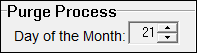 |
Most agencies have set a regular purge day while some smaller agencies choose to run the Purge process every two to three months by setting the Day of the Month to ‘0’. This will pause the Purge process until a new Day of the Month is set.
Items that are purged can be viewed on the Destruction list located in SSIS Admin>Tools>Destruction List>Action>View Purge Log.
Workers have the ability to copy and make adjustments to existing MAPCY records when a new MAPCY is required. The Copy MAPCY feature allows you to keep the same information, yet allows the assessor to change the needs and indicators selected. This may be useful and appropriate for the following scenarios:
- Competing a reassessment
- When the SSIS template changes
- When a child changes placement (the assessor MUST select the correct placement setting)
To copy an existing MAPCY record, select Action>Copy MAPCY. On the MAPCY setup tab, verify that the associated placement is correct. Carefully review the copied MAPCY and make appropriate adjustments. Remember: a Copied MAPCY must have a different effective date selected!
Documentation for SSIS Administration has been updated and can be found on the SSIS Worker Documentation and SSIS Fiscal Documentation pages on CountyLink.
On Feb. 1, the MnCHOICES team sent an email notifying mentors and users about an issue with launching MnCHOICES Assessment (MnA) from SSIS and using the ampersand (&) in passwords between MnA and SSIS. Using the ampersand in passwords in this situation caused an error message and the user was not able to log in to MnA. In that email, we noted that we would look into removing the MnA link from SSIS and notify you when the decision was made. The MnCHOICES team and the SSIS team have confirmed that they will remove the MnA link from SSIS in the V19.2 statewide release.
Details of the removal:
- Date of removal: May 28 or 29 (half of the agencies on each day).
- This release will remove the MnA link from SSIS and users will not be able to access MnA from SSIS after May 29.
- Users will only be able to access MnA through the MnA link after May 29.
- The removal of the MnA link from SSIS does not remove MnA connection to SSIS.
- Lead agencies still need to use SSIS to get user IDs and passwords to validate users logging in to MnA.
For questions regarding this change, lead agencies may contact the MnCHOICES help desk at DHS-6979, email mnhelp@state.mn.us or call (651) 431-4801.
 |
|
The next SSIS Repository upload will be May 28, 2019 for agencies that are not yet centralized.
Note: Agencies no longer need to email the DHS Help Desk or other MNIT staff when monthly uploads have been completed. If an upload is not completed by the deadline, MNIT staff will reach out individually.
|
If you receive SSIS Update emails forwarded from your colleagues and would like to receive them directly, click here to subscribe.
|
|
 |
|