MnCHOICES Assessment 2.0 surveys are underway
The Minnesota Department of Human Services (DHS) is asking lead
agencies for help as we design MnCHOICES Assessment (MnA) 2.0. Your input on
the user experience design online surveys will help the MnA 2.0 business team and
MNIT project team better understand how this application affects your work. Your feedback will guide us as we develop the
next version of software.
How the survey
process works:
- Surveys are
brief, typically requiring 5 to 10 minutes of time
- We send you
an e-mail with the survey link and the date the survey is due
- There is no
prerequisite to participate in any survey
- DHS will send
you the results about two weeks after the survey closes
DHS will gather input and feedback about specific items and
technical features as the development process continues. We value your input, but
you are not required to participate. The project team will review all responses
and take them into consideration as it creates MnA 2.0.
Microsoft known issue affects MnCHOICES Support Plan
DHS recently became aware of a Microsoft known issue
affecting workflow for users when working in MnCHOICES Support Plan (MnSP). The application might transfer
data in error if a user has two windows open in the same browser while working
on a document in each window.
For example, you have two windows
open in Internet Explorer. You are working on Plan A in one window and Plan B
in the other. The application might transfer data between the two documents. If
you used this workflow before Aug. 6, 2018, you must go back to your plans to review
data and make sure information is correct.
Because of this known issue, DHS made a change that will cause a different window
to open if you open two sessions in MnSP in the same browser. This is a temporary fix
that allows you to use multiple windows by creating a unique session ID for
each window to prevent inadvertent data transfer.
Note: Even with the temporary fix in
place, there is still a slight possibility that a user could inadvertently open
two identical browser sessions. Users must check to be certain they are working
in two different unique sessions to avoid data transfer.
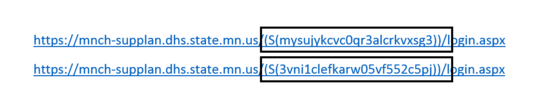
Look
at the URL for each session you are in:
 Make
sure the two URLs show different ID session numbers:
 DHS will add a permanent
solution to MnSP in the Oct. 11 and 12 release of 18.4.1. A user who tries
to open a second session of MnSP in the same browser after the release
will receive an error message that a second session is not allowed. If
a user needs to open two MnSP sessions at the same time, he or she must use two
different browsers, such as Internet Explorer and Chrome.
DHS updates developmental disabilities (DD) screening document in
MnCHOICES
DHS no
longer requires lead agencies to enter the long-term care screening document into
MMIS for people who use DD programs and services. To view the full
announcement, see DHS updates developmental disabilities screening document
in MnCHOICES.
Employment services code changes began July 1, 2018
DHS reduced three codes to one
for employment services in the Developmental Disabilities (DD) screening
and the Long-Term Care (LTC) screening documents in MnCHOICES.
For MnCHOICES assessments:
Employment services codes in the LTC
screening document:
- (B2) Employment
Exploration Services
- (B3) Employment
Development Services
- (B4) Employment Support
Services
These codes are now combined into one: (B2) Employment Services
Employment services codes in the DD screening document:
- (62) Employment
Exploration Services
- (63) Employment
Development Services
- (64) Employment Support
Services
These codes are now combined into one: (62) Employment Services
As a reminder, all community-based
work activities (including work crews and enclaves) under the current day
treatment and habilitation services will transition to employment services when
the person’s service authorization renews. Lead agencies should evaluate
transportation and add it to the screening document as appropriate. For more
information, see the Briefcase
resource document: Transportation and day and employment services.
For MnCHOICES Support Plan:
All employment service codes are
now available for use. The current (48 for LTC and 08 for DD) Supportive
Employment Services (SES) code may be used for renewals until Sept. 1. DHS will
not allow any new authorizations of SES after Sept. 1.
Resources for
the new employment services are available on the Employment
First webpage. Through this webpage, you can access On-Demand
Training Modules. We encourage assessors and case managers to
view the recording of the Support Planning Professionals Learning Community
webinar, held on June 27, 2018, that is available in the DSD
training archive.
New questions for Long Term Care (LTC) document type H
DHS made changes to how you enter an LTC document
for health-risk assessments (HRA) using document type H into MMIS for MSC+,
MSHO and SNBC. The system will ask you these new questions for these programs:
- Do you have dental concerns?
- Do you have a dentist?
- Do you have any family planning needs?
(SNBC only)
- Are you sexually active? (SNBC only)
These questions are displayed in other LTC
document types; however, they are only required for LTC document type H and no values
should be entered for any other document types.
Changing plan
dates: assessor and case manager collaboration
When a person needs a midyear assessment, such as a change of
condition or 65th birthday assessment, the case manager and assessor must
work in tandem to make sure the plan dates copy over to the new CSP correctly.
When a case manager notifies the certified assessor of the need
for assessment, the two should coordinate the new date span. The case manager goes into the current CSSP, creates a new CSSP and updates the
dates of the service lines and service agreements. By taking these steps, the
assessor will create a CSP with accurate dates and maintain the previous work
the case manager completed.
Password
alignment
Attention, assessors: Remember to align passwords for MnA
and MnSP. DHS recommends updating your Assessment and Support Plan passwords at
the same time to improve your workflow.
Certified
assessor recertification reminder
The purpose
of recertification is to make sure assessors complete ongoing training to
ensure assessment skills are up-to-date. Therefore, training in the recertification
courses (MNCH8012 or 8015) needs to be within the date span of the certificate.
Assessors should include only CLUs that took place during the current
certificate’s date range. Supervisors should review an assessor's TrainLink
recertification course to ensure the CLUs are within the current certificate
span dates.
After you
receive your recertification certificate, you cannot document any new CLUs
until the start date of your recertification.
Example:
Your current
certificate is valid from Oct. 12, 2015, to Nov. 1, 2018.
You complete
the requirements for recertification on July 12, 2018. We issue you a
recertification certificate that is valid from Nov. 1, 2018, to Dec. 1, 2021.
You cannot
use any activities that take place between July 12, 2018, and the start date of
your new certificate – Nov. 1, 2018 – as CLUs for your next recertification
certificate.
Clarity on MnCHOICES computer applications language
MnCHOICES
includes the Assessment and Support Plan computer applications.
- The current MnCHOICES Assessment
is referred to as MnCHOICES Assessment 1.0, Assessment 1.0 or MnA 1.0. The
MnCHOICES team states each character, M N A 1 . 0, and does not pronounce
the acronym.
- The current MnCHOICES Support Plan
is referred to as MnSP. The MnCHOICES team states each character, M N S P,
and does not pronounce the acronym.
- Work is underway on MnCHOICES
Assessment 2.0. To avoid confusion, we call it MnA 2.0 or Assessment 2.0
- When
we make changes to the MnCHOICES Support Plan so that it connects with
MnA 2.0, the Support Plan will move to a new version or be known as MnSP
2.0
The MnCHOICES team hopes to reduce
confusion by introducing this language now.
The
following publications, forms and CBSM pages are new or have been updated and
are now available in eDocs:
-
DHS-2727-ENG (4-18)
Long-Term Services and Supports Assessment and
Program Information and Signature Sheet
-
DHS-3426-ENG (6-18)
OBRA Level I Criteria – Screening for Developmental Disabilities or Mental
Illness
-
DHS-3427-ENG (7-18)
LTC Screening Document - AC, BI, CAC, CADI, ECS, EW, MHM, MSC+, MSHO
-
DHS-3427H-ENG (8-18)
Health Risk Assessment Screening Document - MSC+, MSHO and SNBC
-
DHS-3427T-ENG (7-18)
LTC Screening Document - Telephone Screening
-
DHS-3471B-ENG (5-18)
Brain Injury (BI) Waiver Eligibility and
Documentation Checklist
-
DHS-4929-ENG (7-18)
Caregiver Living Expenses Worksheet
-
DHS-6790L-ENG (5-18) RMS Worksheet - Employment Services
-
DHS-7108A-ENG (6-18)
EIDBI Comprehensive Multi-Disciplinary Evaluation
(CMDE) Medical Necessity Summary Information Signature Form (Addendum B)
-
DHS-7666-ENG (6-18)
Psychiatric Residential Treatment Facility (PRTF)
Individual Plan of Care and Authorization
Visit CBSM – What's
new often for a
list of policies and pages we've recently updated in the Community-Based
Services Manual.
DSD training news and information page: Free CLUs!
Visit the Disability Services Division's DSD training news and information webpage to read about and register for DSD-sponsored
trainings or to visit TrainLink. Register
using TrainLink. You must have a unique
key to register and receive credit for trainings.
- Go to TrainLink
- Select Sign On in the
upper right hand corner
- Enter your unique key and
click OK
- Click on Find a Course
- Under Category, choose: All
Disability Services Division Courses
- Click the Search button
- Click the Select button
for a course of interest
- Click on the Course
Content tab
-
Select Start to begin the
course
Also
be sure to check out the DSD
training archive page for great information on past presentations
and trainings.
Employment services webinar
Watch this encore
webinar to learn more about: employment services, system updates,
implementation timeline, support-planning overview and resources for employment
services.
If you have
questions about how to use the MnSP application, you may look in the MnSP
user manual, which provides directions and useful tips.
Questions that are not
answered by the MnSP user manual
Question: How do I delete an accidentally created
CSP, CSSP or rate plan?
Answer: You cannot delete plans in MnSP. When
you accidentally create a plan, open the plan. This will take you to the About
Plan tab. Enter a note in the About Plan general notes section stating, “This
plan should not be used because it was created unintentionally.” Then close the
plan.
-
For previous issues of MnCHOICES Matters, or
other MnCHOICES assessment and support planning resources, visit the MnCHOICES CountyLink page.
-
For more information about policies related to assessment
and support planning, please visit the Community-Based Services Manual (CBSM) Assessment and support planning page.
-
The outage
schedule provides information to
help lead agencies to plan for scheduled MnA and MnSP outages.
For more information about MnCHOICES, visit us on the DHS
website. For technical assistance about MnCHOICES, visit us on CountyLink.
|