|
The following two Defects with the Allegation/Allegation
Detail screen in the Child Maltreatment Report (CMR) were discovered
following the 17.3 release.
- SSIS was allowing users to close a CMR at intake or to open
an Assessment Workgroup without entering a screening decision for each
allegation detail. This defect was fixed with the 18.3 release.
- For Assessment workgroups in which determinations of
maltreatment were made, SSIS allowed users to close the CMR without entering a
Severity level for each allegation detail. This defect was fixed with the
18.2 release.
Counties and Child Welfare Initiative Tribes were initially
notified of these defects via email on July 27, 2018. Affected
Workgroups have been identified and Department staff will begin communicating the
process to correct this data.
Additionally,
with the release of 18.3 a defect in the CMR Intake-transfer process was
discovered. This defect caused collateral-type person records from the
originating county to convert to client-type person records for the receiving
agency.
91 records
were impacted by this bug. 52 of these records were corrected by MNIT staff. The
remainder were corrected by the agencies by deleting collaterals or changing them
to “Uncleared Client - do not clear”. A statewide package fix was deployed on Friday,
September 7 to prevent new records from converting incorrectly. No additional
action is needed.
See the SSIS Release Information page for release notes and additional known defects.
- With the
roll-out of the ICWA screens in 18.1, SSIS automatically generated an Eligibility/Determination
record for all children with an existing response to the “Qualifies under ICWA”
field.
- For children
who require an Adoption Assistance Eligibility Determination, the user must
select the applicable ICWA Eligibility/Determination record on the Continuous
Placement screen. The ICWA Eligibility/Determination record must be
created prior to this step.
A defect has been discovered that may cause the calculation for
Applicable Child age to be incorrect when the Northstar Adoption Assistance
Eligibility Determination is created. If you feel the question “Does the child
meet the age requirement to be considered an applicable child for Title IV-E”
is answered incorrectly, please contact your DHS adoption consultant. If you do
not know your DHS consultant contact the SSIS Help Desk.
The
following table contains the Applicable Age calculation, effective
January 1, 2018:
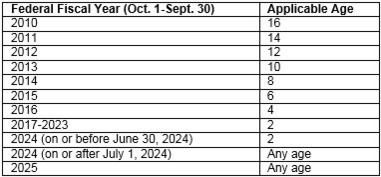 The following is the Applicable
Child criteria for the Northstar Adoption Assistance Eligibility Determination:
Does the child meet the age requirement to be considered an
applicable child for Title IV-E?
- If Yes - Display message: This is an applicable child.
- If No – Proceed to question “Is this child a sibling of an
applicable child, who is being adopted at the same time by the same parent(s)?”
Is this child a sibling of an applicable child, who is being
adopted at the same time by the same parent(s)?
- If Yes – Display message: This is an applicable child. Proceed to Child Eligibility – Applicable Child
- If No - Display message: This is a non- applicable child. Proceed to Child Eligibility – Non-Applicable Child
As Relative Custody Assistance (RCA) is phased out, each
county will get to a point where they are no longer required to submit an RCA
Report. RCA children will either age out, receive a commissioner transition to
Northstar Kinship Assistance or discontinue care.
Counties must continue reporting as long as they have RCA
clients, including those with an RCA Payment Worksheet that has an RCA payment
amount of $0 and therefore not currently receiving an RCA Payment.
After five RCA Reports with $0 in claims and no remaining
RCA clients, counties should notify the SSIS Help Desk by the last day of the quarter
that they are no longer required to submit the RCA Report. SSIS Fiscal Subject Matter Experts will verify that five $0 reports have been submitted and the county does not have
any RCA clients with a $0 RCA Payment Amount on the RCA Payment Worksheet and make necessary changes in SSIS. The county
will then be notified that the End Date has been entered and they are no longer
required to submit the report.
Please see DHS Bulletin #18-32-03
(January 30, 2018) for details.
 |
|
Notice: The next SSIS Repository upload will be September 25, 2018 for agencies that are not yet centralized. |
|