|
The previous MnCHOICES Assessment application release,
17.2.1, included several updates and enhancements to improve data reliability. DHS also made updates to align
MnCHOICES with developmental disabilities (DD) guidelines. The changes improve
how the MnCHOICES Assessment calculates certain field values for children on
the DD Screening Document.
Please see the MnCHOICES
17.2.1 Assessment application release notes and release
notes companion documents. You can find release notes and companion documents
on the MnCHOICES
CountyLink site on the Mentors section of the home page.
After the MnCHOICES Assessment application 17.2.1 release,
you will notice that when you complete a Provider PCA Summary report, the
certified assessor will need to indicate whether or not instrumental activities
of daily living (IADLs) may be included in the plan. When the “Can the provider
build IADL’s into the care plan?” prompt appears, the certified assessor may select
“Yes” if he or she is authorizing the PCA agency to complete appropriate IADLs in
addition to the activities of daily living (ADLs) for which the assessor is authorizing
assistance. It is important that an assessor select “Yes,” if he or she is
authorizing IADLs. This selection is what allows the IADL need to show on the
Provider PCA Summary report and is what authorizes the PCA agency to complete
IADL tasks when working with the person. If there are not appropriate IADLs for
which to authorize assistance, the assessor will select “No.” Specific IADLs
are not required in the Provider PCA Summary report.
The Sept. 8, 2017, MnCHOICES Assessment release included improvements
such as:
- The software now requires fewer
questions to run eligibility. DHS has removed the asterisks (*) or changed the
symbol for questions that are not required for running eligibility.
- DHS has changed the symbol marking
some questions from an asterisk (*) to a double exclamation mark (!!). These
questions have important quality measures, both to better understand the
person’s preferences and needs and for federal reporting. While they will no
longer be required questions to run eligibility, they remain important and are
noted for the assessor with the “!!” symbol.
- DHS moved screening tools (such as
assessment of pain, depression screening, etc.) to a separate domain called
“Screening Tools.”
- The “All Activity” assessment
queue has added search and filter options. This new feature is especially
helpful to those counties that have several potential results when they attempt
to view this queue.
DHS has removed the asterisk or changed the symbol for about
100 questions. The exact number of questions affected depends on the age of the
person and other selections within the application.
The changes allow certified assessors, using the MnCHOICES
Assessment application, to adjust their work styles to the needs of the person
they are interviewing.
More information about these changes and other features of
the September 2017 MnCHOICES Assessment 17.2.3 release are available in the
release notes attached to the all-clear message sent to lead agencies on Sept.
11, 2017. DHS shared information with mentors about the release at the
MnCHOICES Mentor’s Alliance meeting on Sept. 6, 2017.
As of Jan. 1, 2018, the county or tribal nation of residence
(COR) is responsible for completing all reassessments for people receiving
long-term services and supports. Notifications to the COR will begin as of Jan.
1, 2018, for reassessments that are due in the month of April 2018. This means
the county of financial responsibility (CFR) will complete annual reassessments
for people living outside of their county during the months of January,
February and March 2018.
Example: A person has a reassessment due in April 2018 (service
agreement ends May 31, 2018). The CFR would notify the COR between Jan. 1 and Feb.
20, 2018, of the needed reassessment. The COR would begin to process the
assignment of the reassessment during this time. The COR certified assessor
works on scheduling and preparing for the visit during the month of March 2018.
The assessor completes the reassessment and the CSP and sends necessary
information back to the case manager during April 2018. The case manager
completes the CSSP and the service agreement in May 2018.
The COR continues to be responsible for all new assessments
for long-term services and supports requests. For PCA and aging programs, the
county of residence or service completes all assessments (reassessments and new
assessments).
DHS has published the MnCHOICES Reassessment Communication
Form (DHS-6791E)
and Instructions to complete the MnCHOICES Reassessment Communication Form (DHS-6791F)
to help agencies to communicate the work being done between agencies when the
COR and the CFR are separate agencies.
DHS sent an eList
announcement on Aug. 30 to announce the addition of instructions and more
information, Activity
timelines for reassessments when the COR and CFR are different and Reassessments
when the COR and CFR are different, to the Community Based Services Manual.

Before inserting new people into the MnCHOICES Assessment
application, remember to search by name, date of birth, gender, PMI and Social
Security number first. If you are not certain of the spelling of the name or
gender of the person, use the “Starts With” or “Soundex” options to search.
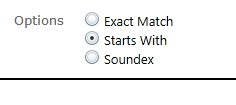 This step is important because DHS is finding multiple
records for the same person more frequently as more people have assessments. If
the user adds a new record for the person rather than finding last year’s
information, the assessment data does not copy into the new assessment.
Many records did not have a PMI at the time of the initial
assessment. Once the person was opened to services, however, a PMI was assigned
to him or her. If an assessor notices that a person has a PMI that is not in
the MnCHOICES record, the mentor may contact the Help Desk using the DHS-6979 Help
Desk Contact form and ask to have the PMI merged into the current record.
DHS is planning to launch the LTSS Improvement Tool on Oct. 30,
2017. The LTSS Improvement Tool will be located in the MnCHOICES Support Plan
application. The person and his or her case manager will use the improvement
tool during a person’s mid-year visit (i.e. a semi-annual visit). If the person
does not have case management, the person and the certified assessor will use the
improvement tool during the person’s annual reassessment visit.
The goal of the tool is to better understand people’s
experiences with their services and determine if they have suggestions to
improve service responsiveness. DHS wants to standardize data sources to meet federal
reporting requirements and to help with other evaluation efforts. DHS will host
a training webinar before the launch of the new tool.
The webinar about the LTSS Improvement Tool will focus on
Phase I of the implementation: the person’s experiences with his or her service
provider and support plan. The webinar will also provide tips on how to
incorporate the questions into the person’s mid-year visit (or annual visit if
no there are no case management services) and how you can use the questions to
guide the conversation with the person. We will send you registration information
by eList announcement soon. You may send questions about the LTSS
Improvement Tool by email to the DSD
Response Center.
You can edit the goals area in the MnCHOICES Support Plan
after you have added the goal. Rather than having to delete a goal and retype
it to make changes, we invite you to try the application’s new feature. To edit
a goal:
- Highlight the goal you would like to edit
- Copy the contents into a new goal
- Make edits to the goal
- Save the new goal
- Delete the old goal, if applicable
Lead agencies begin the process of granting access to the
MnCHOICES Support Plan application. Mentors or other designated lead agency
staff will follow this process to give access to the MnCHOICES Support Plan to new
staff or to make changes (such as a name change, email change or deleting a
user) to existing staff records:
- Identify the Systems, Security and Access
Management (SSAM) security liaison for your agency.
- Submit a request for the addition or change
needed, following your agency’s protocols, to your SSAM security liaison.
- The SSAM security liaison will submit the
“MnCHOICES Support Plan Request and Authorization Form” to SSAM.
You will know when the user has access to the MnCHOICES
Support Plan when he or she receives two emails with the subject line:
“Official MnCHOICES Support Plan User Notification.” The first email will include
the user name. The second email will contain the password.
If the user does not receive the two emails in the time
indicated by SSAM, please have your lead agency’s SSAM security liaison check
back in with SSAM on the status.
Users may reset their passwords by submitting the MnCHOICES
Help Desk Contact Form (DHS-6979).
Recently, DHS published bulletin 17-21-08
to announce the availability of the Minnesota
Health Care Programs (MHCP) Application for Medical Assistance for
Long-Term-Care Services (MA-LTC) form (DHS-3531) (PDF). To clarify, this
form is the revised MA application for payment of long-term-care services that the
person submits when applying for Medical Assistance.
People who are already on Medical Assistance should continue
to use Minnesota
Health Care Programs Request for Payment of Long-Term Care Services (DHS-3543) (PDF)
and Minnesota
Health Care Programs Payment of Long-Term Care Services (Families with Children
and Adults) (DHS-3543A) (PDF) to request payment for long-term care
services. These forms ask specific questions concerning payment for long-term-care
services that are not asked when applying for MA only.
The following MnCHOICES publications/forms are new or have
been updated and are now available in eDocs:
-
DHS-3427-ENG:
LTC Screening Document-AC, BI, CAC, CADI, ECS, EW, MHM, MSC+, MSHO, SNBC
-
DHS-3428-ENG:
Minnesota Long Term Care Consultation Services Assessment Form
-
DHS-3428A-ENG:
Minnesota Long-Term Care Consultation Services Assessment Form: SW Section
-
DHS-6791E:
MnCHOICES Reassessment Communication Form
-
DHS-6791F:
Instructions to complete the MnCHOICES Reassessment Communication Form
For previous issues of MnCHOICES Matters, or other MnCHOICES
assessment and support planning resources, please visit our CountyLink
page.
For more information on assessment and
support planning, please visit the Community-Based
Services Manual (CBSM).
MnCHOICES
brochures available:
-
DHS-7283A: MnCHOICES: Take the first step to get
services to stay home. Counties, tribes and health care providers can order
this document in large quantities by visiting the order fulfillment
website. We encourage lead agencies to distribute
the brochure locally (such as with hospitals and clinics).
-
DHS-7283B: What you can expect with a MnCHOICES assessment
For more information about MnCHOICES, visit us on the DHS
website. For technical assistance about MnCHOICES, visit us on CountyLink.
|