|
November’s SSIS coffee talk topic will be SSIS Statewide Release v24.4. The webinar has been scheduled for Tuesday, November 19 at 9:00 a.m. Registration is required and will remain open until the event begins. Statewide Release v24.4 is scheduled to occur Wednesday, November 20 at 6:00 p.m. Visit the SSIS Resource page Release Notes section to view what’s new in this release, release notes, as well as the known defect report.
This event will be recorded and posted, along with a copy of the PowerPoint presentation, to the Minnesota Child Welfare Training Academy website within seven to ten business days.
Thank you, agency staff, for partnering with us to clean up SSIS AFCARS repository errors and follow up on the AFCARS error-related email notifications sent out over the last several months. Your efforts helped push us over the line and brought Minnesota’s first compliant AFCARS 2020 file. The 24A reporting period (10/1/23-3/31/24) was successfully re-submitted as fully COMPLIANT on November 6, 2024. Great work!
Next, Minnesota will run and submit the initial 24B reporting period (4/1/24-9/30/24). We will know our compliance status for the 24B reporting period before November 15, 2024, and share that status at the upcoming SSIS Statewide Release Coffee talk. Thank you for your hard work and partnership!
Verify payments are accurate prior to submitting a payment batch from SSIS to the agency accounting system.
Due to the payment interface process, payments cannot be altered or deleted after a batch has been successfully submitted and accepted by the accounting system. If altered or deleted a data fix will need to be done.
Best practice is to process the payment through your accounting system. If necessary, void the transaction in your accounting system and complete a Refund/Recovery or Cancellation in SSIS
To Add an Associated Activity to a Service:
- Expand the Services folder and select the Service to add an Activity to.
- Select the Assoc Programs folder from the Tree View.
- Select the Program.
Access the Action menu, select Associated Activities, then select Add Existing Activity.
The Activities Search screen displays.
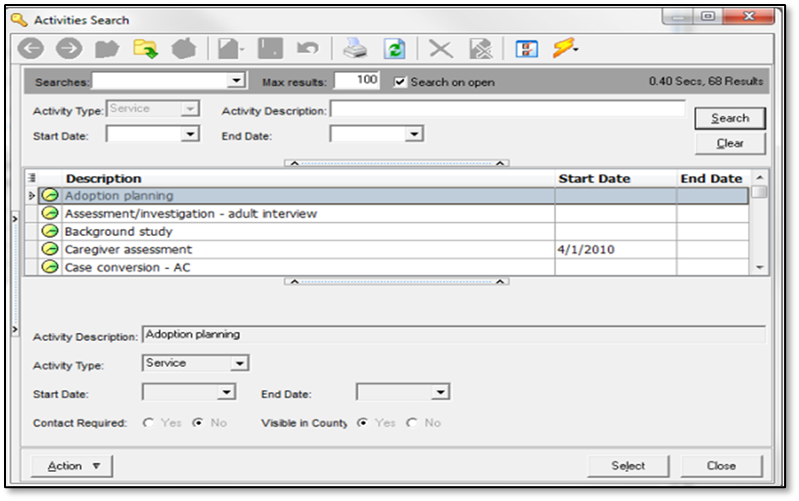 4. Search for and select the Activity you would like to associate to the selected Program area and Service.
5. Click the Select
Program, Service and Start Date are required fields.
Access the complete Job Aid for Programs and Services for more information.
- Monday, February 3rd and Thursday, February 6th, 2025
- Monday, March 3rd and Thursday, March 6th, 2025
- Monday, April 7th and Thursday, April 10th, 2025
- Monday, May 5th and Thursday, May 8th, 2025
The SSIS Adult Protection Worker course follows the life of an adult vulnerable to maltreatment case starting with the intake received from the Minnesota Adult Abuse Reporting Center (MAARC) through the assessment and closing of a case. This is a technical training designed to provide overview of data entry as related to Adult Protective Services (APS) into SSIS. Adult Protection policy staff are also available during each class. Training is offered in two half-day virtual classes and is designed for new Adult Protection workers, SSIS mentors, and for those seeking a refresher. Individuals will need to take both days for credit of course completion. New workers are encouraged (not required) to take the online SSIS Essentials eLearning prior to taking the course.
- The SSIS Essentials eLearning includes two APS specific courses:
- SSIS APS Essentials 104A: Exploring APS Intakes
- SSIS APS Essentials 104B: Exploring APS Assessments
APS workers should take these two courses instead of SSIS 104: Creating an Intake. APS Essentials courses and other APS eLearning resources can be found on the APS eLearning Suite site.
SSIS Adult Protection Training Day 1 9:00 a.m. - 1:00 p.m. includes:
- Adult Maltreatment Report (AMR) in Intake
- AMR Bounce procedure (discussion only)
- Structured Decision Making ® Tools in an APS Intake
- Agency Report Action Options
- Assigning the AMR
- Initial Disposition Letters
- Closing the Intake and transitioning to an Assessment Workgroup
SSIS Adult Protection Training Day 2 9:00 a.m. - 1:00 p.m. includes:
- Chronology Case Notes and Activities
- Structured Decision Making ® Tools required during the APS Assessment
- Participant Folder Entry
- Adding Collaterals
- Updating the AMR
- Data Cleanup
- Closing the AMR and the Assessment Workgroup
- Notice of Findings, Case Closure Communication, and Vulnerable Adult Maltreatment Summary of Investigation
- Transitioning the Assessment to Case Management
- Appeals
To register for SSIS Adult Protection Training navigate to TrainLink Home Page and sign in using your Unique ID.
- Navigate to Children’s Services
- Select Upcoming Webinars/Live Training
- Choose “All SSIS Classes”
- Type in a Date Range, if needed
- Select the SSIS Adult Protection Training of your choice and enroll
Training opportunities for new SSIS users or those seeking a refresher are now available to SSIS users. Courses are great for those new to SSIS or those seeking a refresher. Click the topic below for course descriptions, schedules, and registration information.
SSIS webinar materials and previous recordings can be found on the Minnesota Child Welfare Training Academy (MCWTA) website.
|

