|
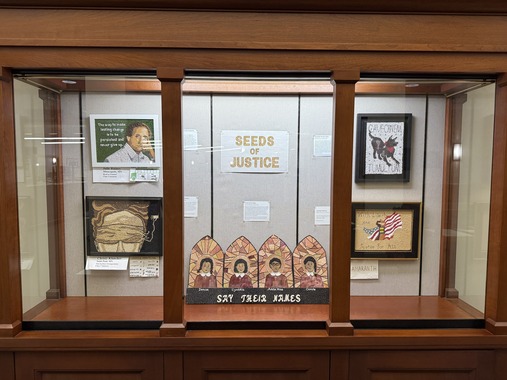
Crop art is consistently one of the highlights of the Minnesota State Fair - but if you can't wait until August for your fix (or weren't able to wait in the 2-hour-long line this year), you're in luck! The State Law Library is excited to announce that we are hosting a new traveling exhibit, "Seeds of Justice."
One of the display cases showcasing works of art from "Seeds of Justice."
This exhibit features pieces of crop art all centered around the themes of law and justice. The exhibit includes 18 pieces of art in total, displayed with statements from the artists about their piece's connection to the theme.
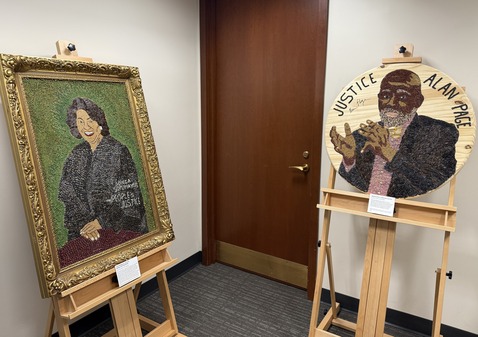
Portraits of Justice Sonia Sotomayor and Retired Minnesota Supreme Court Justice Alan Page are among the works included in "Seeds of Justice."
For a video preview of the exhibit, check out this video produced by the Minnesota Judicial Branch.
These photos and the video can't fully capture the incredible works of art featured in this exhibit, so we hope you will come visit. The exhibit can be viewed during our regular business hours and will be on display through the spring. We hope to see you soon!
In this issue, we are spotlighting some of our resources for filing an appeal in the Minnesota Court of Appeals.
Online Resources
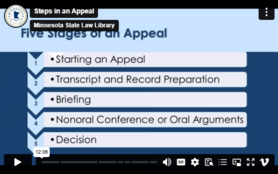
If you are tackling your first appeal or representing yourself, our Appeals Guide is a great place to start your research. This comprehensive guide compiles links to statutes and court rules, templates and forms, tip sheets, and videos that explain the appellate process in Minnesota.
Another great resource for anyone writing a brief is our Briefs Archive. The archive contains briefs from cases that resulted in published or precedential opinions, but also cases that have been added by request. The archive is searchable by keywords, so if you are writing a brief, you can view examples on similar subjects to help you get started. For more tips on how to use the Briefs Archive, view our video Legal Research: Finding Sample Briefs.
|
Print Resources
In addition to our online resources, you can find in-depth resources on appellate procedure in our print collection.
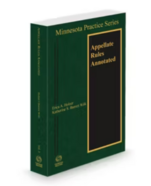
The Minnesota Practice Series: Appellate Rules Annotated is a comprehensive guide to appellate procedure, providing a detailed summary of each Rule of Civil Appellate Procedure and examples of how the courts have interpreted each. Appellate process is also covered in Minnesota Practice Series: Methods of Practice, Volume 5A Chapter 1. These resources are available in print at the State Law Library, or you can access an electronic version through our Westlaw subscription, available on the public computers in the library.
|
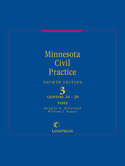
Minnesota Civil Practice is another civil procedure treatise that covers appellate procedure. Chapter 27 covers appealable judgments and orders, discretionary review, and appeals to the Court of Appeals and Supreme Court. There is also an appendix of appellate forms. Minnesota Civil Practice is available in print at the State Law Library, but you can also access it through Lexis Digital Library. Contact Ask a Librarian to get an account.
Several subject treatises have chapters on appellate procedure specific to an area of law. These include:
Wherever you are at in the appellate process, remember you can always reach out to the State Law Library for help finding resources.
|
If you have visited a courthouse to review court records lately, you might have noticed a slight change in the search interface for district court records. Minnesota Public Access (MPA) has been retired and Minnesota Public Access Courthouse (MNPAC) has taken its place. MNPAC contains the same records that you could find in MPA, but uses the same modern search interface as Minnesota Court Records Online (MCRO). If you need a refresher on how to use MNPAC, there are several help guides linked from the home page.
For a refresher on which court records can be found online and which records can only be accessed at a courthouse, here is a simple guide from the courts: Remote Access Court Records.
If you struggle with being able to see everything on your computer screen, window snapping and virtual desktops can help you easily organize your work. Window snapping lets you instantly position windows side-by-side using simple shortcuts: Win + Left/Right Arrow on Window. It’s the fastest way to compare documents, take notes while watching a presentation, or keep communication apps visible without juggling overlapping windows.
Pair this with virtual desktops, which let you maintain multiple, separate workspaces you can switch between in a second. Keep email and chat on one desktop, data and documents on another, and a distraction-free writing or focus space on a third. Switching is fast, and the separation reduces mental clutter. Use the shortcut Win + Tab to see your desktops and add or close a new one (closing will move all your windows to an existing desktop) and use Win + Ctrl + Left or Right Arrow to switch quickly between them.
Together, snapping and desktops create an organized, efficient environment that feels like adding extra monitors.
|