|
February 26, 2021
 |
|
Goodbye Terri |
The Bureau of Elections shares the bittersweet news that Terri Williams is retiring after a 15-year career with the Bureau of Elections. Leading the Bureau’s program development team, Terri has made an enormous contribution to election administration in the state of Michigan through her efforts to upgrade the Qualified Voter File, the Michigan Voter Information Center, and election data collection and submission, along with several other initiatives. Among her many accomplishments was the modernization of the Qualified Voter File through the QVF Refresh project. She also spearheaded implementation of many new features both in QVF and MVIC as a result of legislative changes and Proposal 2018-3, including online voter registration and expanded options for absentee voting. Terri identified functionality and security innovations that will improve election technology and data for years to come. Her leadership was critical in election officials’ successful administration of the extremely challenging 2020 election cycle. We are sad to see her go but wish her the best in her next chapter – please join us in thanking her for years of commitment to Michigan’s voters and election officials.
This is Terri’s last week, but if you’d like to send her a message after this week you can send it to elections@michigan.gov and we will make sure she gets it.
Qualified Voter File (QVF) Multifactor Authentication Update |
|
 |
The final date to enable Multifactor Authentication (MFA) is this Friday, February 26, 2021. Please take a moment to enable your MFA if you have not already done so. The QVF software will automatically request that you enable MFA upon login beginning March 1, 2021 for users who have not yet enabled. Please refer to the MFA materials found under the QVF Help Menu for additional reference and the step-by step directions provided below. As a reminder all new users will now have MFA enabled automatically.
Thanks in advance for continuing to enable MFA and making QVF even more secure. If you have not received your Yubikeys, please contact Sarah McMillan at mcmillans@michigan.gov.
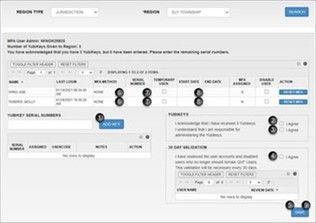
The steps to complete are the following:
- For each Yubikey you were issued, click in the “YUBIKEY SERIAL NUMBERS” box, type the numeric portion of the serial number, and click ADD KEY. This includes extra Yubikeys issued in addition to those in use.
- Check “I Agree” to acknowledge receipt of your quantity of Yubikeys. If this number doesn’t match, email mcmillans@michigan.gov.
- Check “I Agree” to acknowledge you understand that you are responsible for administering the Yubikeys.
- Check “I Agree” if you have reviewed the user accounts and disabled users who no longer should remain QVF Users. QVF will prompt the user administrator to complete this new verification step every 30 days. Users should be disabled immediately when election responsibilities or employment ends; please remember new users can be added via the process outlined in the January 11 News Update.
- Click “SAVE”.
- Assign each user their MFA Method by clicking in the box next to “NONE” and selecting Phone or Yubikey.
- For users with a Yubikey, enter the serial number. For Phone users, skip this step.
- Select the “START DATE” (the day you are entering the information). Please note that only temporary users should have end dates.
- Click “SAVE.” Users’ “MFA ASSIGNED” will update to “Y”.
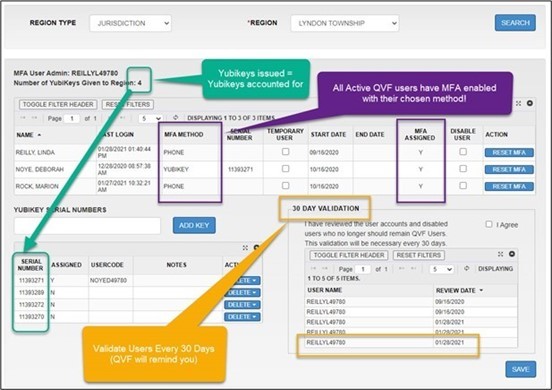
Your MFA setup is complete when you have completed receipt acknowledgement (all steps above) and:
- Your assigned Yubikey count matches the quantity of Yubikeys you have accounted for.
- All Active QVF users have MFA assigned and enabled.
- You have validated your users within the last 30 days.
|