|
March 30, 2018

QVF Refresh Complete Class Now Available to All
If you haven’t registered for QVF training or
wanted to upgrade to the Complete
version, classes in April are now available to everyone. The posted
sessions are the only dates that are scheduled.
Please use the Custom Report - QVF Refresh Class Complete Sessions to
see the available classes. View the Help Document: How to Register for Classes.
Each person must register under their own
account in the Elections eLearning Center under Browse by Subject, Classes. New staff members should complete the Election Account Request Form to
receive an account in order to register.
|
 QVF Refresh Update
The following software changes have been made to QVF
Refresh.
- Ballot numbers are now showing up in AV Scan when selecting Print Now for the Dymo label.
- Ability to sort AV Labels by last name, ballot number, or issue order.
- Ballot number is in a consistent format in the Activity Log portion of the AV Scan screen.
- The capture date for a voter’s signature appears when you hover over it on the Voter Registration record.
- The Inbox Action filter remains when you leave the screen and come back.
- An ID Card preference has been added to User Preference screen allowing them to add or remove clerk name from voter ID card.
- Dymo Labels are now printing from the Print Queue.
- The voter’s edit button from the Voter Search screen now includes a check mark when a signature is present.
- The Ballots Sent and Returned Summary now includes voters who were sent a ballot.
- Show “Closed Messages” in Inbox reloads the Action Types to include those that were closed.
As a reminder, please use the updated QVF Refresh Troubleshooting Guide
found in eLearning to assist you with setting up your printers and Dymo label printer to print out labels, notices, reports, etc.
Problems reported to QVFHelpDesk@michigan.gov or in the QVF voicemail box are being addressed. Many times the problems reported are items others have reported. If you don't receive a response, please know we have noted the problem and are working to correct it as soon as possible. Thank you for your patience as we work through the defects you are reporting.
|
eLearning Center Transcript Box
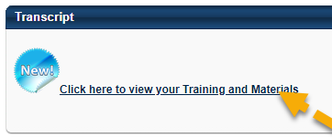
Cornerstone OnDemand, the eLearning Center service provider, recently made a change to the Transcript Box functionality. To view your transcript, you should now click on the link in the Transcript box that says "Click here to view your Training and Materials" (see image below). This will take you to the full Transcript page where you can view items that are active and complete. To view the items that are complete, simply change the Active dropdown to Complete.
For full instructions on how to manage your Transcript, refer to the eLearning Center Transcript Management Help Document.
|