|
October 26, 2016 - Special
ePollbook Edition
This issue is the second in a series of special editions
focusing solely on the ePollbook. Leading up to election day,
the QVF Help Desk's call volume increases exponentially with the majority
of those calls relating to the ePollbook. This series of Special Edition
News Updates will provide you with troubleshooting information for common
EPB problems, as well as guide you to the many resources available to assist in
the successful operation of the ePollbook.

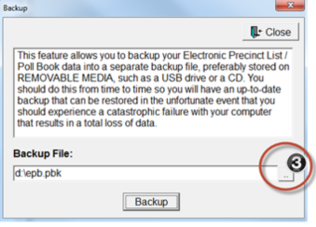
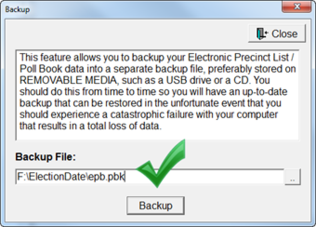
Correctly doing the first backup of the day is
essential! The file location default to the laptop itself, but
your inspectors must take additional steps to navigate to the encrypted flash
drive! They must not skip pg. 6, step 3 of the Inspector's User Manual.
Make sure the backup file path indicates the correct drive, and election date
folder on the flash drive.
Before...
|
 After...
Resources: Electronic Pollbook User Manual for Windows 7
& Verbatim Flash Drives pg.19, Electronic Pollbook Election Inspectors
Manual for Windows 7 or Windows 10 pg.6
 Reverting to Paper
If the ePollbook becomes inoperable on Election Day, be prepared to revert to the paper system. The Bureau of Elections has created Using the QVF Precinct List - a quick guide on how to use the QVF Precinct List when the ePollbook is inoperable on Election Day.
The Using the QVF Precinct List Guide includes:
- A list of supplies needed to convert to the paper system
- Instructions on how to use the Precinct List
- A List of Voters that may be printed and used to insert into the EPB Binder Pollbook
- Precinct List Notes
- A Ballot Summary that may be printed and used to insert into the EPB Binder Pollbook
|
Absentee Ballots - Do Not Spoil in the
Precinct!
Three common AV scenarios are listed below that often confuse
election inspectors. Election inspectors want to DO something in the EPB
in these scenarios when it's simply not necessary. Have them think
"What would paper pollbook do?"
1. If a voter surrenders their AV ballot or completes
the Affidavit of Lost or Stolen Absentee Ballot, the voter is no longer
considered an AV voter. Process the voter using the Regular ballot button. Nothing
else needs to be recorded, although inspectors may add a remark.
2. If an AV ballot needs to be duplicated on Election Day,
record the AV ballot returned by the voter with the ET or original ballot
number in the ePollbook as usual. Then, simply put the ballot in the auxiliary
bin to be processed after the polls close. You won't know who that
voter is and we don't want to identify or associate a duplicated ballot
with a voter so nothing else needs to be recorded. Duplicates will be
accounted for in the Ballot Summary at the end of the night.
3. AV ballots spoiled in the Clerk's office that were recorded
in QVF, are ignored in the ePollbook, and are irrelevant to Election Day.
They should not be sent to the polls for processing and are not included
in the Ballot Summary report.

User Accounts
Every election inspector who will use the Electronic Pollbook
needs their own user account. Follow the simple steps on pg. 16 of the
Electronic Pollbook User Manual for Windows 7 or pg. 14 of the User Manual for
Windows 10 to create these accounts.
Remember…
- Check “Admin User” only for the main EPB user or
precinct chairperson.
- When a user leaves their post, they should log out of
the ePollbook and let the next user log in. See Electronic Pollbook User
Manual for Windows 7 pg. 29 or the Inspectors Manual for Windows 7 pg. 17.
Windows 10 users should see the User Manual for Windows 10 pg. 26 or the Electronic
Pollbook Election Inspector’s Manual for Windows 10 pg. 16.
If you are not sure who is logged in, look
at the bottom of the screen.
|
 Resources: Electronic Pollbook User Manual for Windows 7
& Verbatim Flash Drives pg.16, Electronic Pollbook User Manual for Windows
10 & BitLocker Flash Drives pg.14, Electronic Pollbook Preparing the EPB
Software for Election Day Tutorial Video Clip
|