 The
holidays are over and the overeating is done. Did you hold it for the holidays?
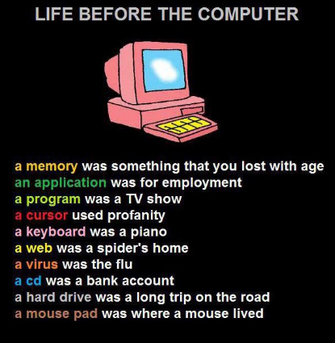
This may be a good time to talk about “Bufferbloat.” That feeling you get when
you’re full and can’t eat anymore but there is still a table full of food. In
the computer world, we have storage called buffers that allows information to
build up while it’s waiting to be processed or sent somewhere. In IT we often
hear about bufferbloat when people call us to say their computer is slow or the
network is slow. Have you ever noticed your phone shows five bars but nothing
seems to be getting through: e-mail or
messages? All possible signs of bufferbloat.
Unlike us, computers cannot expand their stomachs to accommodate more information. So if you have a lot of programs open on your computer, or you’re working on a large Excel document with lots of calculations or macros, or you’re sending or downloading large files over the network, or you’re working on the server during peak hours, you may experience the affects of bufferbloat.
|
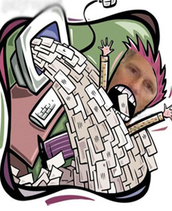
Side effects of
bufferbloat may include “Tail Drop.” That is a rejection by the system.
Latency, or delay while the information ahead of yours is processed. You might
also call this deferment. Bufferbloat also occurs in a more common way, your
mailbox. Before voicemail, you had to actually get someone on the line to pass
information. But now with voicemail and e-mail systems that have large amounts
of storage there is almost no limit to the communication buffer. Consider the
new reality: buffers reduce idle time. And what does that mean? How many of you
check e-mail while traveling, on vacation, during the weekend, during meetings,
in the middle of the night, as soon as you wake up, OR IN THE BATHROOM!?
My hold it for
the holidays effort has focused on my e-mail bufferbloat problem. In November,
I began unsubscribing from nearly every incoming commercial e-mail (taildrop).
While I was away, I turned on my phones temporary greeting and my e-mail
Out-of-office notice (informing e-mail senders to expect latency in my
response). I set up rules so my e-mail was directed to folders. By pre-sorting
them, I could quickly process them. I used the “Clean Up Folders &
Subfolders” option in Outlook to remove duplicates. The results? It’s still
something I need to continue to work on. Bufferbloat is something I need to
deal with every day.
Back to Top
|
 January brings with it a
new year…… and a Super bowl! Everyone
knows that it takes a great team, led by great coaches to make it to the Super
bowl. We are very fortunate to have such
a team within the County’s IT department.
Last month we acquainted you with Coach Pavlak (GIS), and we continue
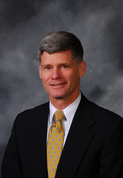
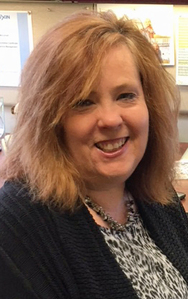
this month with an introduction to our Project Manager, Coach Tina McConnell.
How did you end up in IT?
Actually, it was never my intention to end up in IT. I graduated from the University of Michigan
with a BA in Psychology and an Elementary School Teacher’s Certificate. My plan was to teach, so I was applying for
teaching jobs and planned to substitute teach in the fall if I did not find a
full time position. In the meantime, right
after graduation, I got a summer job at Holland Hitch in their IT Department assisting their IT Secretary. They did
not have a formal Help Desk, but my phone number was the number that staff
called to get assistance. I would help
them or record their issue and pass it onto a programmer. At the time, Holland Hitch was just starting
a project to move to Windows computers and install Microsoft Office. Towards the end of the summer, the IT
Director, came to me with a proposal.
He wanted to keep me on beyond the summer in a flexible manner. If one of the schools called me to sub, I
could do that, but on any days that I did not get a call, I would come in to
work there. He also asked me if I could
develop a training program for Microsoft Office for their staff and conduct
classes. I had experience teaching, and
I had experience using Word and Excel from college. I ended up working for Holland Hitch for 2
years, and I traveled to each of their locations in South Carolina, Missouri,
and Arkansas to teach my Microsoft Office classes. After a year of substitute teaching and
working at Holland Hitch, I had discovered that I liked teaching adults much
better than kids.
What are your major job
functions?
I wear a lot of different hats in the IT
Department. My title is Project
Management Coordinator. I do some project management, some process
management for internal IT processes, Service Management, and Business
Relationship management. Basically, it
all boils down to making sure our customers are getting the best service
possible!
How long have you worked
for the County?
I’ve been at the County for 12 years.
What was your very first
job?
Little Caesars, making the pizza, crazy bread and taking orders over the
phone.
What did you aspire to be
as a child?
I honestly don’t ever remember having one specific career that I wanted to
do. I started college as a pre-med
student, got a degree in Psychology and a teacher’s certificate, and ended up
in IT. Go figure!
Did you go to
college? If so, what college and what was
your major?
University of Michigan – GO BLUE!
Majored in Psychology and Education
Where are you from
originally? If not this area, how did
you end up here?
I have always lived in Michigan. We moved to Holland from Owosso, MI when I
was 10, and I now live less than a mile from the home in Holland where I grew
up.
Are you married? If so, spouse’s
name?
I’ve been married to Jack for almost 21 years.
Do you have Children/grandchildren? If so, names and ages?
I have 2 kids. Kaylie, 18, is a freshman at the University
of Michigan Dearborn, majoring in Engineering and playing on their softball
team. Jaxson, 16, is a sophomore at West
Ottawa High School.
Do you have any Pets?
I’ve always thought I was a dog person,
because we always had dogs when I was growing up, but we have two cats right
now, Toby and Keiko. I’m thinking about adopting a golden retriever
puppy in the spring, but we’ll see.
Do you have any Hobbies?
I love to read. My favorite author is Stephen King, I think
I’ve read everything he’s ever written, except for the Dark Tower series. I also like to see movies. My dad took me to see the original Star Wars
7 times in the theater. Harrison Ford
has always been my favorite actor. I
joke that Han Solo and Indiana Jones were the first men I ever loved. I was crushed when I saw A Force Awakens and Han
died! I think my husband was a little
jealous. I also have always loved to do jigsaw
puzzles, the more difficult and bigger, the better. I like to do crafts, but there hasn’t been a
lot of time for that hobby while raising kids.
I listen to music. I’ve been told that my musical taste is not what
people would expect. It’s a little
eclectic. I’m partial to rock bands from
the 80s, especially Bon Jovi, but actually enjoy the same music my teenagers
listen to, which is what is usually playing loudly in my car. My daughter and I have gone on several road
trips together singing along with Pitbull and Meghan Trainor. Finally, I love to watch my kids play sports,
especially softball, and I’m looking forward to softball at the collegiate
level this spring.
What do you enjoy doing in
your spare time in addition/in place of any hobbies?
I’m a huge believer in life-long
learning. I have a Master’s degree in
Information Technology that I got when my kids were little because I felt I
needed to justify my career in IT with a degree. Currently, I am working on another Master’s degree
in Information Technology Management.
Did you have a favorite toy growing up?
Puzzles and books. I also loved Legos, but never had any of my
own. My little brother would get Lego
sets for presents, and I would “help” him follow the instructions to build
it. Helping usually consisted of taking
over, and making sure the directions were followed. Can
you tell I’m a first born child?
In your opinion, what is the greatest
technological advance of our time?
I would have to say the smartphone. My dad worked in IT and I remember when I was
little going with him to work and seeing the huge computers and disk
drives. Now, we hold that power in the
palm of our hands.
If you could have lunch
with any person living or dead, who would it be and why?
Although there are a ton of people I would love to talk to, I have to say my
mom. Both of my parents passed away from
Alzheimer’s in the past 4 years, my mom first.
My dad was able to cover for mom for a long time, so by the time the rest
of us realized she was really sick, she was beyond conversation. I miss
talking to her, and I have a ton of questions I never got to ask her.
If you knew you were going
to be were stranded on a deserted island, what is the one item you would bring
with you?
My Kindle loaded with books!
Back to Top
|
 Congratulations to Aaron Becker who has achieved certification as a CISCO-Certified
Network Associate(CCNA). This challenging certification requires a strong
knowledge of network setup and configuration. Aaron achieved this through
self-study, classroom work, hands-on experience, and after passing two
certification exams. Congratulations Aaron!
Back to Top
|
 |
Fillmore Main Conference Room Technology Update
Beginning in February, the main Conference room at the
Fillmore campus will be getting a much needed technology facelift. New
hand-held and ear-set/headset microphones will be included in the
refresh. The new mic system will allow up to six presenters to be “wired”
at a single time. We will be introducing a wireless presentation gateway
that will allow a wireless connection to the system to present content.
We will be replacing the low lumen DLP projectors with high lumen laser
projectors. The change in projector technology will produce better colors
and brighter projected images. In addition to the projectors, we will be
getting a RoboTRAK Presenter Tracking System. It works when the presenter wears a lanyard
containing an infrared signal source. The RoboTRAK IR Camera follows the
lanyard and directs movements of the RoboSHOT video camera. RoboTRAK
makes presenter tracking intelligent and automatic, and eliminates the need for
dedicated camera operators. (Vaddio, 2017). Incorporated with the
RoboTRAK is the Extron 300 Streaming Media processor that will allow to easily
record or stream content to YouTube Live, Facebook Live, UStream, and many
other streaming formats allowing remote users to enjoy the LIVE
experience. SoundCom will provide training on the new system on February
8 at 2:00pm in the Main Conference Room Fillmore Campus.
Phone System
The IT Department is
getting closer to the end of the process of developing the Request for Proposal
(RFP) to replace our phone system with our consultant, Secant
Technologies. Secant is beginning to create a first draft and get answers
to lingering questions. They are also continuing to review network
upgrade configuration options in light of our network video recording RFP which
is also in process. Communication continues between us and Secant with a
goal of releasing the RFP as soon as possible.
Watch for further
updates in future IT newsletters.
Back to Top
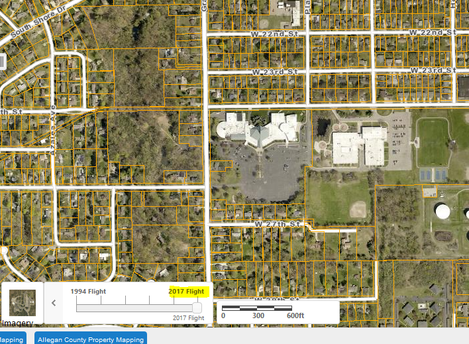
“Didn’t we get new aerial photos last year?” was one of the
more frequently asked questions I got in 2017. My response usually was “Yes,
but….”. Unfortunately, the flight failed to meet the specification of the
contract, so this means that we will be having another flight in the spring of
2018.
The 2017 imagery was still given to us and has been added to
most of our applications, so feel free to use it but know there are some issues
with the quality of the data.
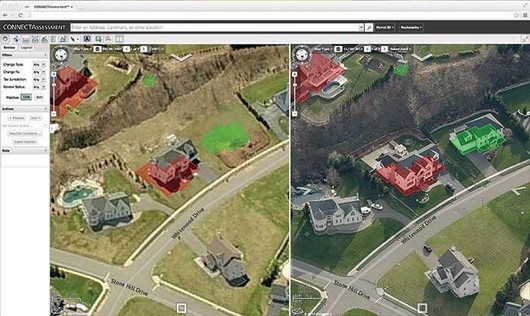
We have also contracted with Pictometry to provide us with
change analysis between the 2014 and 2018 imagery, and then again in 2020. With
Pictometry’s ChangeFinder deliverable we will be able to easily find any
structural changes that have occurred on a parcel.
Story map of the month:
The Life and Words of Dr.
Martin Luther King Jr.
https://storymaps.esri.com/stories/2017/mlk/
If you have any questions, please reach out to Shane Pavlak,
GIS Supervisor, at spavlak@miottawa.org
or call at 738-4602.
Back to Top
How to Take Screenshots in Windows 10
Snapping screenshots can be
extremely useful for quickly showing someone something from your desk top,
capturing an error, or creating manuals and procedures. The following tools have been around for
quite some time, but aren’t always obvious to users. They are native to the Windows operating
systems and should work on most Windows versions.
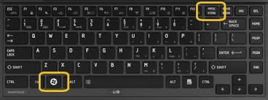
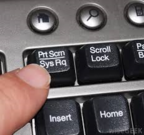 Print Screen
Pressing this key will copy your entire screen (or
multiple screens) onto the clipboard.
You can then paste it into any program that will allow you to paste an
image.
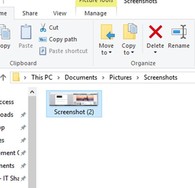
Windows Key + Print Screen
This function was an “upgrade” in Windows 8, but also works
for 10. Pressing these keys
simultaneously will again capture your entire screen (or screens) and automatically
saves it to a folder located in Pictures
> Screenshots.
|
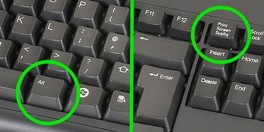
Alt + Print Screen
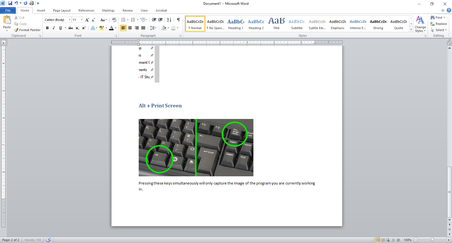
Pressing these keys simultaneously will only capture the
image of the program you are currently working in. I have taken an Alt + Print Scrn capture
below as an example. As you can see, it
only captured the Word document I was working in.
Back to Top
|