HOW TO SUBMIT COMMENTS OR QUESTIONS IN ADVANCE FOR THE MAYOR’S TASK FORCE ON COMMUNITY SAFETY VIRTUAL TOWN HALL MEETING
If you are interested in submitting comments or questions to be read by the moderator for the scheduled Town Hall meeting on January 19th, 2021 please utilize the form available at the following link:
https://forms.gle/f83wvLUSWHoVSMxP9
or by submitting an email directly to publicsafety@cityofbakerla.com. Please note, that this email address accepts incoming mail only and is not used for outbound correspondence.
Please be aware that the following guidelines will be strictly enforced.
All emails sent to publicsafety@cityofbakerla.com must contain:
- Resident/Business Owner Information
- First and Last Name
- Full Address
- City, State & Zip Code
- Comment or Question
- Any comments or questions submitted via this form will be accepted until 12:00 noon Monday, January 18, 2021, to allow for retrieval and compilation of questions in preparation for the Town Hall Meeting.
- Any comments that do not contain the above listed required items will be discarded.
- Duplicate comments or questions will only be read once.
- Inappropriate content will be excluded.
Thank you in advance for supporting our efforts to move Baker forward together. We look forward to working with the members of our community to improve the safety and quality of life for all.
HOW TO ATTEND AND/OR PARTICIPATE IN THE MAYOR’S TASK FORCE ON COMMUNITY SAFETY VIRTUAL TOWN HALL MEETING
How to join the Virtual Town Hall webinar:
https://zoom.us/j/92757471084
Or iPhone one-tap for audio only:
US: +13017158592,,92757471084#
Or Telephone for audio only:
Dial US: +1 669 900 9128 and enter Webinar ID: 927 5747 1084
Procedure for Speaking during the Virtual Town Hall webinar:
Each participant will be muted upon entry to the Virtual Town Hall. When the public comment/question session begins each party wishing to speak will be unmuted, one at a time, and given two minutes to speak.
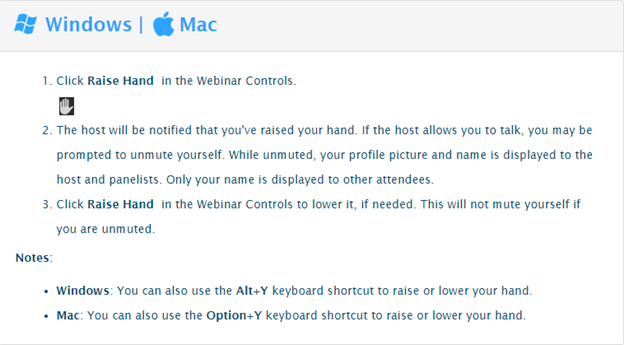
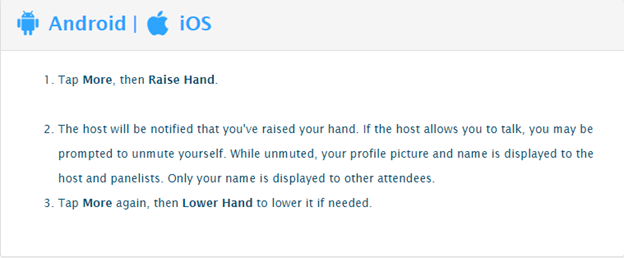
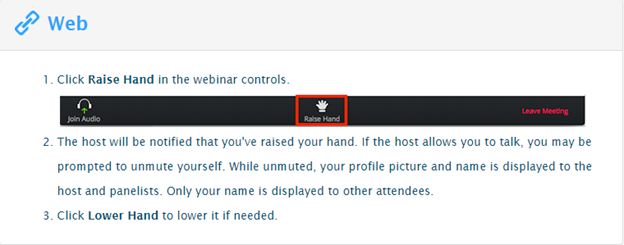
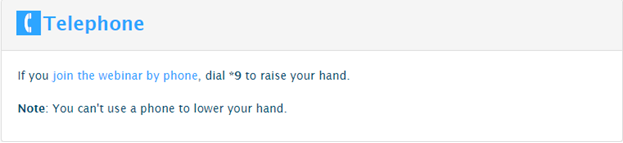
To be recognized as wishing to speak it is necessary for you to “raise your hand” in the zoom application. Persons will be unmuted in the order in which they raised their hands. Following are the directions for the most widely used hardware accessing zoom indicating where you can find the “raise your hand” button and how to request to be recognized if you are dialing in from a telephone.
If you wish to submit a comment or question for the moderator to read on your behalf please feel free to do so by submitting online at https://forms.gle/f83wvLUSWHoVSMxP9.
###
|