|
October 30, 2026
Learn more about the latest enhancements and bug fixes from the past two weeks, along with the latest news and how-to articles.
You can access training materials on the DX Training website. Let the DX team know if you have a suggestion for training materials you'd like to see added.
. . . . .
Meet the New Digital Experience Product Owner and New IT Accessibility Officer
On Friday, Oct. 16, we said goodbye to Natalie Sipes, Digital Services Portfolio Manager.
In September we welcomed Logan Essy as the new Product Owner for the Digital Experience Platform. Logan has 5+ years with the State of Iowa, previously supporting DOT products. His background is in digital products, business analysis, and process improvement. |
|
 |
 |
|
In October, we welcomed Paola Sepulveda to DOM DoIT as the IT Accessibility Officer. In her new role, she will build and advance a statewide digital accessibility program, including strategy, governance, and collaboration across state government. Paola will also work to develop processes to help empower teams to develop sustainable practices to embed and support accessibility within their work, products, and services to continue improving digital experiences for all Iowans.
|
. . . . .
Independent Accessibility Testing Underway for Iowa DX and Marketing Platforms
To help ensure the Iowa DX and Marketing platforms are accessible to every Iowan, Lullabot - the State’s Drupal development vendor - has partnered with the Blind Institute of Technology (BIT).
BIT’s accessibility consultants are certified professionals with disabilities who use assistive technologies in their own daily work. They are manually auditing every component of the Iowa DX and Marketing platforms using the most widely adopted screen readers, identifying real world barriers that automated tools often miss.
|
BIT delivered its first set of findings in early October, and Lullabot is now implementing accessibility improvements to address each item. Once that work is complete, BIT will conduct a second round of testing and produce a formal Accessibility Conformance Report (ACR) in the industry standard Voluntary Product Accessibility Template (VPAT) format.
This independent report will provide the State with documented evidence of the platforms’ accessibility, giving agencies confidence that the sites they build rest on a foundation designed and tested to be usable by everyone.
Clear Formatting Button Not Working
Problems clearing formatting with the Clear Formatting button in the Drupal WYSIWYG toolbar is fixed. If you've had issues with text wrapping in odd spots or other formatting problems, you shouldn't see those anymore if you're using that button.
Need help, have a suggestion for a Drupal enhancement, or think you've found a bug?
Submit a ticket through ServiceDesk Plus for DOM DoIT Digital Experience(DX) & Digital Services.
Please submit a ticket rather than emailing,
messaging, or otherwise contacting the DX team.
By using ServiceDesk Plus we can better track tickets as a team and have the solutions available as future resources for all DX team members.
|
Stay up to date with the latest training resources created specifically for content managers. Whether you’re looking to strengthen your skills or streamline your website updates, this section will keep you informed and ready for new challenges. Visit the DX Training website to brush up.
You can review a PDF of the slide deck from the October 2026 Content Manager meeting on the DX Training website.
|
|
 |
. . . . . .
How To: CivicPlus Social Media Archiving Reports
What Your Social Media Data Can Tell You About Your Community - from CivicPlus
CivicPlus Social Media Archiving offers additional insights about your social media accounts included with your account. Reports include:
-
What content resonates
Your Sentiment Report shows which social media posts drove positive or negative reactions, month by month. Your team can point to actual posts and share that story with leadership.
-
Who's shaping the conversation
Every community has its most active voices. The Top Commenters Report surfaces them, so you know who's driving engagement and where to focus your outreach.
-
Where your audience actually is
The Social Media Network Usage Report breaks down activity by platform. If your residents are more active on Facebook than X, that's worth knowing before your next campaign.
-
Which accounts need attention
The Social Media Activity Comparison Report flags accounts that post often but get little response, and accounts that have quietly gone dormant.
-
How your archive is performing overall
The Archive Activity Report gives you a snapshot of records preserved and activity levels over time, useful context when you're demonstrating impact internally.
For a full walkthrough of what's available, visit the Social Media Archiving Reporting Overview in the CivicPlus Help Center.
For a general overview of CivicPlus, visit the DX Training website.
. . . . .
How To: Qualtrics - How to Brand and Theme
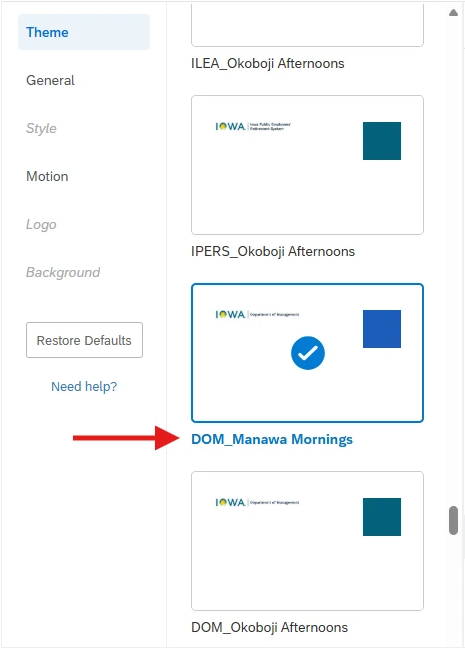
The DX Steering Committee established guidelines to ensure every agency survey is consistent and meets accessibility requirements. When creating a survey in Qualtrics, you can select a theme that aligns with your agency’s website branding and the Iowa Brand standards, including approved colors, fonts, logos, and layout.
Find step-by-step instructions on how to brand your surveys.
 . . . . .
Qualtrics: Stay Up to Date and Get Support
Looking to stay current with Qualtrics resources and program updates? All previous bulletins are available on the Qualtrics Bulletins page anytime.
We offer multiple support options to help you succeed, including on‑demand training, Basecamp resources, one‑on‑one sessions, Office Hours, and more. You can access all of these on the Qualtrics Training and Support page.
Weekly Content Manager Office Hours
Need help or have questions? Join our live office hours every Thursday from 1-2 p.m. CDT. No registration is needed - simply click the live meeting link available on the DX Training page during the scheduled time. The DX team will be there to assist with troubleshooting, platform refreshers, or any other questions you have.
Weekly DX Training Classes
The weekly DX course is designed for new users and those looking for a refresher on the platform basics. You can register directly on the DX Training website: Weekly DX Training Classes. You can also view videos and PowerPoint presentations of the trainings on the DX Training website.
CommonLook Training
You can find more information about CommonLook products and links to their training sessions and support on the DX Training website. Find upcoming CommonLook Training Office Hours.
Find additional CommonLook resources with video demonstrations.
MSF&W Accessibility Weekly Office Hours
Every Wednesday at 9 a.m. CDT, you can join MSF&W’s accessibility experts to ask your questions. If you’re unsure how to fix a table or form, or need guidance on writing appropriate alternative text, feel free to drop in - no reservation required. Visit Accessibility Training on the DX Training website for the Teams meeting link.
MSF&W Accessibility Training Playlist
You can find past MSF&W accessibility training recordings of topics such as Accessible Images, PowerPoint, Excel Tables, Forms, and more within the DOM Digital Experience YouTube Channel.
YouTube Channel
New and updated training videos are being added to the DOM DoIT Digital Experience YouTube Channel and linked within DX Training website pages. You can subscribe to the channel to be notified when new videos are added.
|