|
October 16, 2026
Learn more about the latest enhancements and bug fixes from the past two weeks, along with the latest news, how-to articles, and videos.
You can access training materials on the DX Training website. Let the DX team know if you have a suggestion for training materials you'd like to see added.
. . . . .
News
Mark Your Calendar
Qualtrics Review and Approval Process Training: Best Practices and New Republishing Steps
Tuesday, October 27, 2026
10 a.m. to 12 p.m.
Microsoft Teams
This training walks survey creators and approvers through the review and approval process, highlights the most common mishaps we see during review, and introduces a new, easier way to republish surveys. Whether you're new to the review and approval process or just want a refresher, this session will be valuable for all Qualtrics users.
This training will cover:
- The review and approval process, step by step
- Best practices and the most common mishaps to avoid
- Launching a new, easier way to republish
The Microsoft Teams link and other joining information can also be found on the DX Training website.
. . . . .
Enhancements and Bug Fixes
Using <nolink> on a Child Menu Fixed
You can now add a child link that is only a title but doesn't have a link to a menu and add linked items under it. This can be especially beneficial for Book pages. You can see a working example on the DX Sandbox website. The menu item Child Menu is not a link, but it has one active link underneath it.
Main Menu Navigation Showing Plus Signs Fixed
If you’ve ever tried to view your website menu under Structure > Menus > Main Navigation and see a lot of plus signs, this has been fixed. It had randomly happened on two or three sites.
Reduced Whitespace Above and Below Microcontent Blocks
Extra padding above and below Promos and other microcontent blocks on Landing pages has been reduced, resulting in tighter, more consistent spacing for site editors and visitors.
Improved Internal Link Detection for Complex Iowa Domains
The platform now correctly identifies multi-level iowa.gov subdomains like wcc.ccc.iowa.gov as internal links rather than external, preventing incorrect external-link indicators on your website next to links. If there was more than one level in front of .iowa.gov, Drupal was indicating this was an external site.
Need help or think you've found a bug?
Submit a ticket through ServiceDesk Plus for DOM DoIT Digital Experience(DX) & Digital Services.
Please submit a ticket rather than emailing,
messaging, or otherwise contacting the DX team.
By using ServiceDesk Plus we can better track tickets as a team and have the solutions available as future resources for all DX team members.
Training Corner
Stay up to date with the latest training resources created specifically for content managers. Whether you’re looking to strengthen your skills or streamline your website updates, this section will keep you informed and ready for new challenges. Visit the DX Training website to brush up.
You can review a PDF of the slide deck from the October 2026 Content Manager meeting on the DX Training website.
|
|
 |
. . . . . .
How To: Google Analytics
Updated content on the DX Training website now offers expanded guidance on Google Analytics, including screenshots that show exactly how to access detailed information about your website traffic.
To find the most popular pages on your website, go to Google Analytics: Reports > Business objectives > View user engagement and retention > Pages and screens - Most accessed pages. This insight can help you identify which pages to prioritize for updates or fresh content. You can also use these high‑traffic pages as starting points that guide visitors to harder‑to‑find or time‑sensitive content.
Organic search traffic refers to the number of visits or sessions your top website pages receive from unpaid search results. To view this data, go to Google Analytics: Reports > Search Console dropdown > Search Console > Google organic search traffic. These pages represent some of the most valuable content on your site, and identifying them can help you decide which pages to prioritize for updates, fresh content, or optimization.
Traffic sources
Find out where your website traffic is coming from by navigating to Google Analytics: Reports > Life cycle > Acquisition > Traffic acquisition. In the Session Primary Channel Group dropdown, select Session source/medium to see the exact sources driving visitors to your site. Did you recently send an email newsletter, post on social media, or receive a mention on another website? This view shows which efforts brought the most traffic. Understanding this data is essential for making informed decisions about how to attract more visitors to your website.
Most Popular Keywords and Phrases
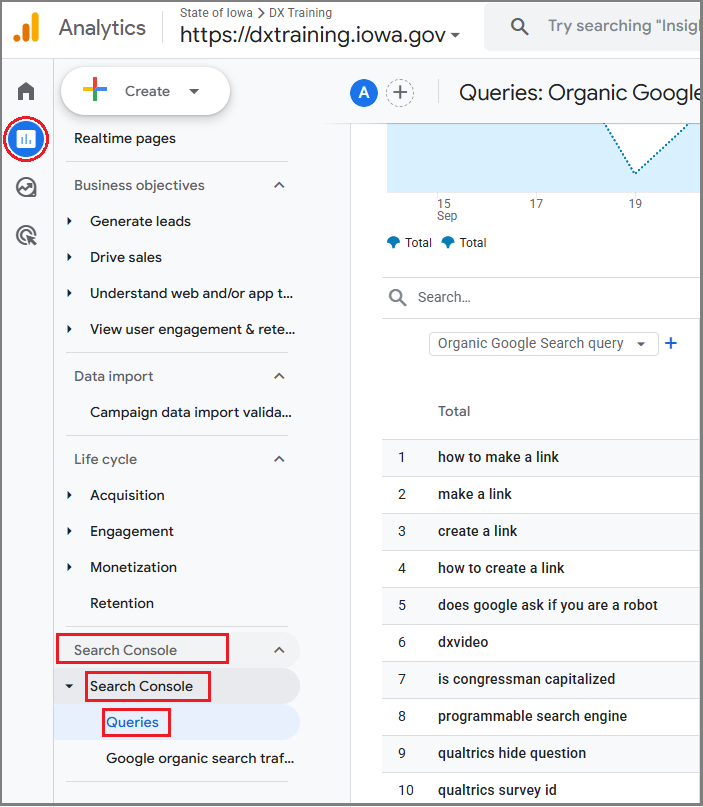
To see the specific words or phrases people typed into Google Search before clicking through to your website, go to Google Analytics: Reports > Search Console > Search Console > Queries. This information can help you update your webpage summaries and content by including these terms, making it easier for both search engines and visitors to find your pages.
Explore more information about Google Analytics, complete with screenshots that illustrate where to find the data referenced above.
. . . . .
How To: Avoid a Common Error When Saving a Page with a List
You created an FAQ list, an Automatic List, a Link Collection List, or a Visual Link Collection List and embedded it in a page, but you keep getting an error when trying to save the page. The most likely cause is that your list is still in Draft status. You must publish the list before embedding it for it to display correctly on a page. The page itself can remain in Draft, Review, or Published status.
. . . . .
Learning Opportunities
Qualtrics: Stay Up to Date and Get Support
Looking to stay current with Qualtrics resources and program updates? All previous bulletins are available on the Qualtrics Bulletins page anytime.
We offer multiple support options to help you succeed, including on‑demand training, Basecamp resources, one‑on‑one sessions, Office Hours, and more. You can access all of these on the Qualtrics Training and Support page.
Weekly Content Manager Office Hours
Need help or have questions? Join our live office hours every Thursday from 1-2 p.m. CDT. No registration is needed - simply click the live meeting link available on the DX Training page during the scheduled time. The DX team will be there to assist with troubleshooting, platform refreshers, or any other questions you have.
Weekly DX Training Classes
The weekly DX course is designed for new users and those looking for a refresher on the platform basics. You can register directly on the DX Training website: Weekly DX Training Classes.
CommonLook Training
You can find more information about CommonLook products and links to their training sessions and support on the DX Training website. Find upcoming CommonLook Training Office Hours.
Find additional CommonLook resources with video demonstrations.
MSF&W Accessibility Weekly Office Hours
Every Wednesday at 9 a.m. CDT, you can join MSF&W’s accessibility experts to ask your questions. If you’re unsure how to fix a table or form, or need guidance on writing appropriate alternative text, feel free to drop in - no reservation required. Visit Accessibility Training on the DX Training website for the Teams meeting link.
MSF&W Accessibility Training Playlist
You can find past MSF&W accessibility training recordings of topics such as Accessible Images, PowerPoint, Excel Tables, Forms, and more within the DOM Digital Experience YouTube Channel.
YouTube Channel
New and updated training videos are being added monthly to the DOM DoIT Digital Experience YouTube Channel and linked within DX Training website pages. You can subscribe to the channel to be notified when new videos are added.
|