|
October 2, 2026
Learn more about the latest enhancements and bug fixes from the past two weeks, along with the latest news, how-to articles, and videos.
You can access training materials on the DX Training website. Let the DX team know if you have a suggestion for training materials you'd like to see added.
. . . . .
News
New Look for Acquia Optimize
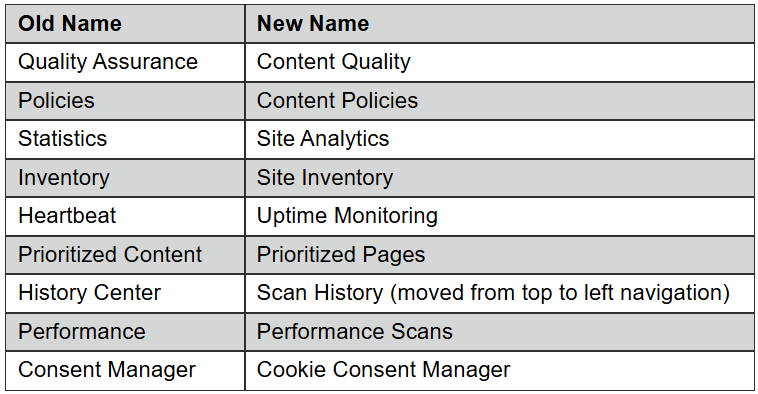
Acquia Optimize has redesigned the Accessibility Module, refreshed Site Analytics, and modernized their navigation layout. You can watch the video walkthrough or explore the release article to get familiar with all the updates. All the statistics and information are still available, just in different places or have been renamed.
To support the new design the Acquia Optimize pages on the DX Training website have been re-organized and combined for a better user experience with easier to find information reflecting the new user interface.
Links have been added to go directly to the Acquia Optimize Help Center for the most up-to-date answers, instructions, and screenshots.
. . . . .
Qualtrics Review and Approval Process Training
Join the Qualtrics team on Tuesday, Oct. 27, 2026, from 10 a.m. to 12 p.m. for Review and Approval Process Training: Best Practices and New Republishing Steps.
This training walks survey creators and approvers through the review and approval process, highlights the most common mishaps we see during review, and introduces a new, easier way to republish surveys. Whether you're new to the review and approval process or just want a refresher, this session will be valuable for all Qualtrics users.
Get more information and the link to the Teams meeting.
. . . . .
CommonLook Office Hours and Forms Training
Are you trying to remediate a document using CommonLook but have questions? Allyant holds CommonLook Office Hours every Tuesday and Friday. You can view their training calendar on the Allyant website. You don't have to sign up for open office hours, and the Zoom link is provided for each session.
Allyant is also hosting a Stepping Stones in CommonLook PDF - Desktop & Advanced Editor - Forms training session on Thursday, Oct. 8, at noon if you would like to learn more about formatting forms.
. . . . . .
Enhancements and Bug Fixes
Media Galleries
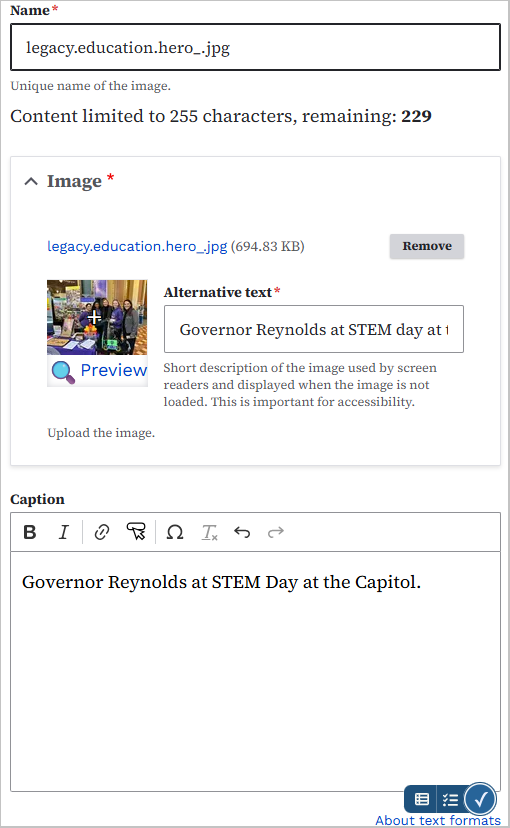
Media Galleries have been added to the Marketing Platform websites. They are also available for the DX Platform websites. You can create stand-alone galleries or embed a gallery in a web page.
You can also add captions to your photos in a Media Gallery by adding captions to the photos in your Media Library.
Learn how to create and embed Media Galleries and add captions by visiting the DX Training website.
Page Numbering on Media Galleries
Page numbering on Media Galleries has been fixed. If you had more than one page of photos, the numbering was backwards on any pages after the first page.
Accessibility Alt Text Warnings in Acquia Optimize for Back to Top and Home Images
Editoria11y was showing warnings in Drupal for the alt text on the Back to top, Home, and Back buttons or images. Their alt text has now been updated with clearer wording to make them fully accessible.
Need help or think you've found a bug?
Submit a ticket through ServiceDesk Plus for DOM DoIT Digital Experience(DX) & Digital Services.
Please submit a ticket rather than emailing,
messaging, or otherwise contacting the DX team.
By using ServiceDesk Plus we can better track tickets as a team and have the solutions available as future resources for all DX team members.
Training Corner
Stay up to date with the latest training resources designed specifically for content managers. Whether you are looking to enhance your skills or streamline your website updates, this section will keep you informed and ready to tackle any new challenges. Visit the DX Training website to brush up.
You can review a PDF of the slide deck from the September 2026 Content Manager meeting on the DX Training website.
|
|
 |
. . . . . .
How To: Exclude Documents from Search
If you have a document on your website that you'd like to hide from search engines, you can easily do that.
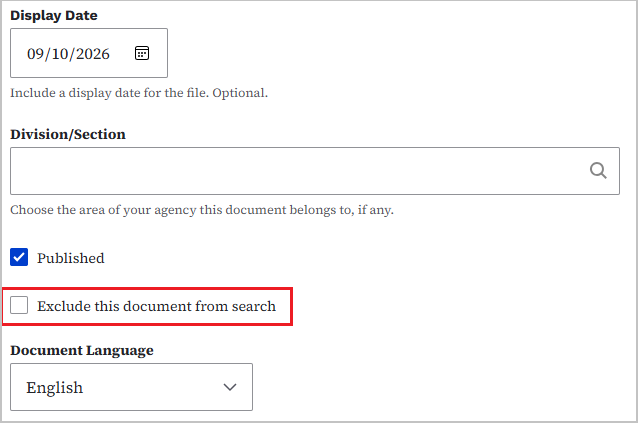
For PDF documents, find the document in your Media Library and select the edit link. Scroll down until you see the Document Language dropdown and you'll see a checkbox just above that says Exclude this document from search. Check the box and your document will be excluded. It may take days to weeks for your site to be re-indexed by search engines for these changes to take effect. If you're logged in to Okta and your Drupal website, you'll still be able to find the documents in a search. To test, you'll need to logout and open an incognito window and test from there.
. . . . .
How To: Exclude Pages from Search
If you have a page on your website that you'd like to hide from search engines, you easily can do that.
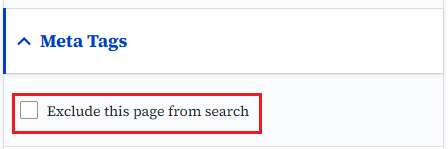
For web pages, open that page in edit mode. Go to the right-hand side of the page options, and you'll see a dropdown box for Meta Tags. In that dropdown, you'll find a check box for Exclude this page from search. Check that box and your page will be excluded.
It may take days to weeks for your site to be re-indexed by search engines for these changes to take effect. If you're logged in to Okta and your Drupal website, you'll still be able to find the documents in a search. To test, you'll need to logout and open an incognito window and test from there.
. . . . .
Learning Opportunities
Qualtrics: Stay Up to Date and Get Support
Looking to stay current with Qualtrics resources and program updates? All previous bulletins are available on the Qualtrics Bulletins page anytime.
We offer multiple support options to help you succeed, including on‑demand training, Basecamp resources, one‑on‑one sessions, Office Hours, and more. You can access all of these on the Qualtrics Training and Support page.
Weekly Content Manager Office Hours
Need help or have questions? Join our live office hours every Thursday from 1-2 p.m. CDT. No registration is needed - simply click the live meeting link available on the DX Training page during the scheduled time. The DX team will be there to assist with troubleshooting, platform refreshers, or any other questions you have.
Weekly DX Training Classes
The weekly DX course is designed for new users and those looking for a refresher on the platform basics. You can register directly on the DX Training website: Weekly DX Training Classes.
CommonLook Training
You can find more information about CommonLook products and links to their training sessions and support on the DX Training website. Find upcoming CommonLook Training Office Hours.
Find additional CommonLook resources with video demonstrations.
MSF&W Accessibility Weekly Office Hours
Every Wednesday at 9 a.m. CDT you can ask MSF&W's accessibility experts your questions. If you are having trouble figuring out how to fix a table or form or need help understanding appropriate alternate text, just pop into the meeting. No reservation is required. Visit Accessibility Training on the DX Training website for the Teams meeting link.
MSF&W Accessibility Training Playlist
You can find past MSF&W accessibility training recordings of topics such as Accessible Images, PowerPoint, Excel Tables, Forms, and more within the DOM Digital Experience YouTube Channel.
YouTube Channel
New and updated training videos are being added monthly to the DOM DoIT Digital Experience YouTube Channel and linked within DX Training website pages. You can subscribe to the channel to be notified when new videos are added.
|