|
September 18, 2026
Learn more about the latest enhancements and bug fixes from the past two weeks, along with the latest news, how-to articles, and videos.
You can access training materials on the DX Training website. Let the DX team know if you have a suggestion for training materials you'd like to see added.
. . . . .
News
CommonLook Office Hours
Are you trying to remediate a document using CommonLook but have questions? Allyant holds CommonLook Office Hours every Tuesday and Friday. You can view their training calendar on the Allyant website. You don't have to sign up for open office hours, and the Zoom link is provided for each session.
Allyant is also hosting a Stepping Stones in CommonLook PDF - Desktop and Advanced Editor - Tables of Contents training session on September 24 if you have questions on formatting Tables of Contents.
. . . . . . . . . .
Enhancements and Bug Fixes
Need help or think you've found a bug?
Submit a ticket through ServiceDesk Plus for DOM DoIT Digital Experience(DX) & Digital Services.
Please submit a ticket rather than emailing,
messaging, or otherwise contacting the DX team.
By using ServiceDesk Plus we can better track tickets as a team and have the solutions available as future resources for all DX team members.
Training Corner
Stay up to date with the latest training resources designed specifically for content managers. Whether you are looking to enhance your skills or streamline your website updates, this section will keep you informed and ready to tackle any new challenges. Visit the DX Training website to brush up.
You can review a PDF of the slide deck from the September 2026 Content Manager meeting on the DX Training website.
|
|
 |
. . . . . . . . . .
How To: What Can Acquia Optimize Do For Me?
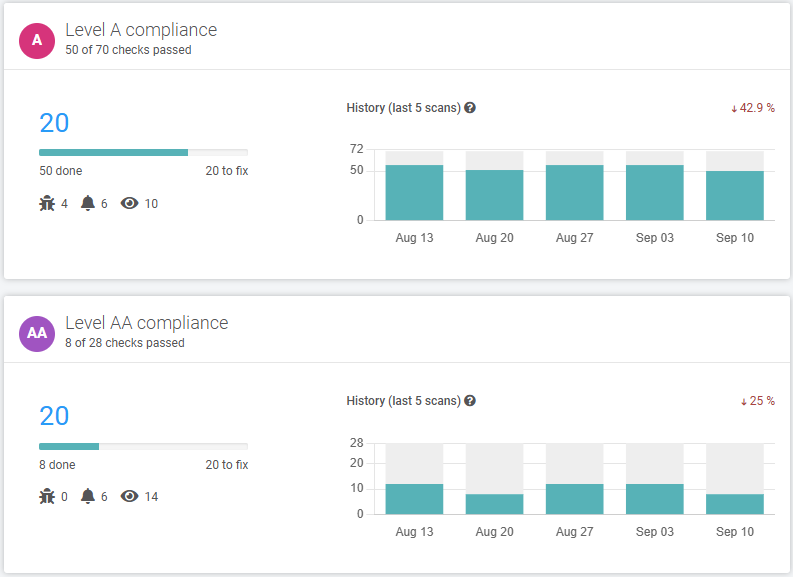
We've refreshed the information and added additional information about Acquia Optimize on the DX Training website, specifically why you should be addressing your accessibility errors and warnings. Don't be intimidated! Acquia Optimize provides several features to help maintain your website:
-
Weekly Reports: Get regular reports on broken links, spelling errors, and other issues.
-
On-Demand Scanning: Scan your website whenever needed to identify any new issues.
-
Statistics: See which pages are getting the most or least visitors, helping you prioritize website updates.
-
Accessibility Checks: Identify accessibility issues that may prevent people with disabilities from using your website, and make sure your website is ADA compliant.
-
Readability / Reading Level Analysis: Understand the complexity of your website content and ensure it's easily understood by a wide audience. This can be found at the bottom of the Quality Assurance tab. If you'd like to work on lowering your content reading level and have a state approved AI license for CoPilot, Claude, Gemini, or other AI software, you can copy and paste content text and ask it to simplify your text. Be sure you're using detailed prompts and do a quick review before using to make sure the final version is not only clear but accurate.
-
Inventory: Curious how many HTML pages and how many documents you have on your website? Select the Inventory tab and scroll to the bottom of the page under Content.
Learn more about Acquia Optimize on the DX Training website.
. . . . . . . . . .
Use Caution with URL Redirects
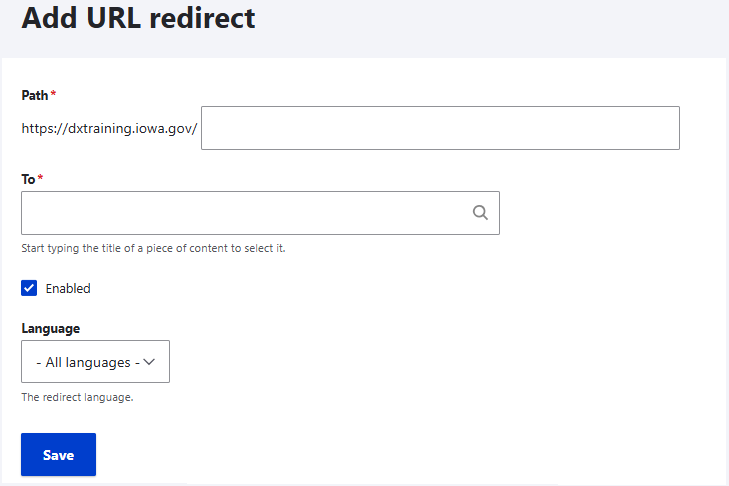
While redirects are essential for site maintenance and URL changes, overusing them or misconfiguring them can harm SEO, slow your site, confuse users, and waste search engine crawl resources. Proper planning and careful implementation are key to avoiding these issues. Official guidance from Google Search Advocates states that a 404 Not Found status code safely signals to Google that a page no longer exists so they can naturally drop it from their search index. It may take Google a few crawls to realize the page no longer exists and it will naturally fall off your page not found report.
Learn more about URL redirects, when to use them, and using caution creating them.
. . . . . . . . . .
How To: Address Your Accessibility Assistance Tickets
Accessibility Assistance Requests are now handled directly through the closed-loop ticketing system in Qualtrics. These requests are generated from the Feedback tab on your website or from the Accessibility Assistance link in your website footer. Each agency has designated an Accessibility Point of Contact who can log in to Qualtrics to efficiently manage and respond to incoming Accessibility Assistance requests.
The requests can be responded to directly from the ticket in Qualtrics and will be automatically tracked. Your Accessibility Point of Contact will also receive an email with a direct link to the ticket when one is submitted.
To address a ticket that you are unable to respond to, a PDF can be created and sent to another person in your agency if the request is other than accessibility-related. If the ticket needs to be assigned to a different agency, you can do that, too.
We've noticed a high volume of open tickets. Please address and close your tickets in a timely manner. If you need help, don't hesitate to reach out. Submit a ServiceDesk Plus ticket and we can schedule a demo or some one-on-one training.
Learn more about the process and watch demonstrations.

. . . . . . . . . .
Learning Opportunities
Qualtrics: Stay Up to Date and Get Support
Looking to stay current with Qualtrics resources and program updates? All previous bulletins are available on the Qualtrics Bulletins page anytime.
We offer multiple support options to help you succeed, including on‑demand training, Basecamp resources, one‑on‑one sessions, Office Hours, and more. You can access all of these on the Qualtrics Training and Support page.
Weekly Content Manager Office Hours
Need help or have questions? Join our live office hours every Thursday from 1-2 p.m. CDT. No registration is needed - simply click the live meeting link available on the DX Training page during the scheduled time. The DX team will be there to assist with troubleshooting, platform refreshers, or any other questions you have.
Weekly DX Training Classes
The weekly DX course is designed for new users and those looking for a refresher on the platform basics. You can register directly on the DX Training website: Weekly DX Training Classes.
CommonLook Training
You can find more information about CommonLook products and links to their training sessions and support on the DX Training website. Find upcoming CommonLook Training Office Hours.
Find additional CommonLook resources with video demonstrations.
MSF&W Accessibility Weekly Office Hours
Every Wednesday at 9 a.m. CDT you can ask MSF&W's accessibility experts your questions. If you are having trouble figuring out how to fix a table or form or need help understanding appropriate alternate text, just pop into the meeting. No reservation is required. Visit Accessibility Training on the DX Training website for the Teams meeting link.
MSF&W Accessibility Training Playlist
You can find past MSF&W accessibility training recordings of topics such as Accessible Images, PowerPoint, Excel Tables, Forms, and more within the DOM Digital Experience YouTube Channel.
YouTube Channel
New and updated training videos are being added monthly to the DOM DoIT Digital Experience YouTube Channel and linked within DX Training website pages. You can subscribe to the channel to be notified when new videos are added.
|