|
September 4, 2026
Learn more about the latest enhancements and bug fixes from the past two weeks, along with the latest news, how-to articles, and videos.
You can access training materials on the DX Training website. Let the DX team know if you have a suggestion for training materials you'd like to see added.
. . . . .
News
New Name for the DX Team in ServiceDesk Plus
To assign tickets to the DX Team in ServiceDesk Plus, you'll need to look for DOM DoIT Digital Experience (DX) & Digital Services. For the full list of websites supported by the DX Team, please visit the DX Training website.
CommonLook Office Users
If you’d like to learn how to create more accessible Microsoft Word documents - and produce PDFs that require less remediation - consider attending Intro to CommonLook Office on September 16. You can register on the Allyant website.
. . . . . . . . . .
Enhancements and Bug Fixes
Same Link Being Handled in Different Ways in a Browser
Depending on how an internal link was added to a website, it may have been opening either in a new window or the same window. Links were opening differently between being an inline text link, used in a Link Collection, or embedded as a PDF. This has been fixed so the link opens the same is all cases - internal links open in the same window and external links open in a new window. Keep in mind all *iowa.gov links are considered internal.
Visual Link Collections Not Adding Alt Text
Even though images in your Media Gallery have alt text, that alt text was not being brought over in Visual Link Collections. Acquia Optimize was showing errors saying those images were missing alt text. This has been fixed.
Alt Text Error in Drupal Media Library
If you received an error that you're missing alt text when adding an image to Drupal Media Library even before you had a change to enter it, this error has been fixed.
New Accessibility Notifications in Acquia Optimize
All websites using Acquia Optimize were recently updated to use success criteria for WCAG 2.2 AA, and it also scans for WCAG 2.2 A.
Here are more of the most common new Issues to Fix, Warnings, or Issues to Review:
-
Is the image alternative text descriptive enough?
If your image alt text is one word or a vague description like screenshot, you may see this warning. Remember to make your alt text descriptive enough for anyone using a screen reader to understand the context.
-
Are all visual lists correctly coded as lists?
This means don't type numbers, letters, or dashes before your list items. Use the Drupal toolbar to choose a bulleted or numbered list option to create your list.
Learn more about improving your accessibility score with Acquia Optimize.
. . . . .
Need Help?
REMINDER: Need help or think you've found a bug? Submit a ticket through ServiceDesk Plus for DOM DoIT Digital Experience(DX) & Digital Services. Please submit a ticket rather than emailing or otherwise contacting the DX team. By using ServiceDesk Plus we can better track tickets as a team and have the solutions available as future resources for all DX team members.
Training Corner
Stay up to date with the latest training resources designed specifically for content managers. Whether you are looking to enhance your skills or streamline your website updates, this section will keep you informed and ready to tackle any new challenges. Visit the DX Training website to brush up.
You can review a PDF of the slide deck from the August 2026 Content Manager meeting on the DX Training website.
|
|
 |
. . . . . . . . . .
How To: Homepage and Landing Page Best Practices
If you're thinking about creating some new Landing pages on your website, consider users often spend less than 20 seconds on a homepage or Landing page. It’s important you focus on what they need first. Remember - less is more. You want to get visitors to the topic or information they are seeking, but you don't want to put links to your entire website on a homepage or Landing page. Use your navigation for that and use the right-hand navigation within each section to do that.
To add visual interest along with the important links, consider adding:
- Promos
- Link Collection lists
- Visual Link Collection lists
- Callouts
These items visually break up a page and are easier for a visitor to skim through the content for what they are looking for.
Reminder - if you're looking for different or new images for your website, visit the DX Iowa Photo Gallery.
Learn more about homepage and Landing page best practices on the DX Training website.
. . . . . . . . . .
How To: Create a Callout
You can think of Callout microcontent as an advertisement to highlight information or website content. It's ideal for providing context, emphasizing key points, or offering additional details.
- Use on Landing pages to provide more context or information
- Use on Basic pages or Book pages to break up larger blocks of text
- Use to highlight important points or emphasize key messages
Callouts don't allow links but are used for informational purposes or emphasis.
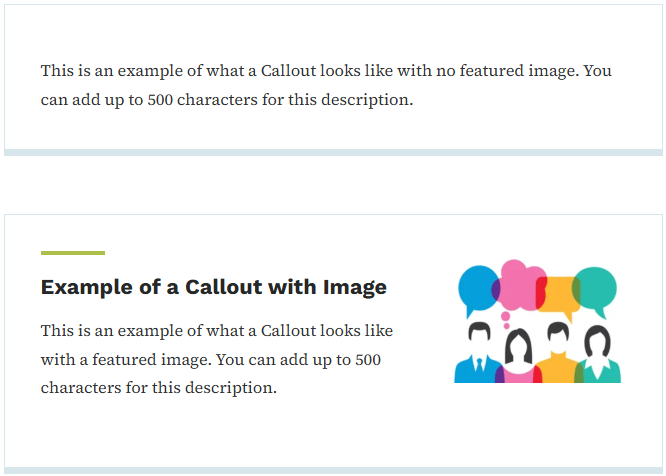
Learn more about using Callouts and see more examples on the DX Training website.
Learning Opportunities
Qualtrics: Stay Up to Date and Get Support
Looking to stay current with Qualtrics resources and program updates? All previous bulletins are available on the Qualtrics Bulletins page anytime.
We offer multiple support options to help you succeed, including on‑demand training, Basecamp resources, one‑on‑one sessions, Office Hours, and more. You can access all of these on the Qualtrics Training and Support page.
Weekly DX Training Classes
The weekly DX course is designed for new users and those looking for a refresher on the platform basics. You can register directly on the DX Training website: Weekly DX Training Classes.
Weekly Content Manager Office Hours
Need help or have questions? Join our live office hours every Thursday from 1-2 p.m. CDT. No registration is needed - simply click the live meeting link available on the DX Training page during the scheduled time. The DX team will be there to assist with troubleshooting, platform refreshers, or any other questions you have.
MSF&W Accessibility Weekly Office Hours
Every Wednesday at 9 a.m. CDT you can ask MSF&W's accessibility experts your questions. If you are having trouble figuring out how to fix a table or form or need help understanding appropriate alternate text, just pop into the meeting. No reservation is required. Visit Accessibility Training on the DX Training website for the Teams meeting link.
MSF&W Accessibility Training Playlist
You can find past MSF&W accessibility training recordings of topics such as Accessible Images, PowerPoint, Excel Tables, Forms, and more within the DOM Digital Experience YouTube Channel.
CommonLook Training
You can find more information about CommonLook products and links to their training sessions and support on the DX Training website. Find upcoming CommonLook Training Office Hours.
Additional CommonLook resources with video demonstrations
YouTube Channel
New and updated training videos are being added monthly to the DOM DoIT Digital Experience YouTube Channel and linked within DX Training website pages. You can subscribe to the channel to be notified when new videos are added.
|