|
August 21, 2026
Learn more about the latest enhancements and bug fixes from the past two weeks, along with the latest news, how-to articles, and videos.
You can access training materials on the DX Training website. Let the DX team know if you have a suggestion for training materials you'd like to see added.
. . . . .
News
CommonLook Users
Allyant is hosting a live Iowa Only session on Thursday, August 27, at 10:30 a.m. This isn't a full remediation training - it's a chance to get started and learn about the resources available to help you scale up faster. Allyant will walk through the Get Started with CommonLook PDF support site and take questions.
Thursday, August 27, 2026
10:30-11:15 AM
Join with Teams
Meeting ID: 268 158 137 304 684
Passcode: kD3ew7qv
. . . . .
New Name for the DX Team in ServiceDesk +
To assign tickets to the DX Team in ServiceDesk +, you'll need to look for DOM DoIT Digital Experience(DX) & Digital Services. For the full list of sites supported by the DX Team, please visit #SOL-851 Solution Details - State of Iowa.
. . . . . . . . . .
Enhancements
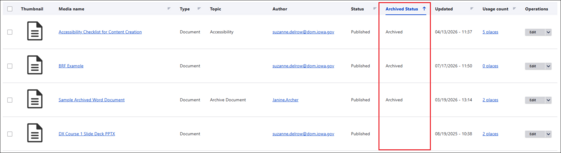
Archived Status Column for Documents in Your Media Library
A new column has been added to the Media Library in Table view titled Archived Status. Archived documents will show a status of Archived in that column, so you can quickly determine which documents have been archived. Archived Status is not available in Grid View.
Learn more about archiving documents and the new Archived Status column on the DX Training website.
. . . . .
New Accessibility Notifications in Acquia Optimize
All websites using Acquia Optimize were recently updated to use success criteria for WCAG 2.2 AA, and it also scans for WCAG 2.2 A.
Here are some of the most common new Issues to Fix, Warnings, or Issues to Review:
-
Do links on top of images have minimum contrast?
This check ensures that when link text is over an image, background gradient, or backdrop filter, it remains in sufficient contrast with the background. Drupal does allow some different background colors for sections or layouts but should automatically be adjusting the link color to acceptable contrast. Drupal doesn't allow links over images. After reviewing the warning to verify, you can ignore.
-
Does text on top of images have minimum contrast? or Does text over images or background have minimum contrast?
This success criteria is about contrast. This related accessibility check states that website owners must provide sufficient contrast between text and the background when the text is positioned over images, gradient background color, or a backdrop filter. It is best practice not to have text on images, and Drupal doesn't allow text over images. After reviewing the warning to verify, you can ignore.
-
Are interactive elements big enough to target easily?
These interactive elements refer to linked icons or other types of buttons or clickable elements. When pointer targets such as buttons or links are too small, they become difficult to accurately activate with devices like a mouse, stylus, or touch input. This can lead to frequent errors, such as selection of the wrong element or difficulty to activate the intended control. These issues particularly affect users with limited dexterity, tremors, or other motor impairments. Users may find it difficult to interact with websites efficiently. After reviewing the warning to verify, you can ignore.
-
Does the local language attribute match the language of the content?
The lang attribute of the local language must correctly identify the language of the content it applies to. This ensures that assistive technologies, such as screen readers, can correctly interpret and pronounce the text. If your website doesn't offer alternate languages, you can ignore this warning. If your website does offer alternate languages, Drupal and Google Translation should be attributing the correct language attribute. You can ignore.
Ignored warnings can be restored or unignored at any time.
Learn more about improving your accessibility score with Acquia Optimize.
. . . . .
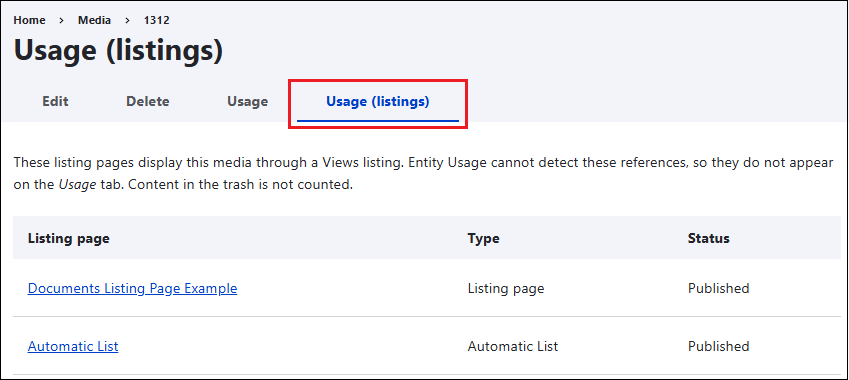
Find Where Media is Being Displayed on Listing Pages
A new tab in the Media Library called Usage (listings) will show you the Listing pages displaying your selected media. The Usage tab cannot detect these references, so they do not appear on the Usage tab. Content in the trash is not counted. In the example below, the document with Media ID 1312 is being used on two different Listing pages, with links to each of those pages.
Learn more about creating Listing pages on the DX Training website.
. . . . .
Need Help?
REMINDER: Need help or think you've found a bug? Submit a ticket through ServiceDesk Plus for DOM DoIT Websites and Digital Services. Please submit a ticket rather than emailing or otherwise contacting the DX team. By using ServiceDesk Plus we can better track tickets as a team and have the solutions available as future resources for all DX team members.
Training Corner
Stay up to date with the latest training resources designed specifically for content managers. Whether you are looking to enhance your skills or streamline your website updates, this section will keep you informed and ready to tackle any new challenges. Visit the DX Training website to brush up.
You can review a PDF of the slide deck from the July 2026 Content Manager meeting on the DX Training website.
|
|
 |
. . . . . . . . . .
How To: Create HTML Pages Instead of PDFs
HTML pages are better for mobile and responsive viewing, have improved searchability, and are more accessible.
In short, HTML wins for adaptability, accessibility, and ease of use on the web, while PDFs remain the go-to for fixed, print-ready, or highly secure documents.
Learn more on the DX Training website about Why Going HTML Over PDF is Worth It | Digital Experience.
Learning Opportunities
Qualtrics: Stay Up to Date and Get Support
Looking to stay current with Qualtrics resources and program updates? All previous bulletins are available on the Qualtrics Bulletins page anytime.
We offer multiple support options to help you succeed, including on‑demand training, Basecamp resources, one‑on‑one sessions, Office Hours, and more. You can access all of these on the Qualtrics Training and Support page.
Weekly DX Training Classes
The weekly DX course is designed for new users and those looking for a refresher on the platform basics. You can register directly on the DX Training website: Weekly DX Training Classes.
Weekly Content Manager Office Hours
Need help or have questions? Join our live office hours every Thursday from 1-2 p.m. CDT. No registration is needed - simply click the live meeting link available on the DX Training page during the scheduled time. The DX team will be there to assist with troubleshooting, platform refreshers, or any other questions you have.
MSF&W Accessibility Weekly Office Hours
Every Wednesday at 9 a.m. CDT you can ask MSF&W's accessibility experts your questions. If you are having trouble figuring out how to fix a table or form or need help understanding appropriate alternate text, just pop into the meeting. No reservation is required. Visit Accessibility Training on the DX Training website for the Teams meeting link.
MSF&W Accessibility Training Playlist
You can find past MSF&W accessibility training recordings of topics such as Accessible Images, PowerPoint, Excel Tables, Forms, and more within the DOM Digital Experience YouTube Channel.
CommonLook Training
You can find more information about CommonLook products and links to their training sessions and support on the DX Training website. Find upcoming CommonLook Training Office Hours.
Additional CommonLook resources with video demonstrations.
YouTube Channel
New and updated training videos are being added monthly to the DOM DoIT Digital Experience YouTube Channel and linked within DX Training website pages. You can subscribe to the channel to be notified when new videos are added.
|