|
August 7, 2026
Learn more about the latest enhancements and bug fixes from the past two weeks, along with the latest news, how-to articles, and videos.
You can access training materials on the DX Training website. Let the DX team know if you have a suggestion for training materials you'd like to see added.
. . . . .
Enhancements
FAQ Lists Now Support H2 Headings
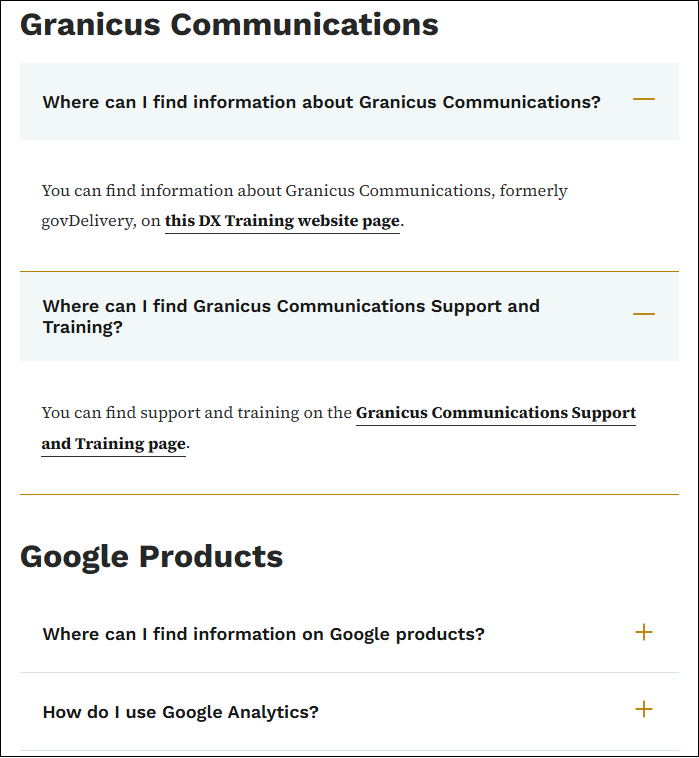
FAQ List pages now support sections with H2 headings so you can group Q&As inside a single page. There are no character limits and no limit on how many Q&As you can add. Existing FAQ Lists are not affected.
To implement:
-
On the first Q&A of each group, fill in the new Section heading field
-
Leave Section heading empty on the other Q&As of that same group
-
To start a new group, fill in Section heading again on the next Q&A
-
Save. Each heading shows as an H2 above its group of questions
Learn more about using headings in a FAQ list.
View a working example on the DX Training website.
New Accessibility Notifications in Acquia Optimize
All websites using Acquia Optimize were recently updated to use success criteria for WCAG 2.2 AA, and it also scans for WCAG 2.2 A. The state of Iowa mandates websites comply with WCAG 2.2 Level AA.
Here are some of the most common new Issues to Fix, Warnings, or Issues to Review:
Ignored warnings can be restored or unignored at any time.
Learn more about improving your accessibility score with Acquia Optimize.
. . . . . . . . . .
Bug Fixes
Cache Issue in Firefox
Firefox browsers were having a caching issue when new links were added to a footer menu. The new links couldn't be seen until you cleared your cache. This has been fixed, and you should be able to see your newly added menu items immediately after adding.
Document Language in the Media Library
Document language options are now automatically sorted in alphabetical order when new languages are added on both DX and MP sites. Previously, new languages were appended to the bottom of the list regardless of alphabetical position.
Marketing Platform Site Settings Link
A bug was fixed on the Marketing Platform sites where the Site Settings admin menu item was not clickable when the admin toolbar was set to horizontal orientation. The link is now
accessible regardless of toolbar orientation.
Show as Expanded Checkbox
Users reported the Show as expanded checkbox in the Edit menu link under Structure > Menus was not working. This was a holdover from an earlier version of Drupal, and menus now expand with users choosing to expand a menu and is working as expected. The checkbox wasn't supposed to do anything at this point and has been removed to avoid confusion.
. . . . . . . . . .
Need Help?
REMINDER: Need help or think you've found a bug? Submit a ticket through ServiceDesk Plus for DOM DoIT Websites and Digital Services. Please submit a ticket rather than emailing or otherwise contacting the DX team. By using ServiceDesk Plus we can better track tickets as a team and have the solutions available as future resources for all DX team members.
Training Corner
Stay up to date with the latest training resources designed specifically for content managers. Whether you are looking to enhance your skills or streamline your website updates, this section will keep you informed and ready to tackle any new challenges. Visit the DX Training website to brush up.
You can review a PDF of the slide deck from the July 2026 Content Manager meeting on the DX Training website.
|
|
 |
. . . . . . . . . .
How To: Clear Quality Assurance Checks in Acquia Optimize
Potential Misspellings
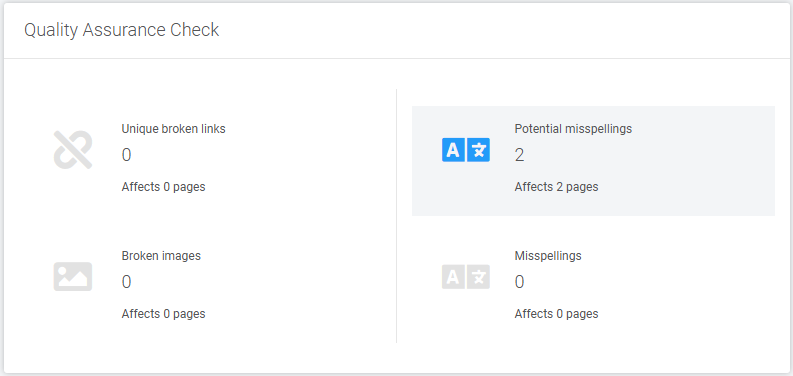
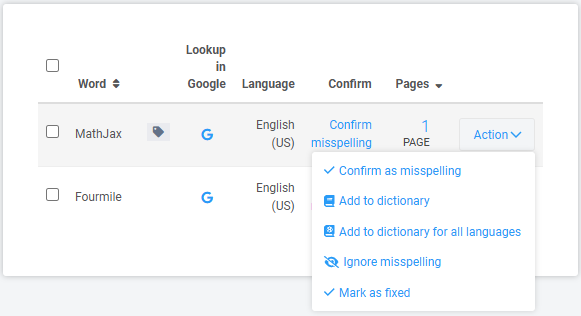
If your Acquia Optimize website scan shows potential misspellings listed on the Quality Assurance page, select Potential misspellings. You'll be taken to a second page that lists those potential misspellings, listing how many pages the misspelling appears on, and an Action dropdown list of the actions you can take. Many times titles, programs, and names are flagged. After reviewing the word that's been flagged, you can Add to dictionary so it doesn't get flagged again or fix it on each page listed and choose Mark as fixed. You can choose ignore misspelling for proper nouns or names that are marked as misspellings when they are not.
The difference between Mark as fixed and Ignore misspelling is that issues marked as Fixed are still included in future scans and can be flagged again if the error persists. Issues that are set to Ignore are permanently omitted from future scans and compliance scores.
Learn more about Acquia Optimize on the DX Training website.
Learning Opportunities
Qualtrics: Stay Up to Date and Get Support
Looking to stay current with Qualtrics resources and program updates? All previous bulletins are available on the Qualtrics Bulletins page anytime.
We offer multiple support options to help you succeed, including on‑demand training, Basecamp resources, one‑on‑one sessions, Office Hours, and more. You can access all of these on the Qualtrics Training and Support page.
Heads Up: With Qualtrics in Iowa happening August 17-21, resources will be limited. There will be no Office Hours or 1:1 bookings, and reviews or approvals may take a little longer than usual.
Weekly DX Training Classes
The weekly DX course is designed for new users and those looking for a refresher on the platform basics. You can register directly on the DX Training website: Weekly DX Training Classes.
Weekly Content Manager Office Hours
Need help or have questions? Join our live office hours every Thursday from 1-2 p.m. CDT. No registration is needed - simply click the live meeting link available on the DX Training page during the scheduled time. The DX team will be there to assist with troubleshooting, platform refreshers, or any other questions you have.
MSF&W Accessibility Weekly Office Hours
Every Wednesday at 9 a.m. CDT you can ask MSF&W's accessibility experts your questions. If you are having trouble figuring out how to fix a table or form or need help understanding appropriate alternate text, just pop into the meeting. No reservation is required. Visit Accessibility Training on the DX Training website for the Teams meeting link.
MSF&W Accessibility Training Playlist
You can find past MSF&W accessibility training recordings of topics such as Accessible Images, PowerPoint, Excel Tables, Forms, and more within the DOM Digital Experience YouTube Channel.
YouTube Channel
New and updated training videos are being added monthly to the DOM DoIT Digital Experience YouTube Channel and linked within DX Training website pages. You can subscribe to the channel to be notified when new videos are added.
CommonLook Training
You can find more information about CommonLook products and links to their training sessions and support on the DX Training website. Find upcoming CommonLook Training Office Hours.
Additional CommonLook resources with video demonstratons.
|