|
July 24, 2026
Learn more about the latest enhancements and bug fixes from the past two weeks, along with the latest news, how-to articles, and videos.
You can access training materials on the DX Training website. Let the DX team know if you have a suggestion for training materials you'd like to see added.
News
Accessibility Assistance Requests in Qualtrics |
|
 |
Accessibility Assistance Requests are now handled directly through the closed-loop ticketing system in Qualtrics, rather than being routed to the DX Team. Each agency has designated an Accessibility Point of Contact, who can log in to Qualtrics to efficiently manage and respond to incoming Accessibility Assistance requests.
The requests can be responded to directly from the ticket in Qualtrics and will be automatically tracked. A PDF can be created and sent to another person in your agency if the request is other than accessibility-related.
Learn more about the process and watch demonstrations.
. . . . .
Name Change for govDelivery
The product known as govDelivery has been renamed Granicus Communications. There will be no changes to functionality. All features, capabilities, and workflows will remain exactly the same.
There is no action required on your part. Your access, login credentials, and day-to-day operations will not be impacted.
. . . . .
Bug Fixes
Wide Tables in Edit Mode
Editors can once again scroll horizontally in the table edit view. A recent issue had prevented scrolling on wide tables, making it hard to reach columns on the right. This fix restores full access to all columns when creating or editing large tables.
Location Table Listing Pages
Location Table Listing pages displayed no results and had inconsistent pagination - the number of items displayed. Location Tables, Event Tables, and Past Event Tables now display content correctly, and the associated map section loads without errors.
. . . . .
Enhancements
Collapsible Chapters for Book Module
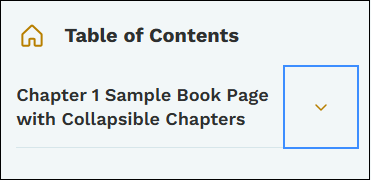
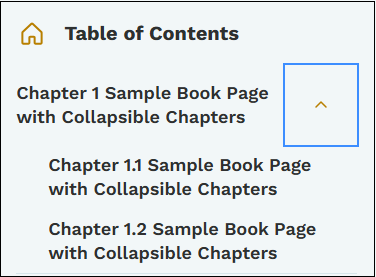
The Book module navigation now supports collapsible chapters, making long multi-chapter documents much easier to browse. Editors and end users can expand or collapse individual chapters in the sidebar without affecting other navigation menus.
View a working example on the DX Sandbox website.
. . . . .
. . . . .
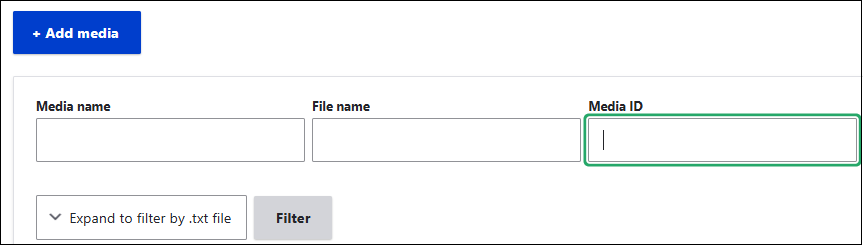
Media Library Search by Media ID
Editors can now search the Media Library by Media name, File name, or the numeric Media ID that appears in file URLs.
. . . . .
BRF Files Now Allowed in Your Media Library
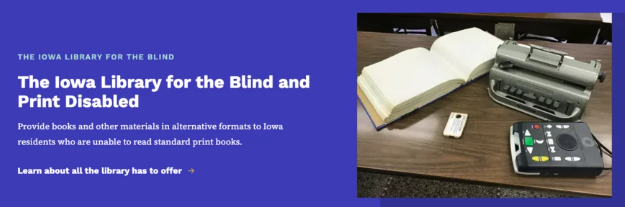
Editors can now upload .brf (Braille Ready Format) files to the Media Library as Document type media, the same way PDFs and Word documents are uploaded. The file type displays with its own icon when linked on pages.
See an example on the DX Training website.
. . . . . . . . . .
Need Help?
REMINDER: Need help or think you've found a bug? Submit a ticket through ServiceDesk Plus for DOM DoIT Websites and Digital Services. Please submit a ticket rather than emailing or otherwise contacting the DX team. By using ServiceDesk Plus we can better track tickets as a team and have the solutions available as future resources for all DX team members.
Training Corner
Stay up to date with the latest training resources designed specifically for content managers. Whether you are looking to enhance your skills or streamline your website updates, this section will keep you informed and ready to tackle any new challenges. Visit the DX Training website to brush up.
You can review a PDF of the slide deck from the July 2026 Content Manager meeting on the DX Training website.
|
|
 |
. . . . . . . . . .
How To: Promos vs Alerts
A Promo is a standard promotional piece that may be identified by its use of a Call to Action. It typically consists of a title, text, an optional image, and a link, consisting of a label and URL. Promos can be embedded anywhere on a Basic page or Landing page. Video Promos can also be created but only added to Landing pages.
Learn more about creating Promos on the DX Training website.
Alerts provide a quick, direct way to share important information with website visitors. You can display them across your entire site or on selected pages. Alerts always appear at the top of the page, and they are text‑only to maintain clarity and consistency.
Learn more about creating Alerts on the DX Training website.

. . . . . . . . . .
How To: Create Great Surveys in Qualtrics
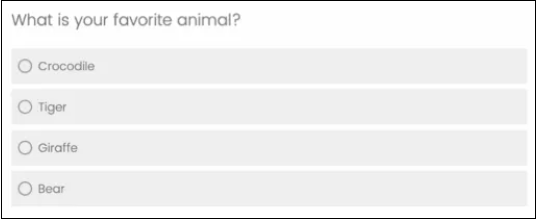
Learn how to create high‑quality surveys and forms for your agency. Throughout development, we prioritize security, accessibility, and consistent alignment with the State of Iowa’s brand to ensure every form meets the highest standards.
Learn more about creating Qualtrics surveys and form on the DX Training website.
Learning Opportunities
Qualtrics: Stay Up to Date and Get Support
Looking to stay current with Qualtrics resources and program updates? All previous bulletins are available on the Qualtrics Bulletins page anytime.
We offer multiple support options to help you succeed, including on‑demand training, Basecamp resources, one‑on‑one sessions, Office Hours, and more. You can access all of these on the Qualtrics Training and Support page.
Weekly DX Training Classes
The weekly DX course is designed for new users and those looking for a refresher on the platform basics. You can register directly on the DX Training website: Weekly DX Training Classes.
Weekly Content Manager Office Hours
Need help or have questions? Join our live office hours every Thursday from 1-2 p.m. CDT. No registration is needed - simply click the live meeting link available on the DX Training page during the scheduled time. The DX team will be there to assist with troubleshooting, platform refreshers, or any other questions you have.
MSF&W Accessibility Weekly Office Hours
Every Wednesday at 9 a.m. CDT you can ask MSF&W's accessibility experts your questions. If you are having trouble figuring out how to fix a table or form or need help understanding appropriate alternate text, just pop into the meeting. No reservation is required. Visit Accessibility Training on the DX Training website for the Teams meeting link.
MSF&W Accessibility Training Playlist
You can find past MSF&W accessibility training recordings of topics such as Accessible Images, PowerPoint, Excel Tables, Forms, and more within the DOM Digital Experience YouTube Channel.
YouTube Channel
New and updated training videos are being added monthly to the DOM DoIT Digital Experience YouTube Channel and linked within DX Training website pages. You can subscribe to the channel to be notified when new videos are added.
CommonLook Training
You can find more information about CommonLook products and links to their training sessions and support on the DX Training website. Find upcoming CommonLook Training Office Hours.
|