|
June 12, 2026
Learn more about the latest enhancements and bug fixes from the past two weeks, along with the latest news and how-to articles and videos.
You can access training materials on the DX Training website. Let the DX team know if you have a suggestion for training materials you'd like to see added.
Enhancements
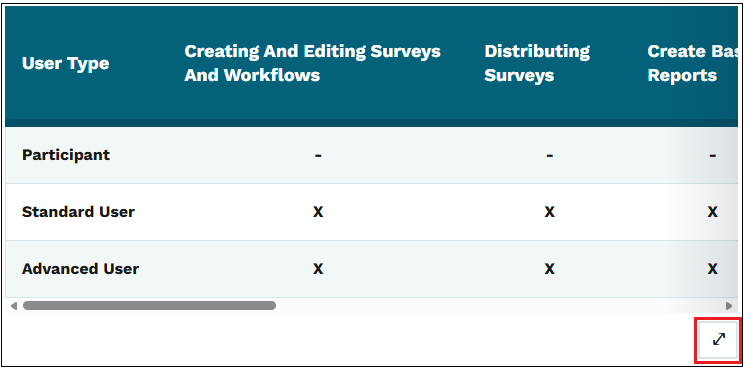
Expandable Table View
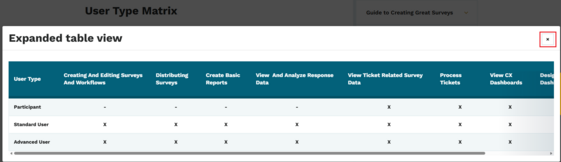
The new icon for expanding a table view presents a pop-up window with the full table. If the table is still wider than the pop-up window, you’ll see a scroll bar at the bottom of the pop-up window. You can use the close button (the x in the top right of the pop-up) to close the window.
 Enhancements Coming Soon
Archived Documents Report
A new report will soon be added to the Agency Content Reports in Drupal that will list all Archived Documents within your website.
. . . . . . . . . .
Need Help?
REMINDER: Need help or think you've found a bug? Submit a ticket through ServiceDesk Plus for DOM DoIT Websites and Digital Services. Please submit a ticket rather than emailing or otherwise contacting the DX team. By using ServiceDesk Plus we can better track tickets as a team and have the solutions available as future resources for all DX team members.
Current Issues List
If you'd like to see a list of all current issues, visit the DX Training website for the latest information.
ServiceDesk Plus Training
You can visit Workday and watch a 30-minute ServiceDesk Plus training video.
Training Corner
Stay up to date with the latest training resources designed specifically for content managers. Whether you are looking to enhance your skills or streamline your website updates, this section will keep you informed and ready to tackle any new challenges. Visit the DX Training website to brush up.
You can review the video and slide deck from the March 2026 Content Manager meeting on the DX Training website.
|
|
 |
. . . . . . . . . .
How To: Add Revision Notes to Your Content
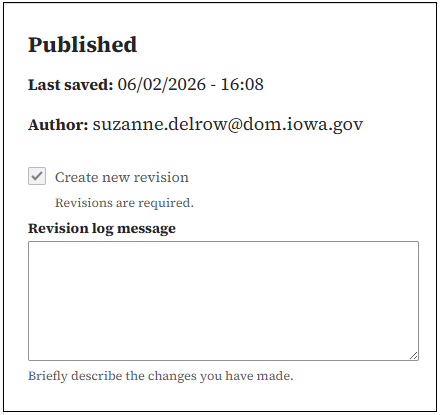
You can add Revision notes to any piece of content you are editing. The Revision log message section appears on the top right side of every content page when you're editing. Add your note in the Revision log message section. After you save the page, you can view the notes by using the Revisions link near the top of the page. On the Revisions page you’ll see a log of the revisions that have been made - author, date, and any notes that were added.
. . . . . . . . . .
How To: Add Revision Notes for a Landing Page Layout
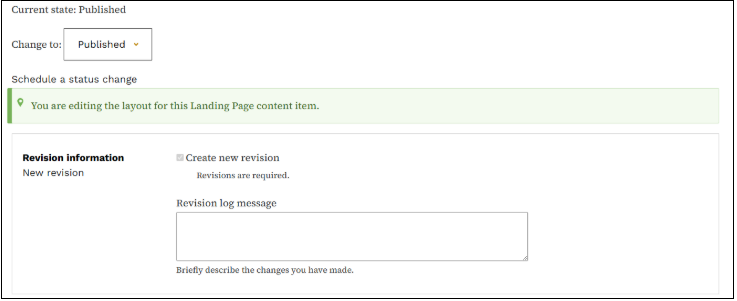
You can add Revision notes for the Layout section of a Landing page. The Revision log message section appears above your Layout. Add your note, then select the Save layout button near the top of the page. To view the notes, select Revisions near the top of the page. You’ll see a log of the revisions made - author, date, and any notes that were added.
Note: The Revision information link next to the Revision log message currently isn’t working.
Learning Opportunities
Qualtrics: Stay Up to Date and Get Support
Looking to stay current with Qualtrics resources and program updates? All previous bulletins are available on the Qualtrics Bulletins page anytime.
We offer multiple support options to help you succeed, including on‑demand training, Basecamp resources, one‑on‑one sessions, Office Hours, and more. You can access all of these on the Qualtrics Training and Support page.
Please note the upcoming dates when Jessica Van Heuveln, Qualtrics Product Owner, will be out of the office for work and personal commitments. During these dates, response times may be delayed:
Weekly DX Training Classes
The weekly DX course is designed for new users and those looking for a refresher on the platform basics. You can register directly on the DX Training website: Weekly DX Training Classes.
Weekly Content Manager Office Hours
Need help or have questions? Join our live office hours every Thursday from 1-2 p.m. CDT. No registration is needed - simply click the live meeting link available on the DX Training page during the scheduled time. The DX team will be there to assist with troubleshooting, platform refreshers, or any other questions you have.
MSF&W Accessibility Weekly Office Hours
Every Wednesday at 9 a.m. CDT you can ask MSF&W's accessibility experts your questions. If you are having trouble figuring out how to fix a table or form or need help understanding appropriate alternate text, just pop into the meeting. No reservation is required. Visit Accessibility Training on the DX Training website for the Teams meeting link.
MSF&W Accessibility Training Playlist
You can find past MSF&W accessibility training recordings of topics such as Accessible Images, PowerPoint, Excel Tables, Forms, and more within the DOM Digital Experience YouTube Channel.
YouTube Channel
New and updated training videos are being added monthly to the DOM DoIT Digital Experience YouTube Channel and linked within DX Training website pages. You can subscribe to the channel to be notified when new videos are added.
CommonLook Training
You can find more information about CommonLook products and links to their training sessions and support on the DX Training website. Find upcoming CommonLook Training Office Hours.
If you're interested in learning about creating or remediating fillable forms in CommonLook, sign up for the training on July 7:
2:30 - 4 p.m.
Stepping Stones in CommonLook PDF - Desktop & Advanced Editor - Forms
|