|
May 15, 2026
You can access training materials on the DX Training website. Let the DX team know if you have a suggestion for training materials you'd like to see added.
Website Features and Enhancements
Now that the DX Project is complete, the State of Iowa has moved to a Support and Maintenance contract with Lullabot. Any enhancements or new features will affect every website on the DX and Marketing Platforms because all sites share the same code base.
If you have an issue or request, please submit a ServiceDesk Plus ticket and we’ll work to find solutions within the current Drupal environment. If your request is essential to your website or agency, we can schedule a meeting to discuss it. Your solution may include a scope and cost estimate from Lullabot.
. . . . . . . . . .
Need Help?
REMINDER: Need help or think you've found a bug? Submit a ticket through ServiceDesk Plus for DOM DoIT Websites and Digital Services. Please submit a ticket rather than emailing or otherwise contacting the DX team. By using ServiceDesk Plus we can better track tickets as a team and have the solutions available as future resources for all DX team members.
Current Issues List
If you'd like to see a list of all current issues, visit the DX Training website for the latest information.
Training Corner
Stay up to date with the latest training resources designed specifically for content managers. Whether you are looking to enhance your skills or streamline your website updates, this section will keep you informed and ready to tackle any new challenges. Visit the DX Training website to brush up.
|
|
 |
. . . . . . . . . .
How To: Find Archived Content
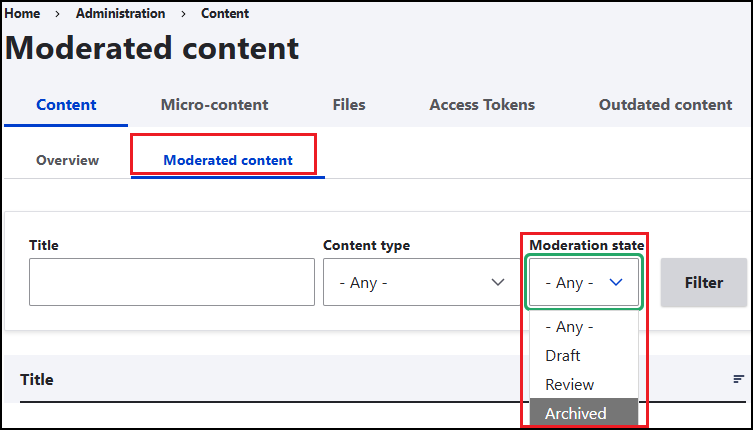
The search for Archived website content / HTML pages in Drupal can be found under Content > Moderated content > Moderation state > Archived. This is where your archived website pages can be found. You can’t search archived media or documents yet, but we plan to add that feature soon.
. . . . . . . . . .
How To: Resolve Issues to Fix Notifications from Acquia Optimize
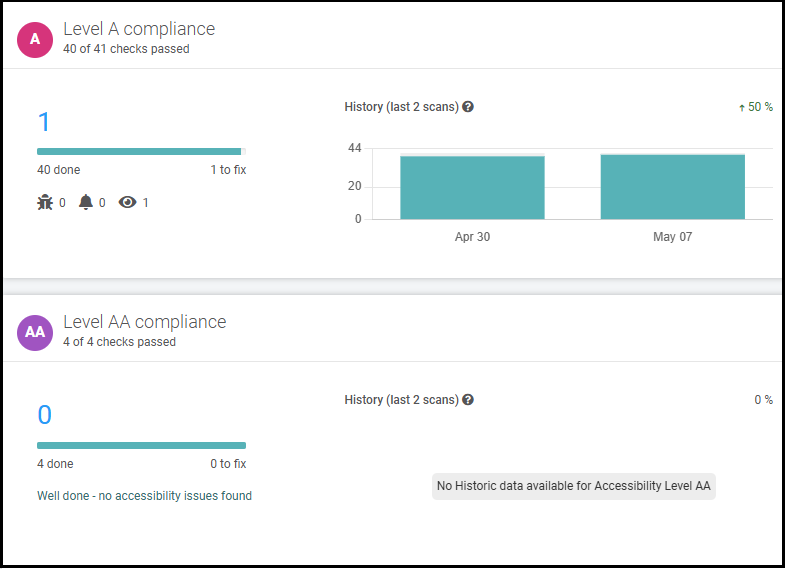
These are suggestions on how to resolve some of the notifications that appear in the Accessibility Checklist in Acquia Optimize.
-
Issue: Heading has non-empty accessible name
-
Action: This issue affected some icons on event pages, and it should have been fixed. Create a new ticket if this issue is still being reported by accessibility tools.
-
Issue: ARIA required owned elements
-
Action: Do not leave the Details or Additional Information field blank on Location pages.
-
Issue: HTML page has non-empty title
-
Action: Ignore. The issue is on embedded content from third-party sites like YouTube.
-
Issue: Use a quote element to markup quotations
-
Issue: Link has non-empty accessible name
-
Action: Replace empty anchor links with anchor links targeting the intended text
Example: Held Payments FAQ, rather than Payments, or Link
If you notice a large number of new errors in either the Quality Assurance or Accessibility Dashboards, it may help to re-scan your website before attempting to fix all the issues.
Tip: The difference between Mark as Fixed and Ignore Check is issues that you mark as Fixed are still included in future scans and can be flagged again if the error comes back. Issues that you mark as Ignore are removed from future scans and all compliance scores. They can be unignored at any time.
Learning Opportunities
Qualtrics: Stay Up to Date and Get Support
Looking to stay current with Qualtrics resources and program updates? All previous bulletins are available on the Qualtrics Bulletins page anytime.
We offer multiple support options to help you succeed, including on‑demand training, Basecamp resources, one‑on‑one sessions, Office Hours, and more. You can access all of these on the Qualtrics Training and Support page.
Please note the upcoming dates when Jessica Van Heuveln, Qualtrics Product Owner, will be out of the office for work and personal commitments. During these periods, response times may be delayed:
- May 15-18, 2026
- May 20-22, 2026
- June 15-26, 2026
The Qualtrics support team will remain available to assist you. You may submit a ServiceDesk Plus request, join office hours, or schedule a 1:1 session on the page on the DX Training website.
Weekly DX Training Classes
The weekly DX course is designed for new users and those looking for a refresher on the platform basics. You can register directly on the DX Training website: Weekly DX Training Classes.
Weekly Content Manager Office Hours
Need help or have questions? Join our live office hours every Thursday from 1-2 p.m. CST. No registration is needed - simply click the live meeting link available on the DX Training page during the scheduled time. The DX team will be there to assist with troubleshooting, platform refreshers, or any other questions you have.
YouTube Channel
New and updated training videos are being added monthly to the DOM DoIT Digital Experience YouTube Channel and linked within DX Training website pages. You can subscribe to the channel to be notified when new videos are added.
MSF&W Accessibility Weekly Office Hours
Every Wednesday at 9 a.m. CST you can ask MSF&W's accessibility experts your questions. If you are having trouble figuring out how to fix a table or form or need help understanding appropriate alternate text, just pop into the meeting. No reservation is required. Visit Accessibility Training on the DX Training website for the Teams meeting link.
MSF&W Accessibility Training Playlist
You can find past MSF&W accessibility training recordings of topics such as Accessible Images, PowerPoint, Excel Tables, Forms, and more within the DOM Digital Experience YouTube Channel.
CommonLook Training
You can find more information about CommonLook products and links to their training sessions and support on the DX Training website. Find upcoming CommonLook Training Office Hours. View the CommonLook Training Calendar.
|