|
March 20, 2026
Learn more about the latest enhancements and bug fixes from the past two weeks, along with the latest news and how-to articles and videos.
You can access training materials on the DX Training website. Let the DX team know if you have a suggestion for training you'd like to see added.
Enhancements and Bug Fixes
Current Issues List
If you'd like to see a list of all current issues, visit the DX Training website for the latest information.
Need Help?
Need help or think you've found a bug? Submit a ticket through ServiceDesk Plus for DOM DoIT Websites and Digital Services.
ServiceDesk Plus Training
You can visit Workday and watch a 30-minute ServiceDesk Plus training video.
Training Corner
Stay up to date with the latest training resources designed specifically for content managers. Whether you are looking to enhance your skills or streamline your website updates, this section will keep you informed and ready to tackle any new challenges. Visit the DX Training website to brush up.
You can review the video and slide deck from the March 2026 Content Manager meeting on the DX Training website.
|
|
 |
. . . . . . . . . .
How To Reminder: Adding Contact Information to Your Archived Documents Page
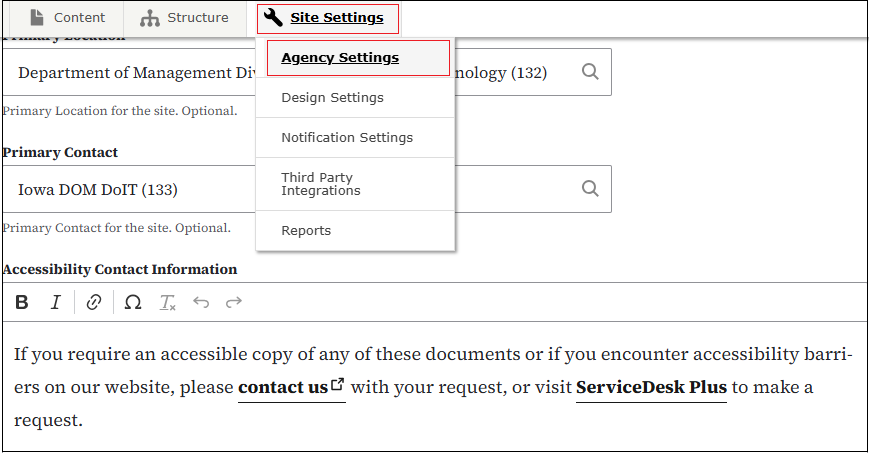
For those websites archiving documents and seeing the Archived Documents link in your website footer, you can now add a customized message under the static information at the top of your Archived Documents page. To add your customized message, go to Site Settings > Agency Settings and add your message in the Accessibility Contact Information box. You can add hyperlinks or an email link using the WYSIWYG toolbar the same way you would in a web page.
. . . . . . . . . .
How To: Tips for More Accessible Content
- Rather than using double or single quotation marks or italics for emphasis, use bold text. Bold text provides a clear and consistent signal of importance and is easily understood by all users. Quotation marks used to emphasize text can be confusing to screen readers. Italics can be hard to read for everyone. If you are using a quotation by a person, double quotation marks are fine to use or use the Quotation icon on the WYSIWYG toolbar.
- Use the word and instead of using an ampersand &. Ampersands are not universal in all languages.
- Remember that screen readers may read everything. If you use parentheses surrounding text, like (content), a screen reader could read that as left/open parenthesis content right/closing parenthesis.
-
Don’t use all caps for titles or content. It reduces readability for everyone, particularly for users with cognitive disabilities. It may cause screen readers to spell out words letter-by-letter as they may see it as an acronym.
-
Avoid directional language that requires users to see the layout or design of the page. Avoid using below, above, right, or left when trying to direct a user to another element or link on a page.
Read more about Creating Accessible Content on the Accessibility and Inclusivity page on the DX Training website.
Learn more about screen readers on the DX Training website.
. . . . . . . . . .
How To: Reduce Spam Risk When Using YouTube Links in govDelivery
|
Some YouTube links - especially those with tracking parameters or multiple redirects - can cause govDelivery emails to be flagged as spam. A typical clean or direct YouTube link will look like either www.youtube.com/watch?v=VIDEOID or youtu.be/VIDEOID.
Do not copy links from previous govDelivery bulletins. Links copied from past govDelivery messages always contain tracking parameters. These create long redirect chains and should never be reused.
|
|
 |
Learning Opportunities
Qualtrics Office Hours
Join Qualtrics virtual office hours every Tuesday and Thursday for live support from Qualtrics experts. You can find all office hour details and additional training opportunities at Qualtrics Training and Support.
Weekly DX Training Classes
The weekly DX course is designed for new users and those looking for a refresher on the platform basics. You can register directly on the DX Training website: Weekly DX Training Classes.
Weekly Content Manager Office Hours
Need help or have questions? Join our live office hours every Thursday from 1-2 p.m. CST. No registration is needed - simply click the live meeting link available on the DX Training page during the scheduled time. Sharean Morishita will be there to assist with troubleshooting, platform refreshers, or any other questions you have.
MSF&W Accessibility Weekly Office Hours
Every Wednesday at 9 a.m. CST you can ask MSF&W's accessibility experts your questions. If you are having trouble figuring out how to fix a table or form or need help understanding appropriate alternate text, just pop into the meeting. No reservation is required. Visit Accessibility Training on the DX Training website for the Teams meeting link.
MSF&W Accessibility Training Playlist
You can find past MSF&W accessibility training recordings of topics such as Accessible Images, PowerPoint, Excel Tables, Forms, and more within the DOM Digital Experience YouTube Channel.
YouTube Channel
New and updated training videos are being added monthly to the DOM DoIT Digital Experience YouTube Channel and linked within DX Training website pages. You can subscribe to the channel to be notified when new videos are added.
CommonLook Training
You can find more information about CommonLook products and links to their training sessions, support, and office hours on the DX Training website.
|