Digital Experience
March 6, 2026
Learn more about the latest enhancements and bug fixes from the past two weeks, along with the latest news and how-to articles and videos.
You can access training materials on the DX Training website. Let the DX team know if you have a suggestion for training you'd like to see added.
ENHANCEMENTS AND BUG FIXES
Hamburger Menu Issue
The issue of a website main menu converting to a hamburger menu on a few websites has been fixed.
Link Icon Causing Misalignment in Menus
The off-site link icon within navigation was causing the text in that link to be misaligned. This has been fixed.
Need Help?
Need help or think you've found a bug? Submit a ticket through ServiceDesk Plus for DOM DoIT Websites and Digital Services.
TRAINING CORNER
Stay up to date with the latest training resources designed specifically for content managers. Whether you are looking to enhance your skills or streamline your website updates, this section will keep you informed and ready to tackle any new challenges. Visit the DX Training website to brush up.
|
|
 |
. . . . . . . . . .
HOW TO: Check for Bug Reports and Current Issues
If you visit the Report an Issue page on the DX Training website, you'll find a section titled Current Issues. You can view a list of reported issues to check if the problem you're having has already been reported.
|
|
 |
. . . . . . . . . .
HOW TO: Drupal and Editoria11y Accessibility Checker Reminder
The Editoria11y Accessibility Checker within Drupal helps content editors find and fix accessibility issues as content is created. It will flag problems like missing alt text, incorrect heading structure, and making sure embedded items like videos are available. As you create or edit content, the yellow or red flags will alert you to problems. A blue badge with a checkmark means you're good to go!
TIP: Alt text is a description of an image (picture, photo, icon, screenshot) that is read by a screen reader. A screen reader is an assistive technology that converts digital text and interface elements into speech or braille, enabling visually impaired users to access and interact with digital content. Alt text is required by Drupal when you upload an image to your Media Library.
. . . . . . . . . .
HOW TO: Acquia Optimize Reminder
To make sure your website is staying compliant, be sure to view your Acquia Optimize reports. Use the Accessibility tab to check for WCAG 2.1 Level A and Level AA compliance. It will alert you to issues like missing alt text for images, incorrect order of headings, bolded paragraph titles that should or could be a heading style, spacing being used to create columns or white space, and more. It will also alert you to possible errors in focus order or keyboard traps that affect assistive devices. Access your Acquia Optimize reports.
For assistance or questions about using Acquia Optimize, visit the weekly Content Manager office hours, submit a ServiceDesk Plus ticket, or visit Understanding Acquia Optimize on the DX Training website.
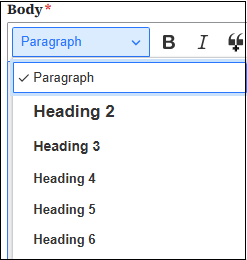
TIP: Headings are elements used to define titles or subtitles for sections of content on a webpage. They help organize information, improve readability, and provide structure for both users and search engines. Headings allowed in Drupal are H1 (used for titles and is the largest font), H2, H3, H4, H5, and H6 in descending order. They must appear in descending order without skipping levels so they don't confuse assistive technologies. Proper order also improves SEO and readability.
LEARNING OPPORTUNITIES
Qualtrics Office Hours
Join Qualtrics virtual office hours every Tuesday and Thursday for live support from Qualtrics experts. You can find all office hour details and additional training opportunities at Qualtrics Training and Support.
NOTE: March 16-20 resources will be limited. There will be no office hours or 1:1 bookings that week, and reviews or approvals may take a little longer than usual.
Weekly DX Training Classes
The weekly DX course is designed for new users and those looking for a refresher on the platform basics. You can register directly on the DX Training website: Weekly DX Training Classes.
Weekly Content Manager Office Hours
Need help or have questions? Join our live office hours every Thursday from 1-2 p.m. CST. No registration is needed - simply click the live meeting link available on the DX Training page during the scheduled time. Sharean Morishita will be there to assist with troubleshooting, platform refreshers, or any other questions you have.
MSF&W Accessibility Weekly Office Hours
Every Wednesday at 9 a.m. CST you can ask MSF&W's accessibility experts your questions. If you are having trouble figuring out how to fix a table or form or need help understanding appropriate alternate text, just pop into the meeting. No reservation is required. Visit Accessibility Training on the DX Training website for the Teams meeting link.
MSF&W Accessibility Training Playlist
You can find past MSF&W accessibility training recordings of topics such as Accessible Images, PowerPoint, Excel Tables, Forms, and more within the DOM Digital Experience YouTube Channel.
YouTube Channel
New and updated training videos are being added monthly to the DOM DoIT Digital Experience YouTube Channel and linked within DX Training website pages. You can subscribe to the channel to be notified when new videos are added.
CommonLook Training
You can find more information about CommonLook products and links to their training sessions, support, and office hours on the DX Training website.
|